Description of parameters (ToF Tool) Cerabar S/Deltabar S
96 Endress+Hauser
P01-xMx7xxxx-19-xx-xx-xx-028
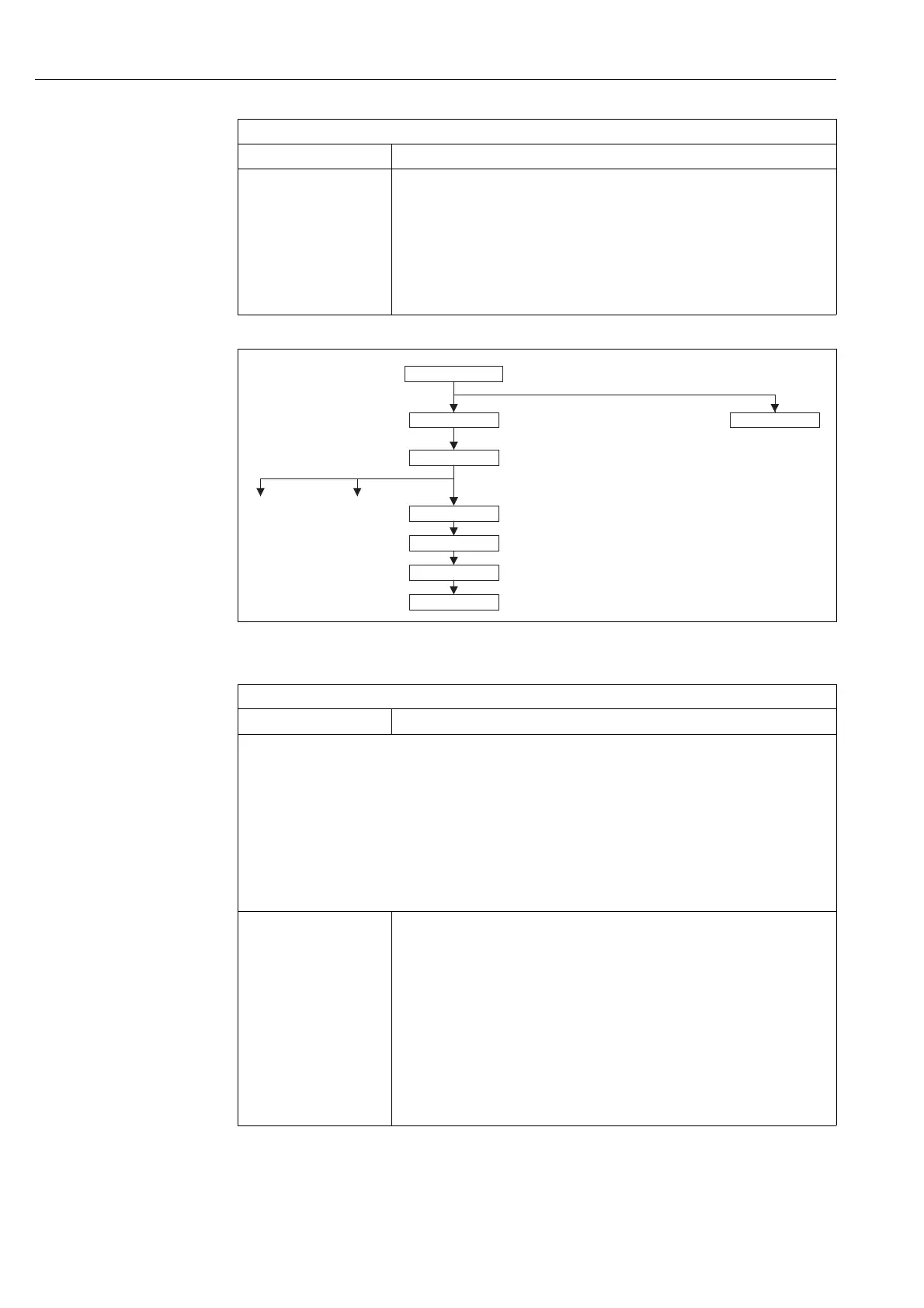
Fig. 20: Quick Setup menu, "Flow" measuring mode (Differential pressure transmitter Deltabar S only)
DAMPING VALUE
Entry
Enter damping time (time constant τ).
The damping affects the speed at which all subsequent elements, such as the on-site
display, measured value and OUT value of the Analog Input Block react to a change in the
pressure.
Input range:
0.0...999.0 s
Factory setting:
2.0 s or as per order specifications
ToF Tool, Table 2: QUICK SETUP "Level"
Parameter name Description
OPERATING MENU
MAX FLOW
MAX. PRESS. FLOW
POS. ZERO ADJUST
DAMPING VALUE
Flow
Pressure
Level
MEASURED VALUE
QUICK SETUP
MEASURING MODE
ToF Tool, Table 3: QUICK SETUP "Flow"
Parameter name Description
This menu displays the most important parameters for the "Flow" measuring mode.
Prerequisite:
• Deltabar S differential pressure transmitter
•MEASURING MODE = flow
Note:
See also
– Page 125, ToF Tool, table 10: BASIC SETUP
– Page 130, ToF Tool, table 13: EXTENDED SETUP
– Page 134, ToF Tool, table 15: TOTALIZER SETUP
– Page 89 ff, Section 9 "Flow measurement (ToF Tool)".
MEASURING MODE
Selection
Select the measuring mode.
The operating menu is structured according to the selected measuring mode.
!
Note!
When the measuring mode is changed, no conversion takes place. The device has to be
recalibrated if the measuring mode is changed. → See also Page 89, Section 9 "Flow
measurement (ToF Tool)".
Options:
• Pressure
• Level
• Deltabar S: flow
Factory setting:
Pressure






 To Next Page