Operation Proline Promass E 300 PROFINET
148 Endress+Hauser
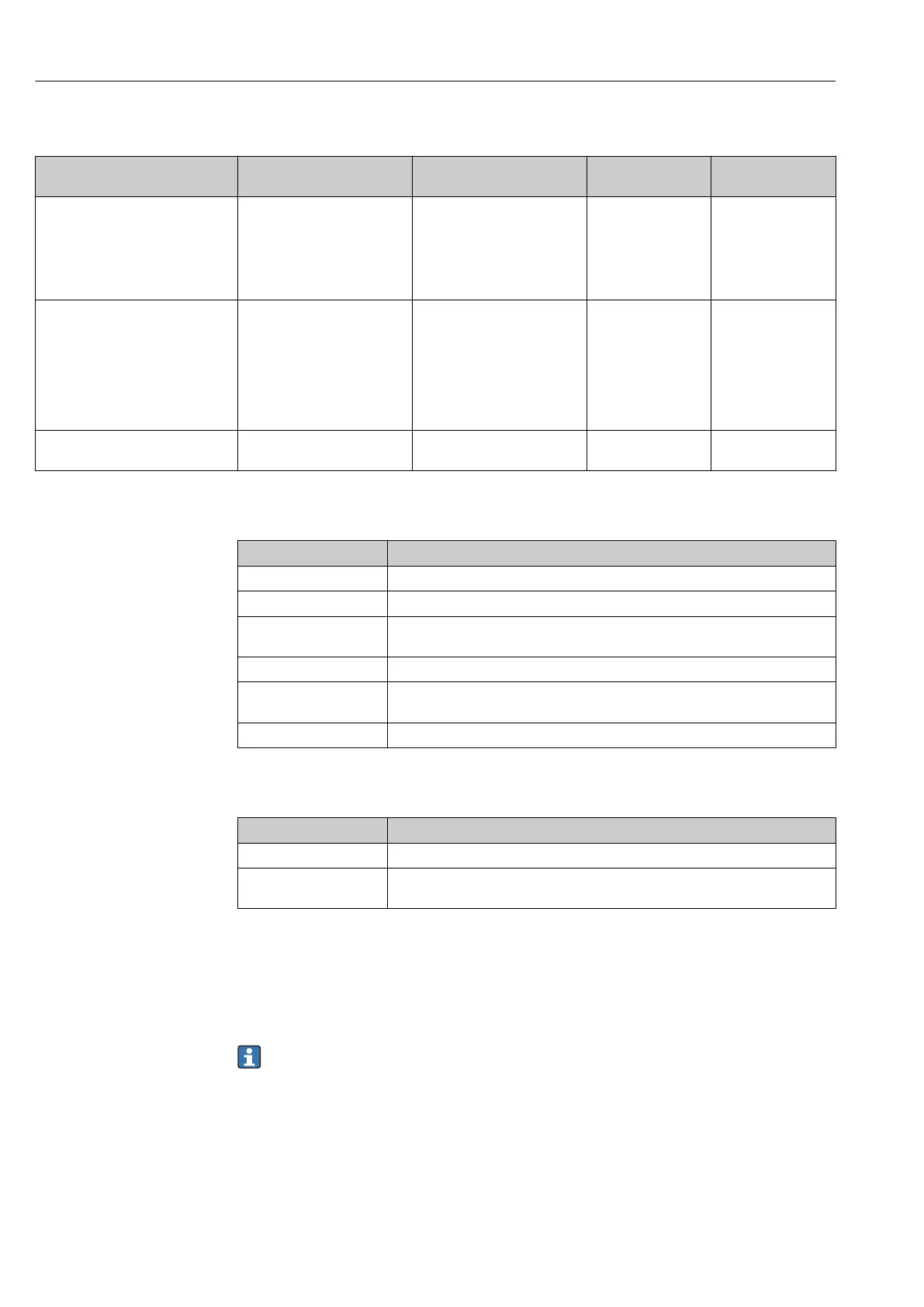
Parameter overview with brief description
Parameter Prerequisite Description Selection / User
entry
Factory setting
Control Totalizer 1 to n A process variable is selected
in the Assign process variable
parameter of the Totalizer
1 to n submenu.
Control totalizer value. • Totalize
• Reset + hold
• Preset + hold
• Reset + totalize
• Preset + totalize
• Hold
–
Preset value 1 to n A process variable is selected
in the Assign process variable
parameter of the Totalizer
1 to n submenu.
Specify start value for totalizer.
Dependency
The unit of the selected
process variable is
specified for the totalizer
in the Unit totalizer
parameter.
Signed floating-point
number
Country-specific:
• 0 kg
• 0 lb
Reset all totalizers – Reset all totalizers to 0 and
start.
• Cancel
• Reset + totalize
–
11.6.1 Function scope of the "Control Totalizer" parameter
Options Description
Totalize The totalizer is started or continues running.
Reset + hold The totaling process is stopped and the totalizer is reset to 0.
Preset + hold The totaling process is stopped and the totalizer is set to its defined start value
from the Preset value parameter.
Reset + totalize The totalizer is reset to 0 and the totaling process is restarted.
Preset + totalize The totalizer is set to the defined start value from the Preset value parameter and
the totaling process is restarted.
Hold Totalizing is stopped.
11.6.2 Function scope of the "Reset all totalizers" parameter
Options Description
Cancel No action is executed and the user exits the parameter.
Reset + totalize Resets all totalizers to 0 and restarts the totaling process. This deletes all the flow
values previously totalized.
11.7 Showing data logging
The Extended HistoROM application package must be enabled in the device (order
option) for the Data logging submenu to appear. This contains all the parameters for the
measured value history.
Data logging is also available via:
• Plant Asset Management Tool FieldCare → 71.
• Web browser
Function range
• A total of 1000 measured values can be stored
• 4 logging channels
• Adjustable logging interval for data logging
• Displays the measured value trend for each logging channel in the form of a chart













 To Next Page