Document number: ED.03783.00.001.ENG rev 4 Page 80 of 153
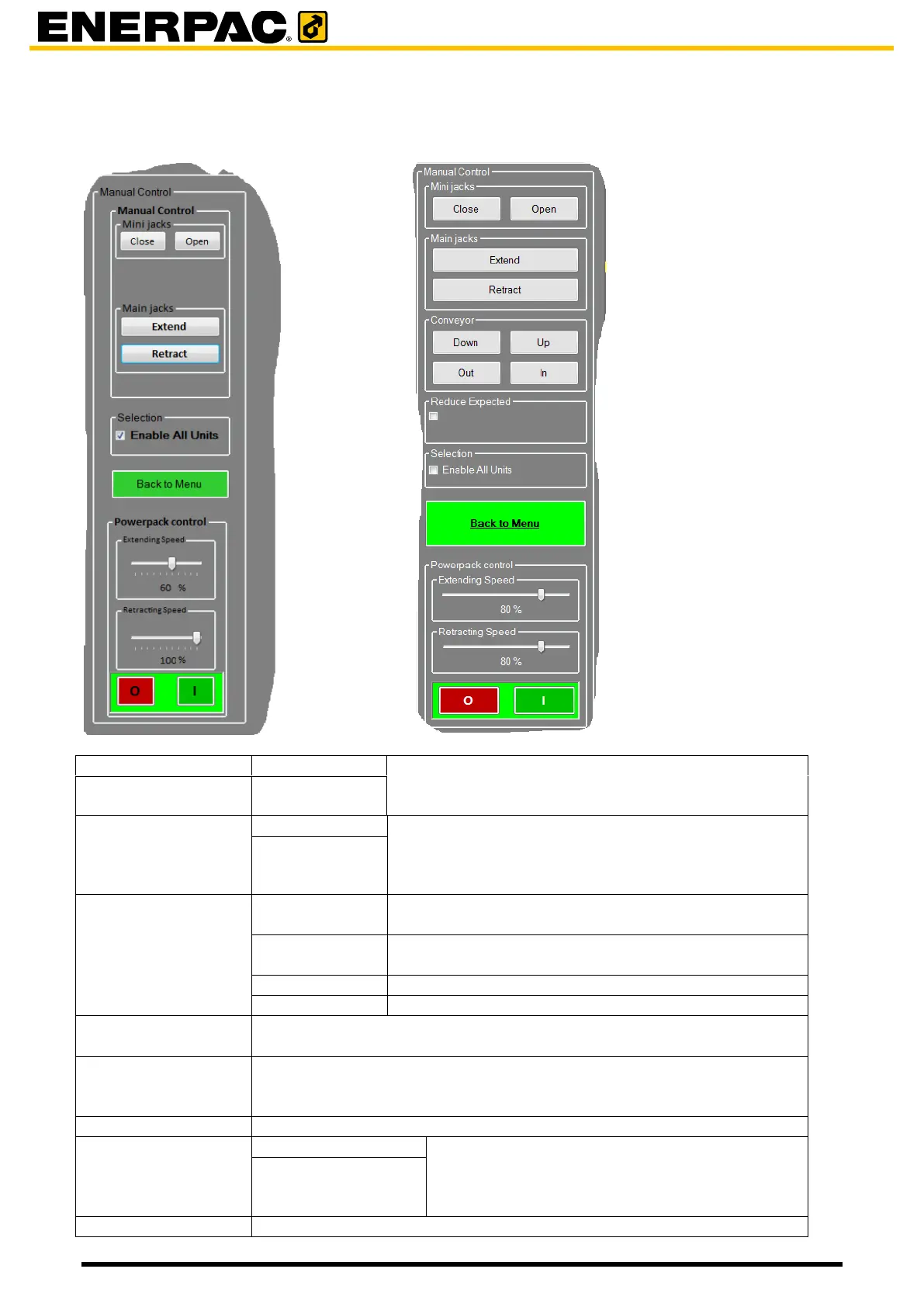
6.4.1.4 Manual control
Without automatic insert table With automatic insert table
Manually extend and retract all four mini-jacks of the
selected units. All mini-jacks are operated
simultaneously.
Manually extend and retract the main jacks of the
selected units.
Movements of the main jacks are synchronized. In
this system the word “hysteresis” is used for this.
Conveyor
(only with automatic
insert table)
Manually move the barrel lifting cylinders in the
conveyor down
Manually move the barrel lifting cylinders in the
conveyor up
Manually move the conveyor out
Manually move the conveyor in
Click to enable the reduce expected load functionality, see par 7.3.2.1
“Reduce expected load functionality”
Click to enable all units.
Commands will be applied to all units which do have hardware
assignments.
Return to the main window
Powerpack control
(Powerpack is a
synonym of HPU)
Setting the speed of extending / retracting of the
main jacks
To switch the pump of the selected units.


 To Next Page