Enertech Global
EAV - EME/EMD Rev. A Models
Installaon and Operaons Manual
Optional connections
Communication
F2120 communicates with NIBE indoor modules/contr ol
modules by connecting a three core, screened cable (max
area 0.75 mm²) to terminal block X22:1– 4, as shown in
the following image.
For cascade connection, join terminal block X23 with
X22 to the next heat pump .
Softwar e version
In order for F2120 to be able to communicate with in-
door module (VVM ) / control module (SMO ) the softwar e
version must be accor ding to the table.
Softw ar e versionIndoor module /
Contr ol module
v7568R4VVM 310 / VVM 500
v7530R5VVM 320 / VVM 325
v7607R3SMO 20
v7635R5SMO 40
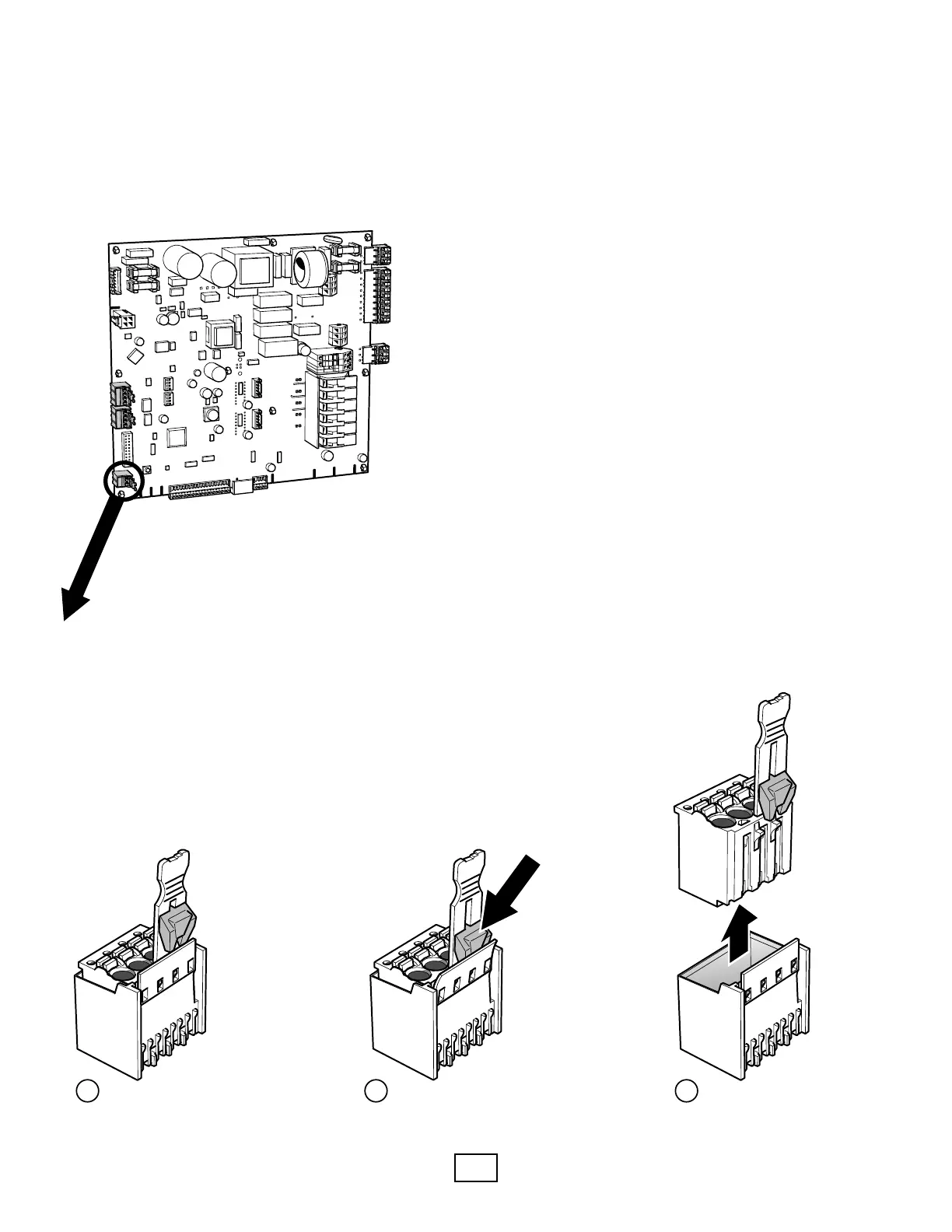
Disconnect the connections in F2120
PRESS
Pull up!
Push down!
1 2 3
29Chapter 5 | Electrical connectionsNIBE F2120
EAV communicates with Enertech indoor modules/control
modules by connecng a 3-conductor, shielded cable (max area
0.75 mm²) to terminal block X22:1–4, as shown in the following
image.
Optional connections
Communication
F2120 communicates with NIBE indoor modules/contr ol
modules by connecting a three core, screened cable (max
area 0.75 mm²) to terminal block X22:1– 4, as shown in
the following image.
For cascade connection, join terminal block X23 with
X22 to the next heat pump .
Softwar e version
In order for F2120 to be able to communicate with in-
door module (VVM ) / control module (SMO ) the softwar e
version must be accor ding to the table.
Softw ar e versionIndoor module /
Contr ol module
v7568R4VVM 310 / VVM 500
v7530R5VVM 320 / VVM 325
v7607R3SMO 20
v7635R5SMO 40
Disconnect the connections in F2120
PRESS
LEK
Push down!
1 2 3
29Chapter 5 | Electrical connectionsNIBE F2120
Larger block is used for viewing purposes. To prevent damage
to Terminal Block tab, use the following example.



 To Next Page