2 INTRODUCTION
0460 896 274
- 11 -
© ESAB AB 2013
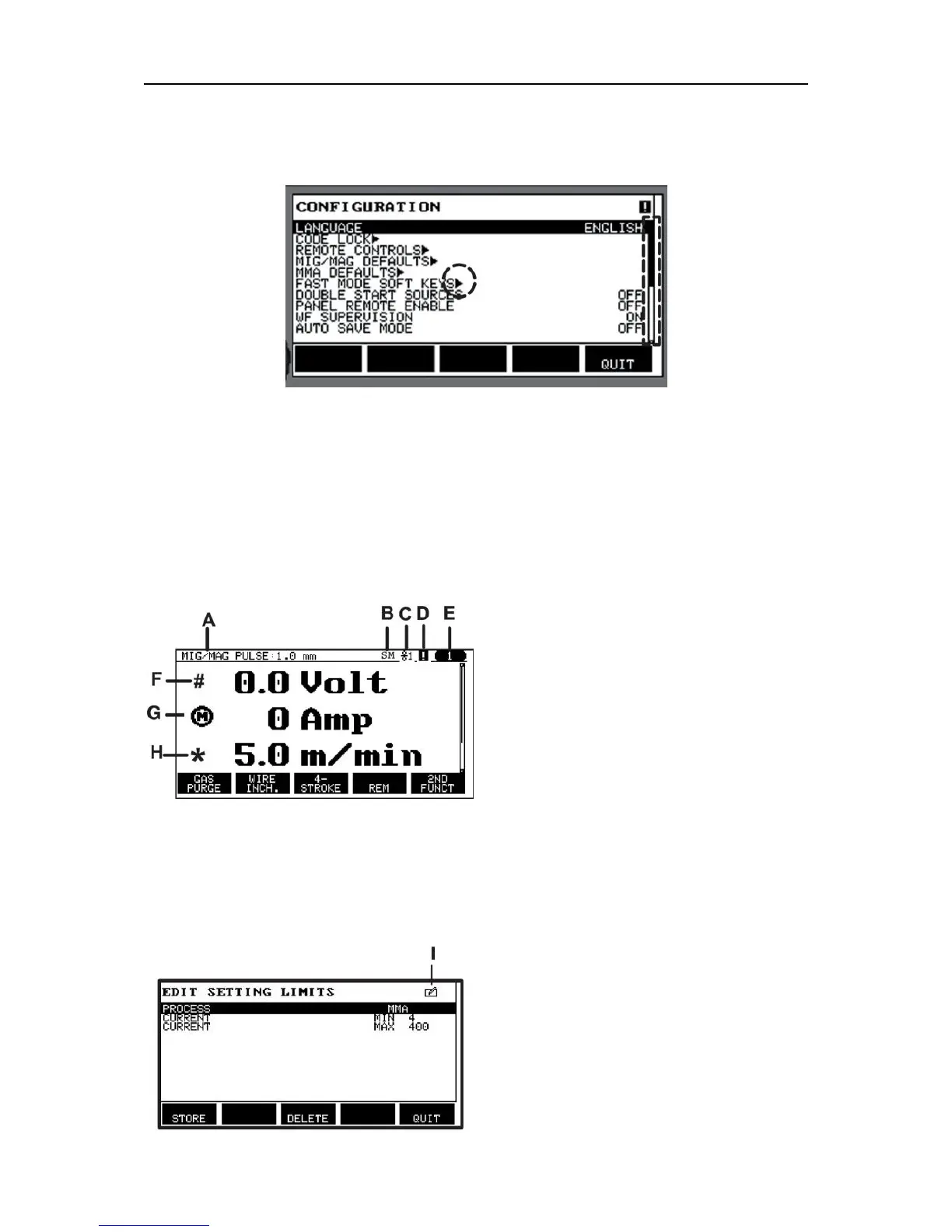
Arrows and scroll bars
Where there is more information behind a row, this is indicated with a black arrow behind the
text. A scroll bar is presented to the right of the display if there are more rows in the list:
Text boxes
At the bottom of the display are five boxes containing text that describes the current function
of the five keys directly below the boxes.
Energy saving mode
To increase the life of the background lighting, it is switched off after three minutes of no
activity.
2.5.1 Symbols in the display
A The selected weld data set
B S = Setting limit activated
M = Measure limit activated
C The selected wire feed unit
D A fault has occurred, see the "Error log"
section in the "TOOLS" chapter.
E Recalled memory position number
F Select the plus/minus knob marked# to
increase or decrease a parameter
value.
G Measured motor current
H Select the plus/minus knob marked* to
increase or decrease a parameter
value.
I Editing mode, editing memory position



 To Next Page