B
A C D E F G SERVICE
36
Changing the Operating Pressure from the Remote
The following instructions must only be undertaken by a suitably approved
person. Any tampering by an unauthorised person will void the product’s
warranty and may result in a dangerous condition.
While the remote is in its “OFF” mode with only the time showing on the
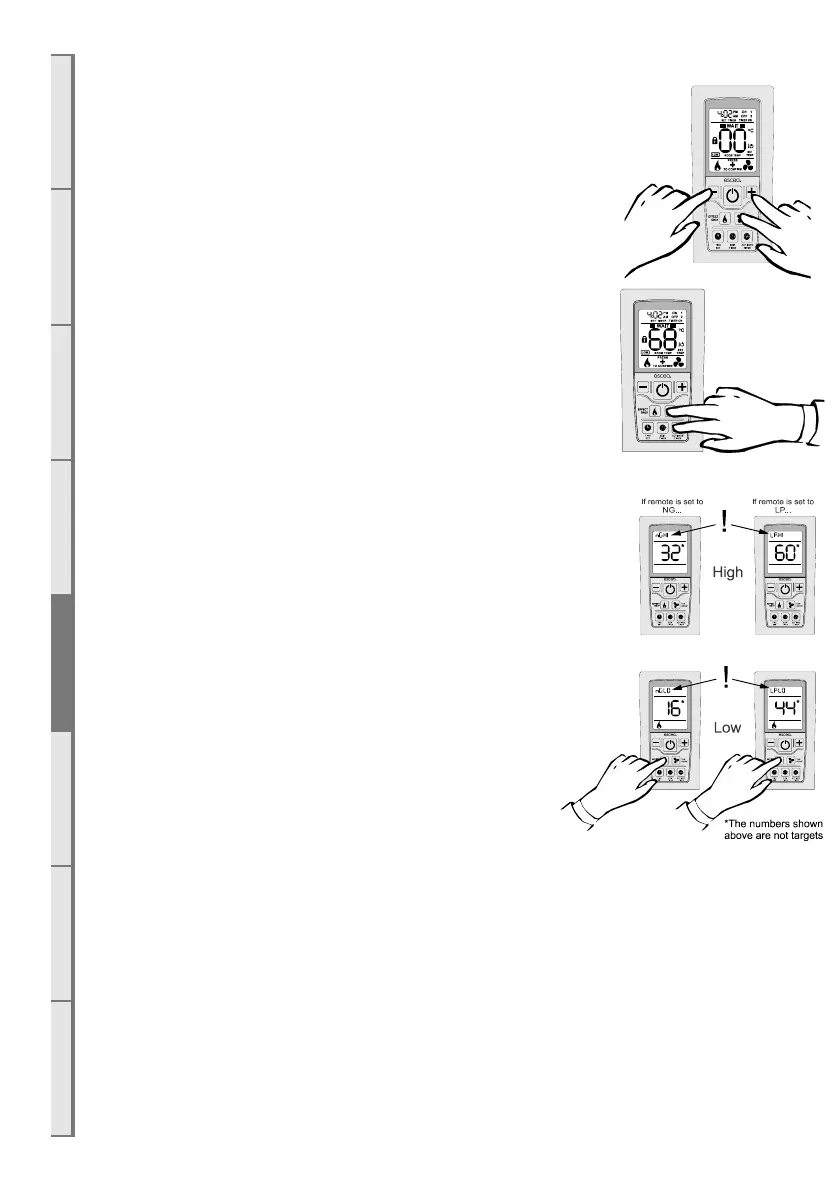
display, press the MINUS, PLUS and FAN BOOST buttons simultaneously
(as shown right) until the characters “03” light up on the display. Release
the buttons and the remote will count down and display “GO”. The screen
will then display all characters and should be reading 00. This will put
the remote into test mode.
Whilst in test mode: press and hold
the “ACTIVATE TIMER” and “FAN BOOST” buttons for 4 seconds to
access the gas valve settings. The appliance will automatically turn on while
in this mode.
WAIT. Allow the appliance to fully light all burners before continuing.
The high setting for the currently set gas type is displayed first
(indicated in
the clock segments at the top). Pressing the plus or minus keys will
change the setting up or down respectively, which will change the
gas pressure measured at point A or D. The large digits will blink
rapidly after the setting is made until the verification is received
from the fire.
Note: The numbers displayed on the remote should only be used
to achieve the correct pressure. The numbers by themselves do not
represent anything and should not be relied upon.
Toggling to the low setting is done by pressing the ‘EFFECT
ONLY’ button (indicated in the clock segments at the top and by the ‘EFFECT ONLY’ icon at the
bottom). Settings are made with the ‘PLUS’ and ‘MINUS’ buttons as above. Exiting this mode is by
pressing the on/o button.
NOTE: This is a powerful gas heater that, on the lowest setting (flame eect), will still generate
approximately 50% heat.



 To Next Page