PLATINOUS SERIES CONTROLLER MANUAL
33
3. Select the program to be displayed.
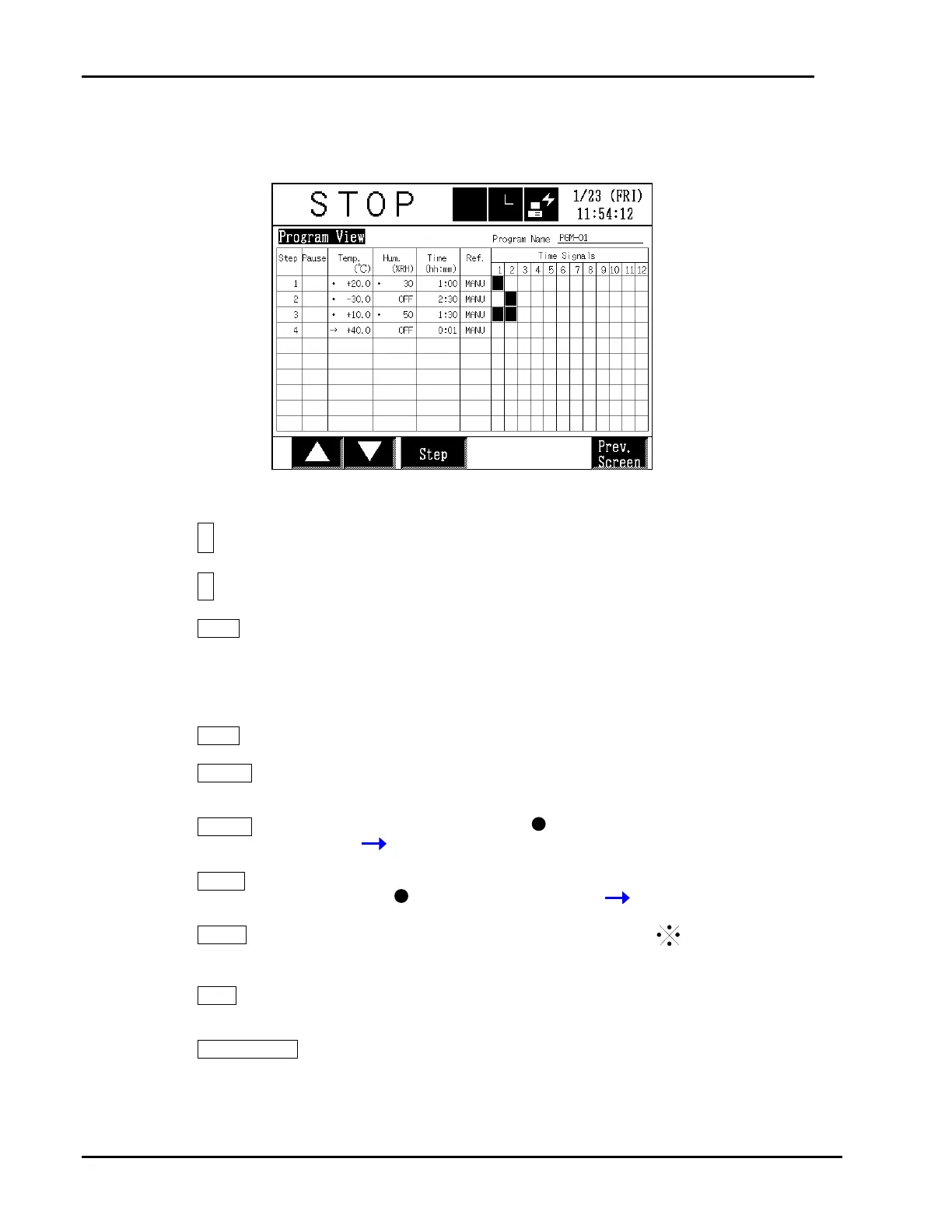
4. Program settings will be displayed in table format.
[Buttons]
+
: Displays the previous page.
,
: Displays the next page.
Step
: Displays a keypad where to input the step number. That
step will appear at the top of the table. Up to 10 steps
can be displayed at a time.
[Screen Elements]
Step
: Step No.
Pause
: “ON” when pause control is ON, otherwise nothing is
displayed.
Temp.
:
Target temperature plus “ “ if ramp control is OFF or
“ “ if ON.
Hum.
: “OFF” when humidity control is OFF. Target humidity
plus “ “ if ramp control is OFF or “ “ if ON.
Time
:
Exposure time is displayed in hour : minute. Is
displayed if soak control is ON, while nothing if it is OFF.
Ref.
: “AUTO” in auto control. “MANU” in manual control.
* The number of refrigerators is not displayed.
Time Signals
: The box is black when output control is ON.
The box is yellow when output control is OFF or the
specific time signal is OFF.
* If output control is OFF, the time signal box will be
yellow even if the specific signal is set to ON.



 To Next Page