Festo — EMCS-ST — 2021-03b
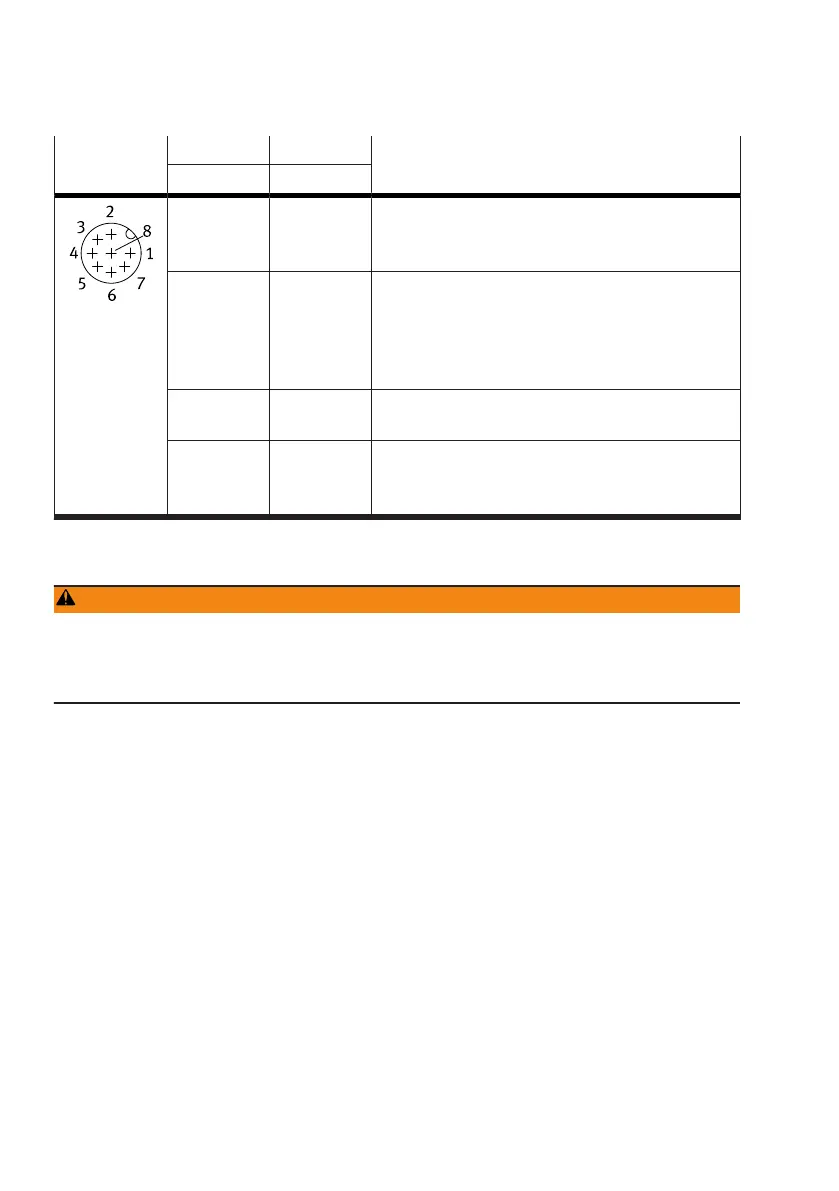
[Logic] Pin 2, DO1 Pin 3, DO2 Description
"State
In
" "State
Out
"
0 0 Status signals for
–
neither of the two "Lim
In
(Ref)" or "Lim
Out
" end
positions is reached
0 1 Status signals for
–
"Lim
Out
" end positions reached
–
Parameterised force "Force" reached in force-con-
trolled range of point-to-point operation with
press function
1 0 Status signals for
–
"Lim
In
(Ref)" end positions reached
1 1 Status signals for
–
critical error
è
12.2.2 Diagnostic messages and
fault clearance.
Tab. 17: Status signal combinations at digital outputs DO1 and DO2
9.2
Commissioning "IO-Link Operation"
WARNING
Risk of injury due to unexpected movement of components.
When starting the homing run, the drive is disconnected from the power supply for a short time. This
can cause unexpected movements of the connected mechanics and crush parts of the body.
• Bring moving parts of the connected mechanical system into a safe position.
Preparation:
1. Check the mounting of the drive system.
2. Check the wiring of the power supplies and the IO-Link "C/Q" interface at the [Power] and [Logic]
connections.
3.
Download application software, IODD device description file, IOLFW firmware file and IOLFW
parameter set
è
www.festo.com/sp.
4. Install the application software.
5. Open IODD file in the application software.
Procedure:
1.
Switch on load voltage.
2. Switch on logic voltage via IO-Link master (≥50 ms switch-on delay required
è
10.2.5 Switch-on
behaviour).
If the logic voltage is switched on before the load voltage, the EMCS-ST starts with an error that
must be acknowledged.
3. Wait for initialisation until C/Q LED is yellow (L 7 s).




 To Next Page