Festo — EMCS-ST — 2021-03b
Diagnostics and malfunctions
12.2 Diagnostic messages
Diagnostic messages are classified as information, warnings or errors. If an error occurs, operation is
interrupted and the power stage is switched off. Warnings and errors remain active until the cause
of the event has been corrected. After the cause has been eliminated, warnings are automatically
deleted from the diagnostic memory with the next motion task. If errors occur, the error must be
acknowledged. After acknowledgment of the error, the power stage is activated with the creation of
the next movement command or via the system parameter "0x0002 System Commands, value 0xCC
Enable power stage".
12.2.1 Acknowledge error
On error acknowledgment active error messages are deleted from the diagnostic memory if the cause
of the error was remedied before acknowledgment.
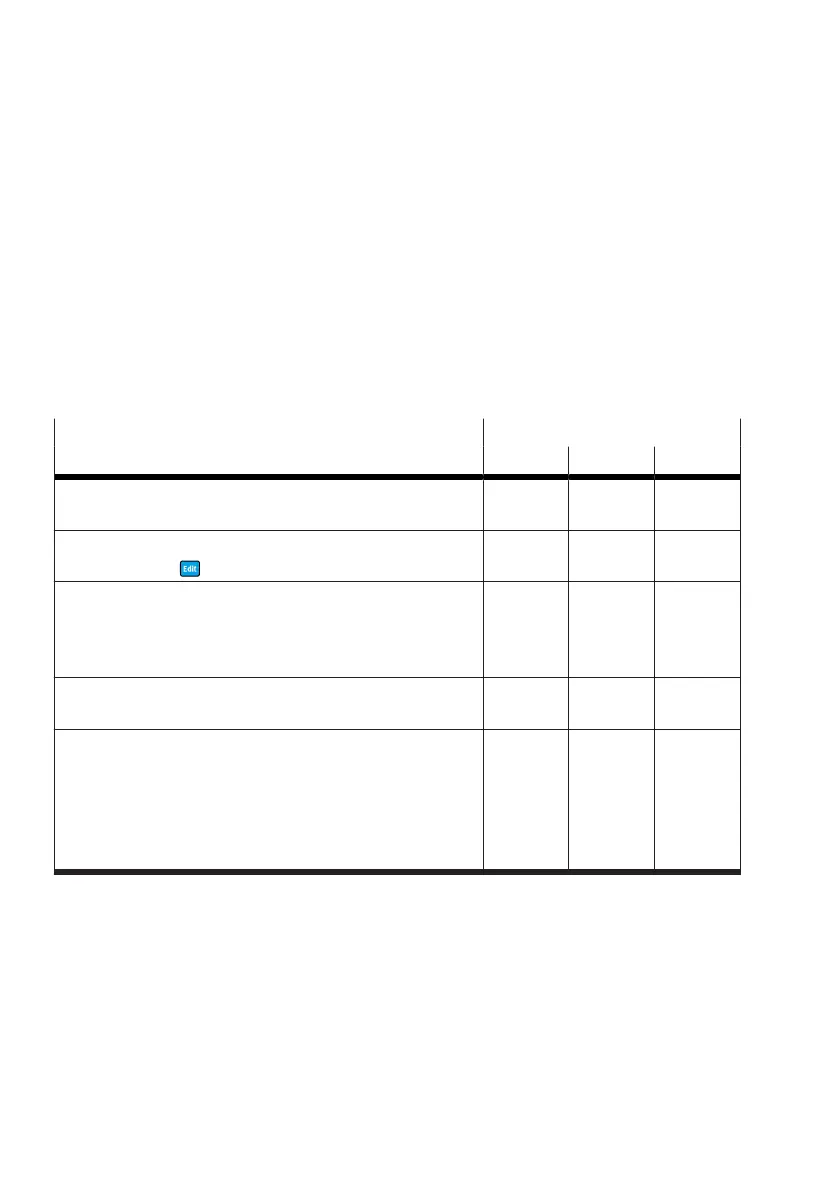
Errors can be acknowledged via the following interfaces:
Error acknowledgement Operation
HMI DIO IO-Link
Restart:
–
Logic voltage L
+
, Power OFF/ON [Logic, Pin 1]
X X X
HMI (from firmware version v19.0.4.107_release):
–
Press and hold for 3 s
X – –
DIO, digital inputs (from firmware version
v19.0.4.107_release):
– DI1 "Mov
In
" = 1 [Logic, Pin 5]
DI2 "Mov
Out
" = 1 [Logic, Pin 6]
– X –
IO-Link, device data:
–
0x0107.0 Quit Error = true
– – X
IO-Link, process data:
–
0x0029.3 Quit Error = true
–
0x0029.1 "Mov
In
" = true
0x0029.2 "Mov
Out
" = true
0x0029.5 "Mov
Intermediate
" = any (from FW version
v19.0.4.107_release)
– – X
Tab. 41: Overview of error acknowledgment
12.2.2 Diagnostic messages and fault clearance
"Information, Warnings and Errors" diagnostic messages are displayed by the C/Q LED and menu and
parameters LED displays.
Errors are reported to the controller as follows:
–
DIO operation: output signals DO1 and DO2 = 1 [Logic, Pin 2/3]
– IO-Link operation: ProcessDataInput state "In" (0x0028.1) and state "Out" (0x0028.2) = true




 To Next Page