Festo — EMCS-ST — 2021-03b
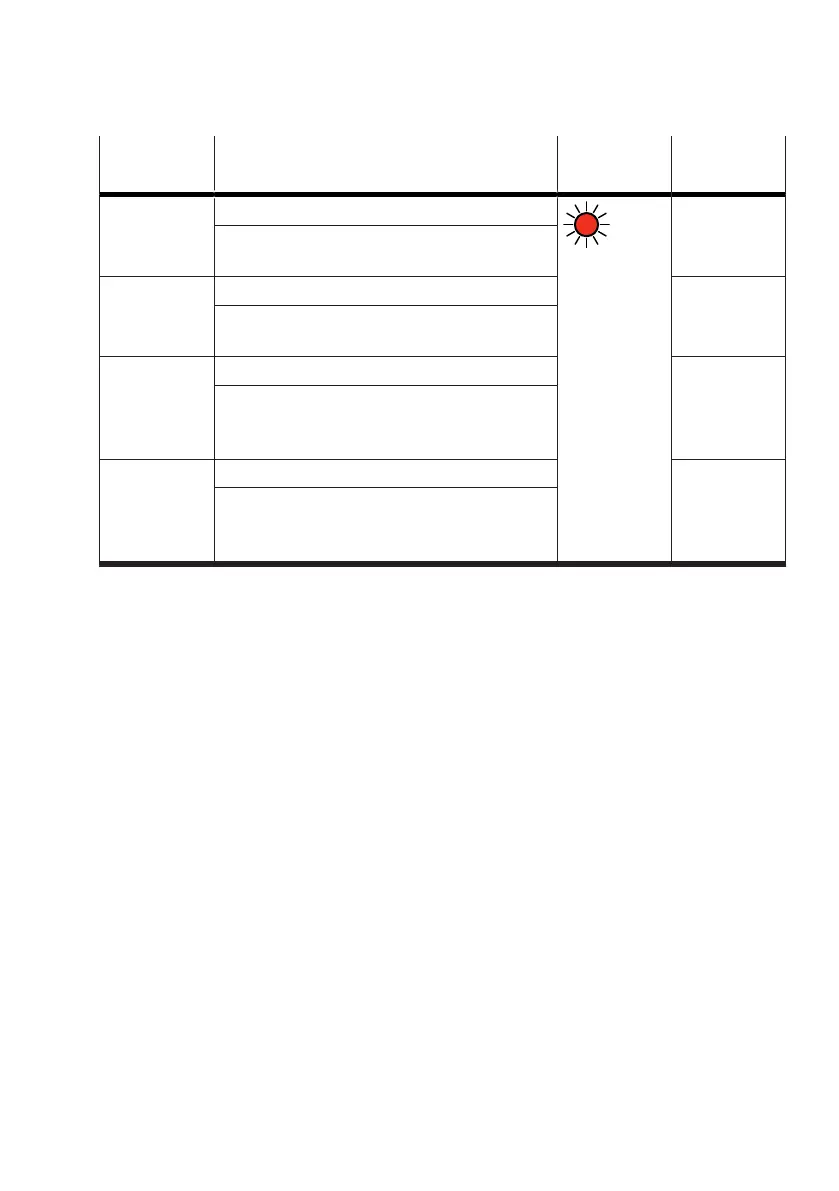
Event code Description LED Error code
(IO-Link) C/Q hex (dec)
0x1820 Parameter set not found
red light
0x0061
(97)
Remedy
–
Check parameter set selection
0x1821 Parameter set invalid 0x0062
(98)
Remedy
–
Overwrite parameter set (save)
0x1822 Parameter set incompatible 0x0063
(99)
Remedy
–
Delete parameter set
–
Overwrite parameter set (save)
0x1823 Parameter not found 0x0064
(100)
Remedy
–
Delete parameter set
–
Overwrite parameter set (save)
Tab. 24: "Parameter set error" diagnostic messages
10.2.3 Data backup (Data Storage)
The integrated drive supports data backup of predefined application data (identification parameters
and device data) in the connected IO-Link master. After a device replacement, the application data
saved in the IO-Link master are automatically restored to the new functionally and design identical
devices. Before transferring the application data, the compatibility of the new device is checked
against the device ID. Final homing with end-position determination is used to check the validity of the
“Start Press”, End Position “Out” and Intermediate position parameter values of the new drive system.
The following data storage functions can be controlled in the IO-Link master via the application
software:
–
Disable:
– Data backup: no application data are saved in the IO-Link master
– Device replacement: the new device has the functionality and behaviour of the factory setting or
the functionality and behaviour of the last data backup in the replaced device
–
Backup/Restore:
–
Data backup: every application data change is automatically saved in the IO-Link master
– Device replacement: the new device has the same functionality and behaviour as the replaced
device
–
Restore only:
–
Data backup: the current status of the application data is saved in the IO-Link master
– Device replacement: the new device has the functionality and behaviour of the last manually
performed data backup in the replaced device




 To Next Page