Festo — EMCS-ST — 2021-03b
Steps for updating the parameter set
–
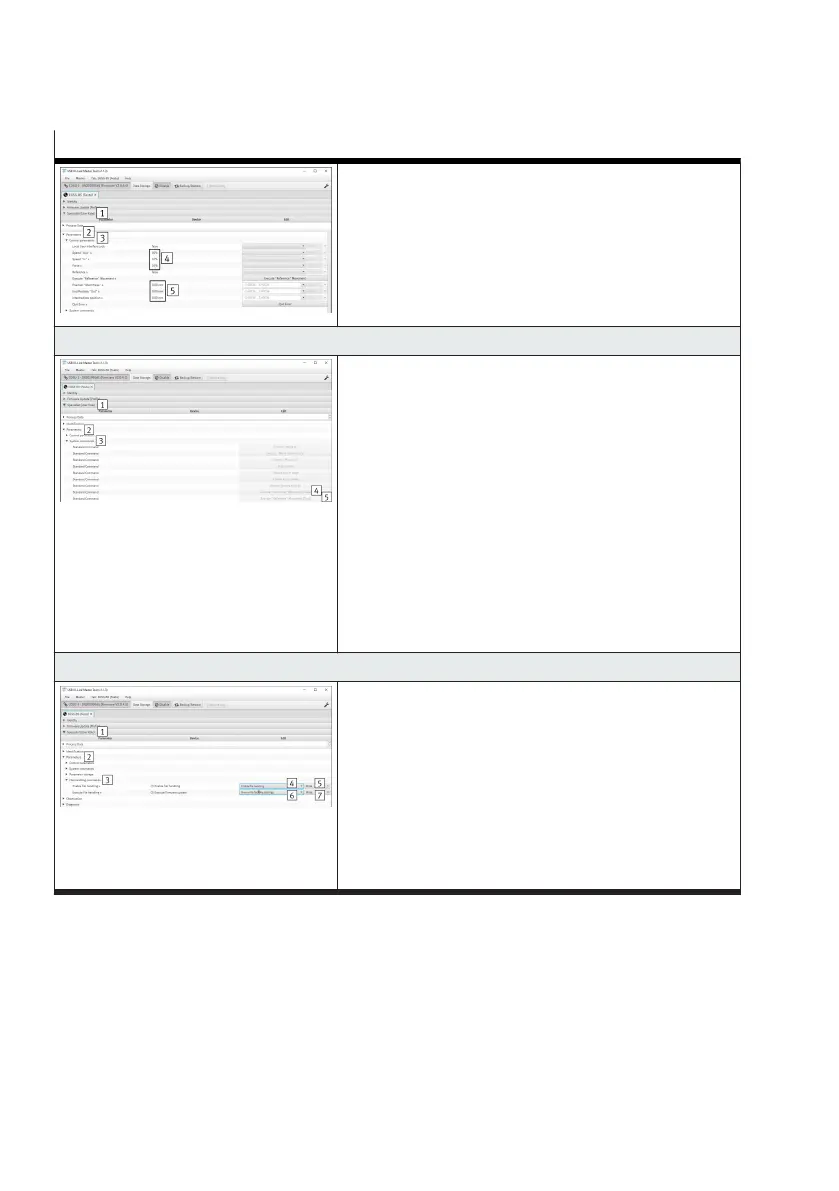
Open the "Specialist (user role) 1" tab
–
Open "Parameter 2" and "Control parameter 3" sub-
menus
–
Default setting of the following values:
–
Speed "In", speed "Out" and force/torque = 10% 4
–
Position "Start Press", End Position "Out" and Inter-
mediate position = 0.00 mm/0.0° 5
10. Initialise end positions "Lim
In
/ Lim
Out
" and reference end position "Ref"
–
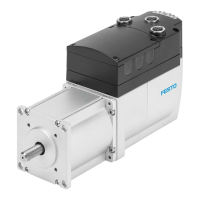
Open the "Specialist (user role) 1" tab
–
Open the "Parameter 2" and "System commands 3"
submenus
–
Execute the default command "Motion "Reference""
4
Press one of the two following buttons for the default
commands:
– Execute movement "Reference" (False) 4 (factory
setting, motor-facing or left reference end position
"Ref")
–
Execute movement "Reference" (True) 5 (facing
away from motor or right reference end position
"Ref")
11. Save parameter set as factory setting
–
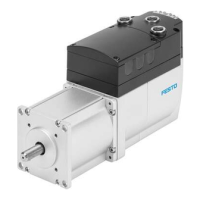
Open the "Specialist (user role) 1" tab
–
Open the "Parameter 2" and "File handling com-
mands 3" submenus
–
In the "Activate file handling" parameter select the
"Activate file handing 4" value and press the "Write
5" button
–
In the "Execute file handling" parameter select the
"Overwrite factory settings 6" value and press the
"Write 7" button
1) The use of the function depends on the application software.
Tab. 23: Steps for updating the parameter set
10.2.2.2
Diagnostic messages when updating the parameter set
The table shows all diagnostic messages that may be shown when updating the parameter set.




 To Next Page