Festo — EMCS-ST — 2021-03b
Steps for updating the parameter set
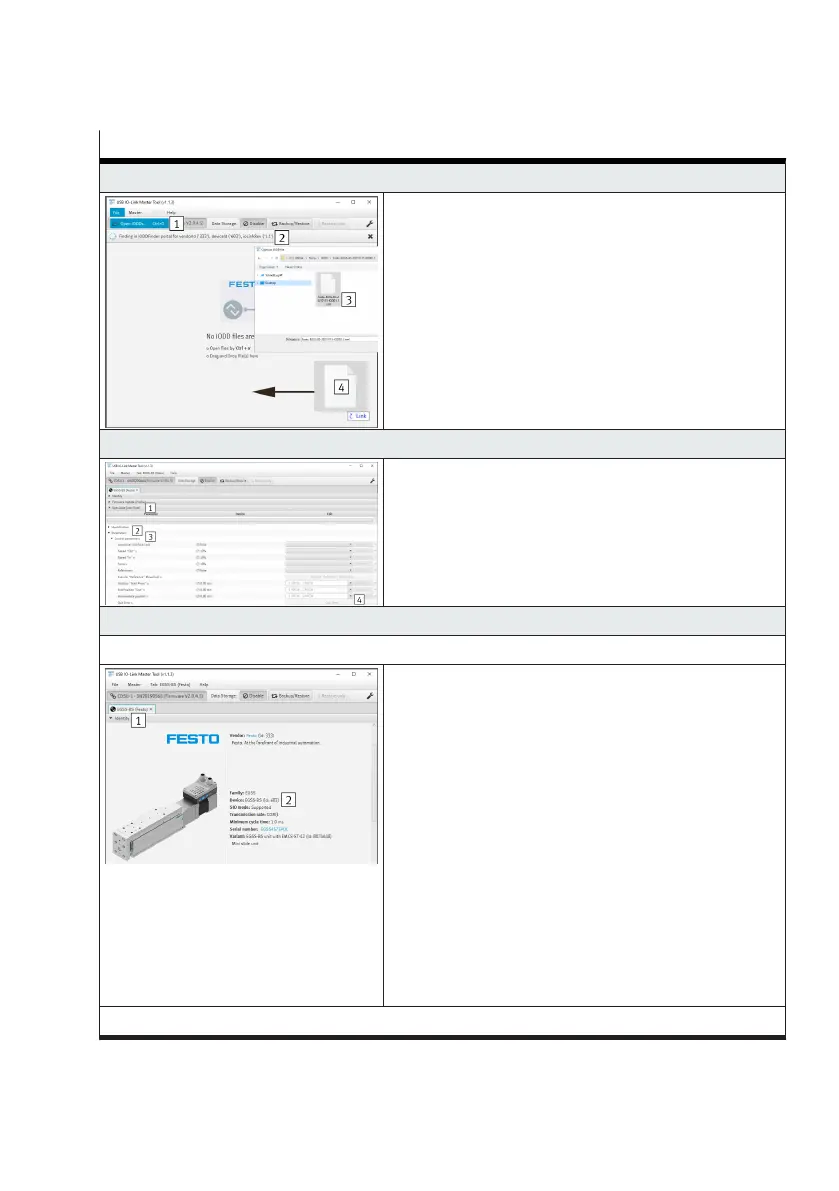
7. Open the IODD file of the drive unit (device description file)
Variants for opening the file:
–
Open the "File" tab and execute the "Open IODDs"
submenu 1
–
Via the automatic search 2
1)
–
Via the key combination "Ctrl + o 3"
–
By drag-&-drop 4
8. Acknowledge error (only if an error is pending)
–
Open the "Specialist (user role) 1" tab
–
Open "Parameter 2" and "Control parameter 3" sub-
menus
–
Press the "Acknowledge error 4" button
9. Check the current status of the parameter set
When commissioning a new integrated drive (spare part)
–
Open the "Identity 1" tab
–
Check the current device ID in the "Device 2" param-
eter. The device ID must correspond to the drive system
in use
–
0x000259 (601): ELGS-TB
–
0x00025A (602): ELGS-BS
–
0x00025B (603): EGSS-BS
–
0x00025C (604): ELGE-TB
–
0x00025D (605): ERMS
– 0x00025E (606): EPCS-BS
–
0x00025F (607): EPCE-TB
With 0x000258 (600), EMCS-YY-ST spare part, the param-
eter set file was not updated successfully. Follow the
sequence from step "4. Repeat the "Open parameter set
file".
When commissioning a used integrated drive




 To Next Page