Festo — EMCS-ST — 2021-03b
10.2.2 Parameter set
10.2.2.1 Update the parameter set (from firmware version v19.0.4.107_release)
WARNING
Risk of Injury due to Unexpected Movement of Components
For vertical or slanted mounting position: when power is off, moving parts can travel or fall uncon-
trolled into the lower end position.
• Bring moving parts of the product into a safe end position or secure them against falling.
The integrated drive supports the update of the parameter set after a device replacement. The
parameter set contains the factory settings of the drive system. Drive system-dependent parameters,
such as maximum payload of the mechanism, are determined with the first homing and stored.
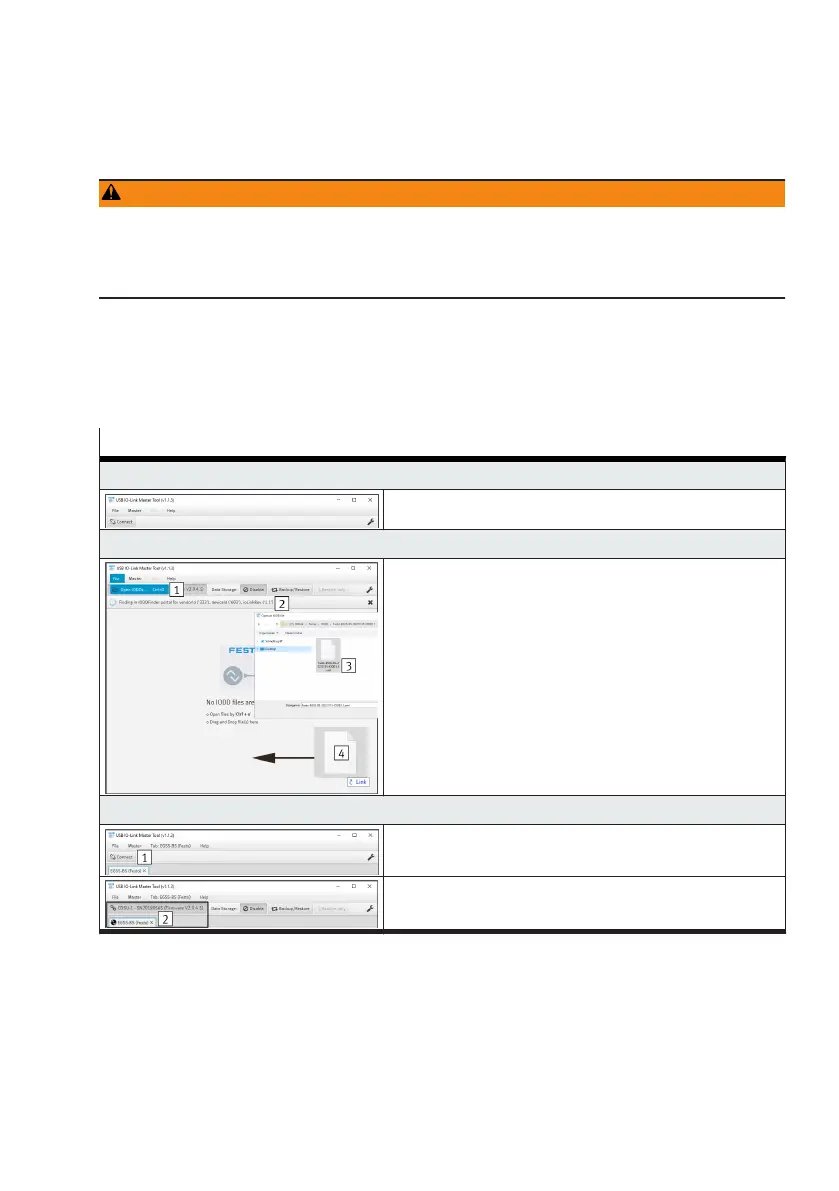
The table shows all steps for updating the parameter set using the application software of the Festo
USB IO-Link Master CDSU-1 as an example.
Steps for updating the parameter set
1. Start the application software
–
Run app
2. Open the IODD file (device description file)
Variants for opening the file:
–
Open the "File" tab and execute the "Open IODDs"
submenu 1
–
Via the automatic search 2
1)
–
Via the key combination "Ctrl + o 3"
–
By drag-&-drop 4
3. Establish a connection to the IO-Link master
–
Press the "Connect 1" button
–
The connection is established 2




 To Next Page