Festo — EMCS-ST — 2021-03b
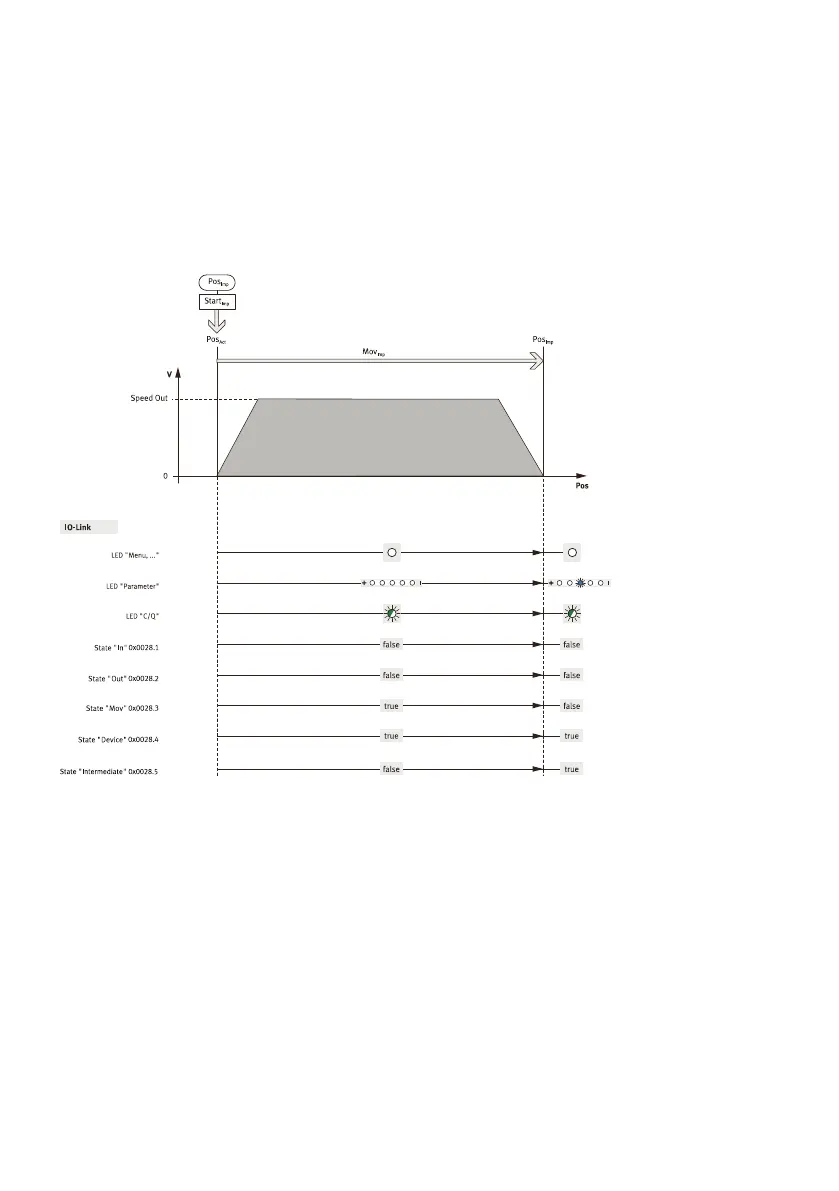
Timing: travel to "Pos
Imp
" intermediate position (example towards "Lim
Out
" end position)
The diagram shows the status data in IO-Link operation of the "Mov
Imp
" motion from the "Start
Imp
"
command to reaching the "Pos
Imp
" intermediate position.
Activating motion task Start
Imp
–
IO-Link, process data: 0x0029.5 = true, 0x0029.1 and 0x0029.2 = false
IO-Link, system parameter: 0x0002, value = 0xD0 (Execute "Move Intermediate")
Fig. 23: Travel to "Pos
Imp
" intermediate position
Timing: stop and continue motion (example "Mov
Out
" motion)
The diagram shows the status data in DIO and IO-Link operation of the "Mov
Out
" motion from the
"Stop" and "Start
Out
" commands to reaching the "Lim
Out
" end position.
Stop task, activate stop
–
DIO, digital inputs: DI1 "Mov
In
" = 0 and DI2 "Mov
Out
" = 0
–
IO-Link, process data: 0x0029.1, 0x0029.2 and 0x0029.5 = false
IO-Link, system parameter: 0x0002, value = 0xCA (stop motion)
Activating positioning task Start
Out
–
DIO, digital inputs: DI2 "Mov
Out
" = 1 and DI1 "Mov
In
" = 0
–
IO-Link, process data: 0x0029.2 = true, 0x0029.1 and 0x0029.5 = false
IO-Link, system parameter: 0x0002, value = 0xC9 (Execute "Move Out")




 To Next Page