65
Adjust prism until ONLY the GREEN sensor LED lights constantly,
the Product’s right LED turns blue
The sensor has a red and a green LED to indicate the beam adjustment
condition. This condition is simultaneously monitored on the Product’s alignment
condition LED (right LED).
Note
Make sure that the prism and sensor lens are clean. Use a soft lint-free cloth.
A lens cleaning cloth is supplied.
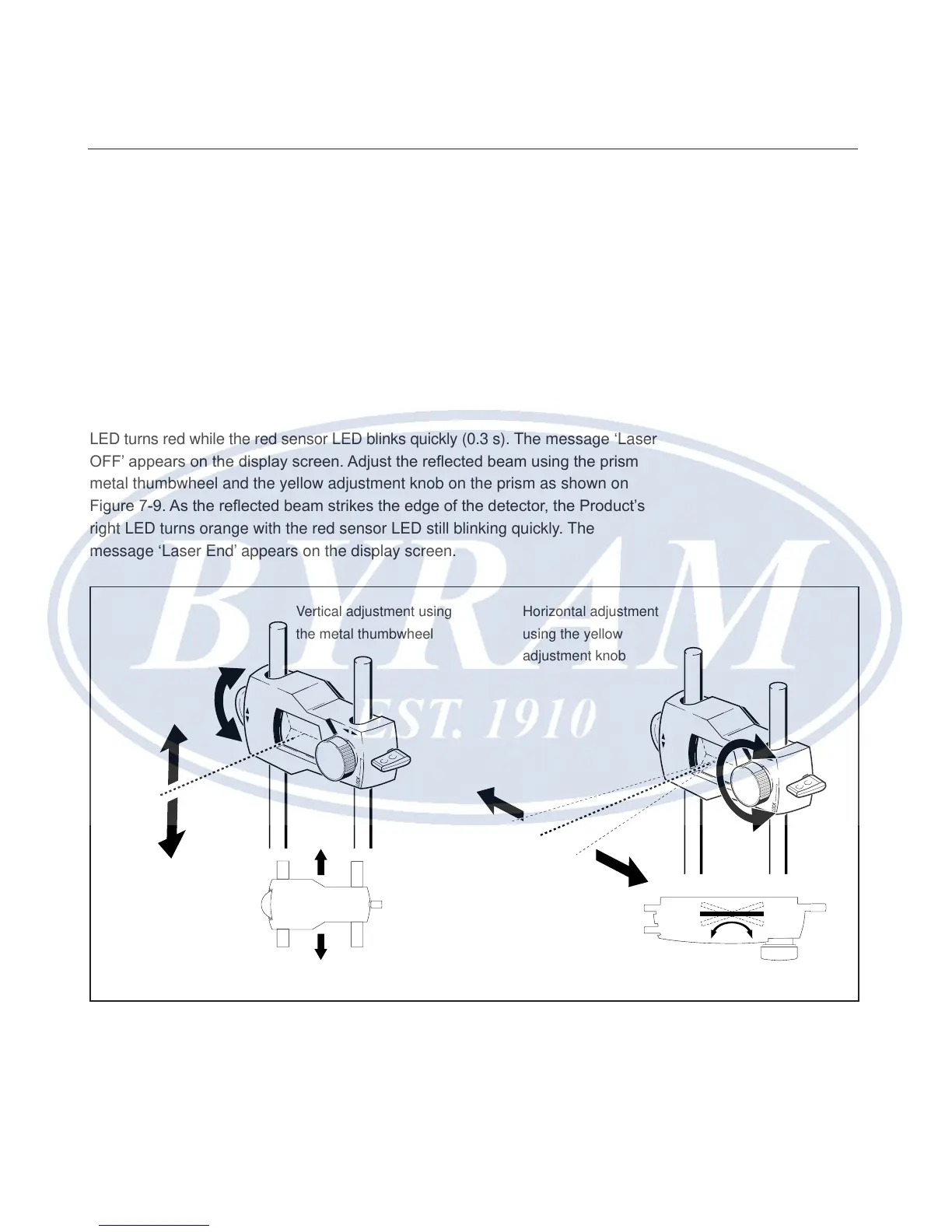
When the reected beam fails to strike the detector surface, the Product’s right
LED turns red while the red sensor LED blinks quickly (0.3 s). The message ‘Laser
OFF’ appears on the display screen. Adjust the reected beam using the prism
metal thumbwheel and the yellow adjustment knob on the prism as shown on
Figure 7-9. As the reected beam strikes the edge of the detector, the Product’s
right LED turns orange with the red sensor LED still blinking quickly. The
message ‘Laser End’ appears on the display screen.
Figure 7-9. Horizontal and vertical adjustment of the laser beam
Vertical adjustment using
the metal thumbwheel
Horizontal adjustment
using the yellow
adjustment knob
Horizontal shaft alignment
Laser beam adjustment



 To Next Page