AirCheck Wi-Fi Tester
Users Manual
22
The Home Screen
Home.eps
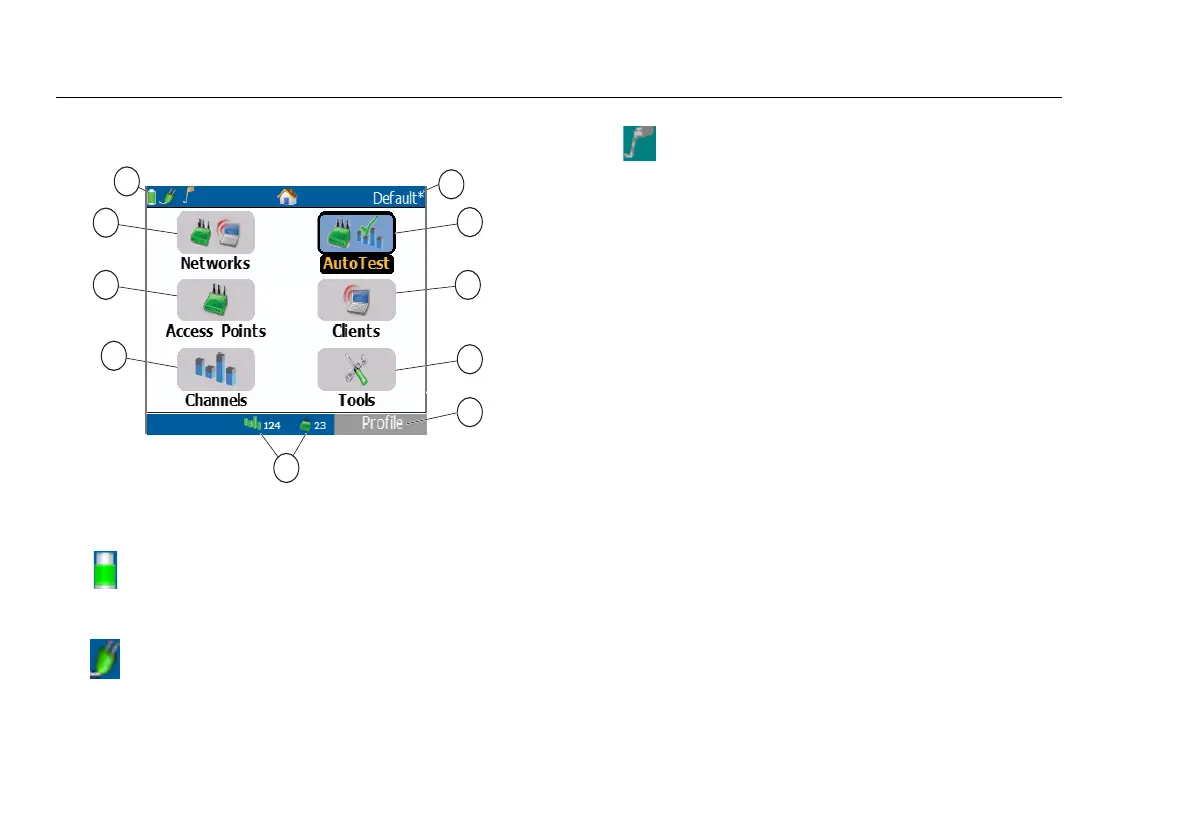
Figure 4. The Home Screen
Networks: Discovers wireless LANs. See page 46.
Access Points: Discovers access points. See page 46.
Channels: Shows usage of WLAN channels. See page 62.
The name of the profile the tester uses. The profile is
Default if you have not loaded a different profile. The
name shows an asterisk if you have changed a setting
on the tester since you loaded or saved the profile. See
page
90.
AutoTest: Automatically checks the health of your
network by looking at air quality (channel usage and
interference), network quality (network coverage and
connectivity), and the presence of ad hoc networks.
Rogue access point detection is optional and requires
ACL configuration.
Clients: Discovers associated and un-associated (e.g.,
probing) clients.
Tools: Lets you manage files and settings.
Shows the battery status. When the battery
charge is low, the icon blinks. Connect the AC
adapter to charge the battery and to make
sure the tester continues to operate.
Indicates that the AC adapter is connected.
Indicates that the external antenna is
connected.
Note
AirCheck will not transmit or connect to an
access point when the external antenna is
connected.



 To Next Page