AirCheck Wi-Fi Tester
Users Manual
62
If the Tester Does Not Discover an
Access Point
In some situations, the tester will not discover an access
point:
•
The tester cannot hear the access point because you
are too far away.
•
The access point does not beacon when the tester
listens to the channel that the access point uses.
•
The tester cannot hear the access point because the
signal cannot go through a wall or some other barrier.
•
There is too much interference on the channel that the
access point uses. Select Channels to see the
interference from non-802.11 sources on the channel.
Channel Usage
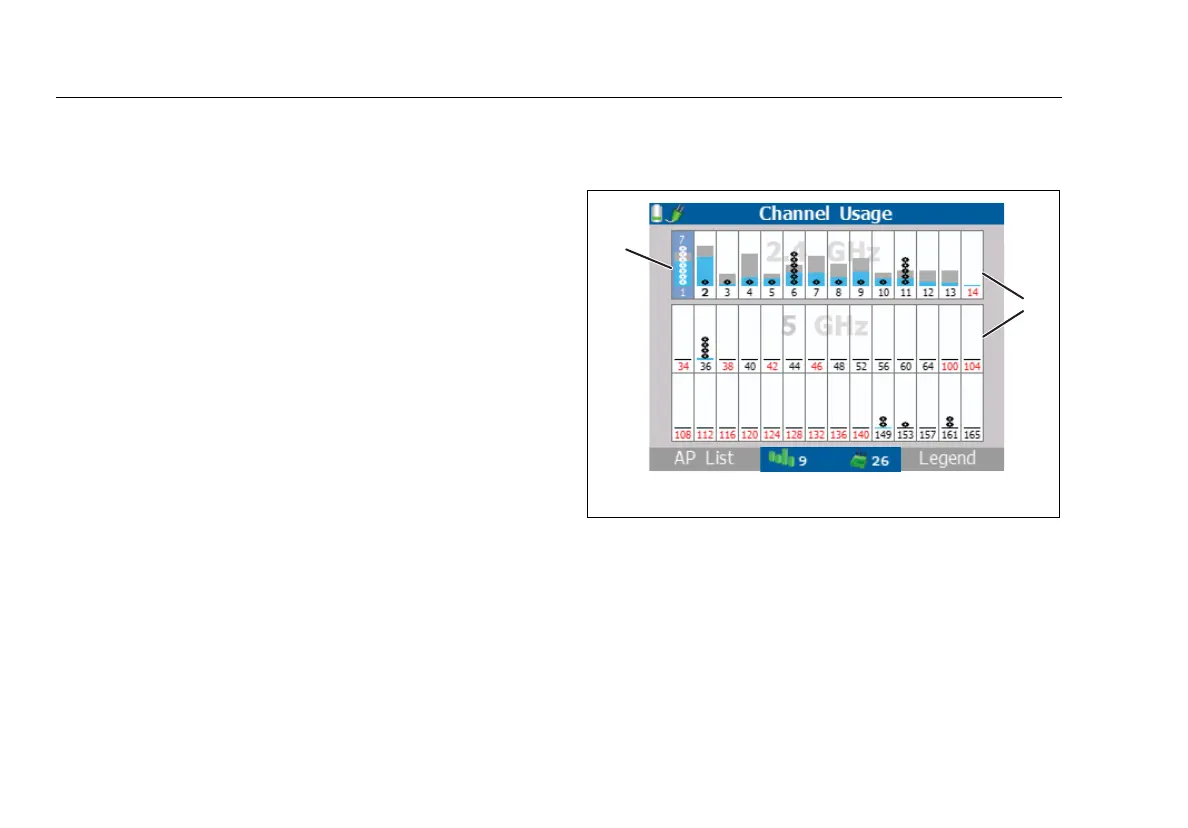
The channel usage function shows you how much wireless
traffic is on each channel. It also shows interference from
non-802.11 sources. Figure 16 shows the Channel Usage
screen.
To see details for a channel (Figure 17), use
to
highlight a channel, then press
L
To select the bands for this function, select Tools, then select
Manage 802.11 settings. See Table 2 on page 36.
ffy08.eps
Figure 16. Channel Usage Screen
The bar graphs show how much of the channel capacity
is used by 802.11 devices (blue) and by non-802.11
devices (gray). The taller the bar, the busier the channel.
The rings in the bar graphs show how many access
points use the channel. When you highlight the
channel, the number of active access points shows
above the bar graph.



 To Next Page