AirCheck Wi-Fi Tester
Users Manual
78
Press Locate to locate the client. See page 80.
ffy11.eps
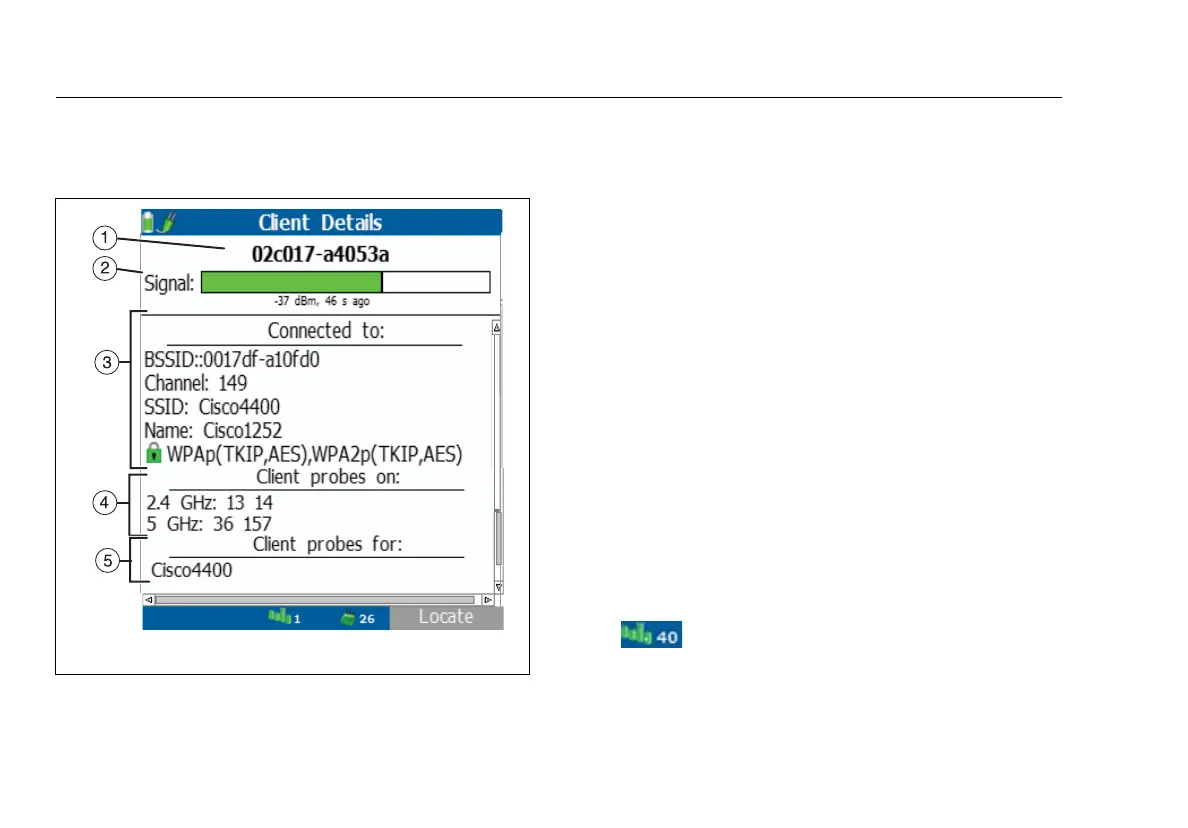
Figure 22. Client Details Screen
The MAC address of the client. The address starts with a
vendor abbreviation prefix, if the prefix is available. See
“oui_abbr.txt” on page 90.
Signal: The signal strength of the last transmission from
the client and the time since the tester heard the
transmission. After 120 seconds, the units change to
minutes. After 120 minutes, the units change to hours.
Connected to: If the client is or was connected to a
network or recently tried to connect, this section shows
information about the access point that the client used.
If this section shows only the BSSID and channel for the
access point, the tester needs more time to collect
information.
Client probes on: The channels that the client
probes.Client probes for: SSIDs the client uses for
probes. When a client connects to a network, it
sometimes does not probe for other networks, so the
list does not always show all the SSIDs the client can use.
More SSIDs will show if the client roams.
The channel the tester currently monitors. The
color of the bars shows the status of the country code
for the regulatory domain. See
“802.11d Operation” on
page 43.



 To Next Page