AirCheck Wi-Fi Tester
Users Manual
64
ffy09.eps
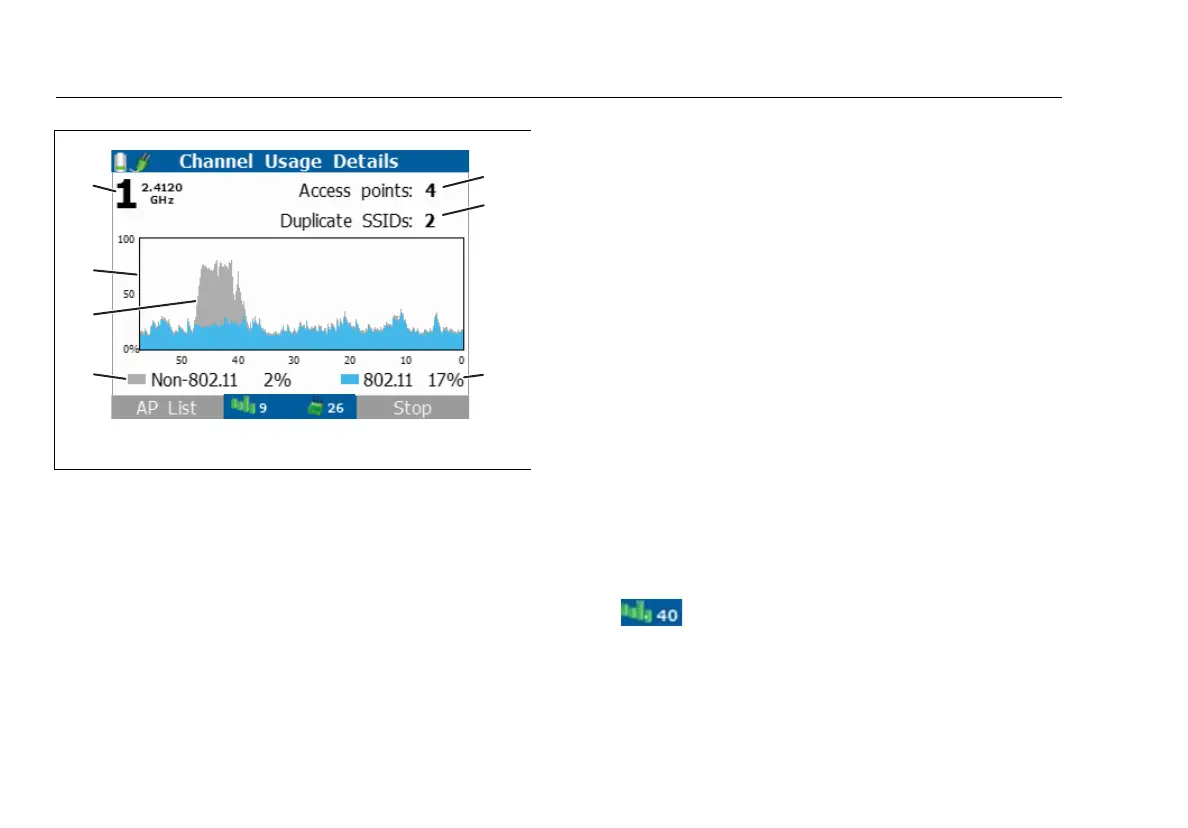
Figure 17. Channel Usage Details Screen
The channel number and frequency of the channel that
is monitored. The number is red if the channel is illegal
for the country selected in Tools > Set country.
To change the channel, press .
A graph of the 802.11 usage and non-802.11
interference of the selected channel over time in
seconds.The more the usage, the busier the channel.
Very busy channels can make the network slow or affect
connectivity.
Interference, e.g., from a microwave oven.
Non-802.11, 802.11: The percentage of signals on the
channel that are not from 802.11 devices (gray) and that
are from 802.11 devices (blue).
Non-802.11 noise can come from microwave ovens,
wireless telephones, Bluetooth
®
devices, motion
detectors, wireless cameras and other wireless devices.
This noise can interfere with WLAN connections or
performance.
Note
This feature may not be available in some countries.
Press AP List to see the access points that use the
channel. See Figure 14.
The channel that the access point uses. The
color of the bars shows the status of the country code
for the regulatory domain. The bars are red if the tester
has received different country codes from two or more
access points. See
“802.11d Operation” on page 43.



 To Next Page