- 51 -
CONTROLS AND INDICATORS
3
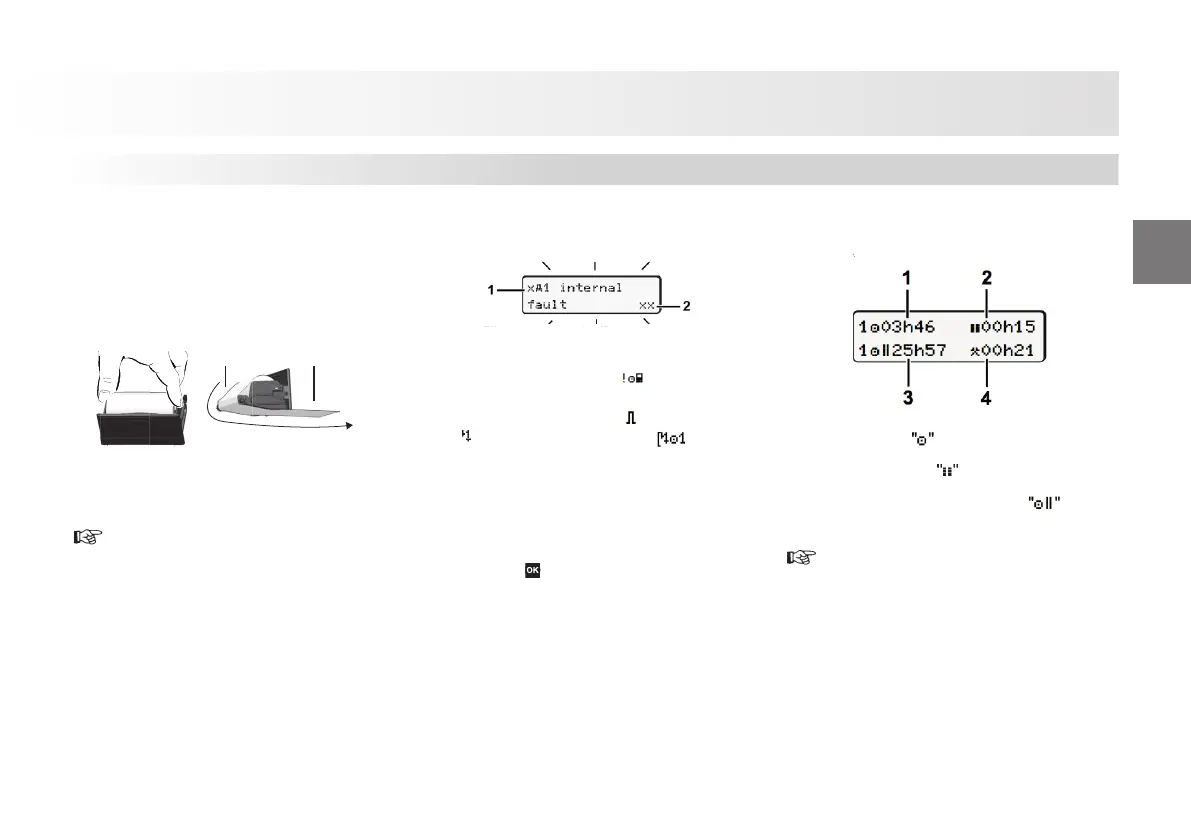
Insert paper roll
► Presstheunlockingsurfaceontheprinterp
anel,theprinterdrawer opens.
► Pull the printer drawer out of the DTCO.
N O
► Insert new paper roll according to the
illustration and guide it via the pulley
(1).
Make sure that the paper roll does not
become jammed in the printer drawer
and the start of the paper (1) extends
beyond the edge of the printer drawer!
► Push printer drawer into the printer
compartment until it engages.
► The printer is ready for operation.
► You can start a printout.
Messages
(1) Pictogram and plain text of the
message
! = Event, example [ driving
without card]
x = Fault, example [ x sensor fault]
= Driving time warning break!
Operational note, example
(2) Error code
For further messages and measures refer
to the operating instructions.
Acknowledge message:
► Presskey
2times,themessagedisappears.
Times of the driver card(s)
(1) Driving time since a valid break time.
(2) Valid break time in accordance
with regulation (EU) no. 561/2006.
(3) Driving time over two weeks
with regulation (EU) no. 561/2006.
.
(4) Duration of the set activity.
These brief instructions shall
not, under any circumstances, be
regarded as a substitute for the
exhaustive operating instructions
for the DTCO 1381 prescribed by
EU Regulation (EEC) no. 3821/85,
Annex I B.
Tachograph












 To Next Page