FRAMOS Industrial Depth Camera D400e Series - User Manual
Version 1.6.0
from 2021-10-15 49 of 64
Firmware Updates
The firmware contains the operational instructions. Firmware on the camera can be upgraded via
Ethernet interface. This allows implementing new features and potential bug fixes using the firmware
update tool.
The UpdateFirmware tool is used to update the firmware on FRAMOS Industrial Depth Cameras.
The firmware update file is verified by the tool for compatibility with selected camera before firmware
update process is initiated. Tool can be run in two modes: interactive and non-interactive.
9.1 Firmware Update Interactive Mode
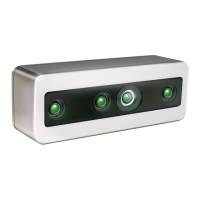
This is the default running mode of the UpdateFirmware tool. User must manually select the camera
by index from the list of connected cameras and follow the on-screen instructions to perform
firmware update on selected camera.
Usage example on Linux:
./UpdateFirmware FRAMOS_D415e_r1111_v1_7_0_0.fw_update
Figure 26 – Tool UpdateFirmware Part 1
Select a camera from the list, and confirm to initiate firmware update procedure:


 To Next Page