QUANTUM
™
HD COMPRESSOR CONTROL PANEL
MAINTENANCE
090.040-M (NOV 2016)
Page 45
SERVICE - MAINTENANCE (FACTORY)
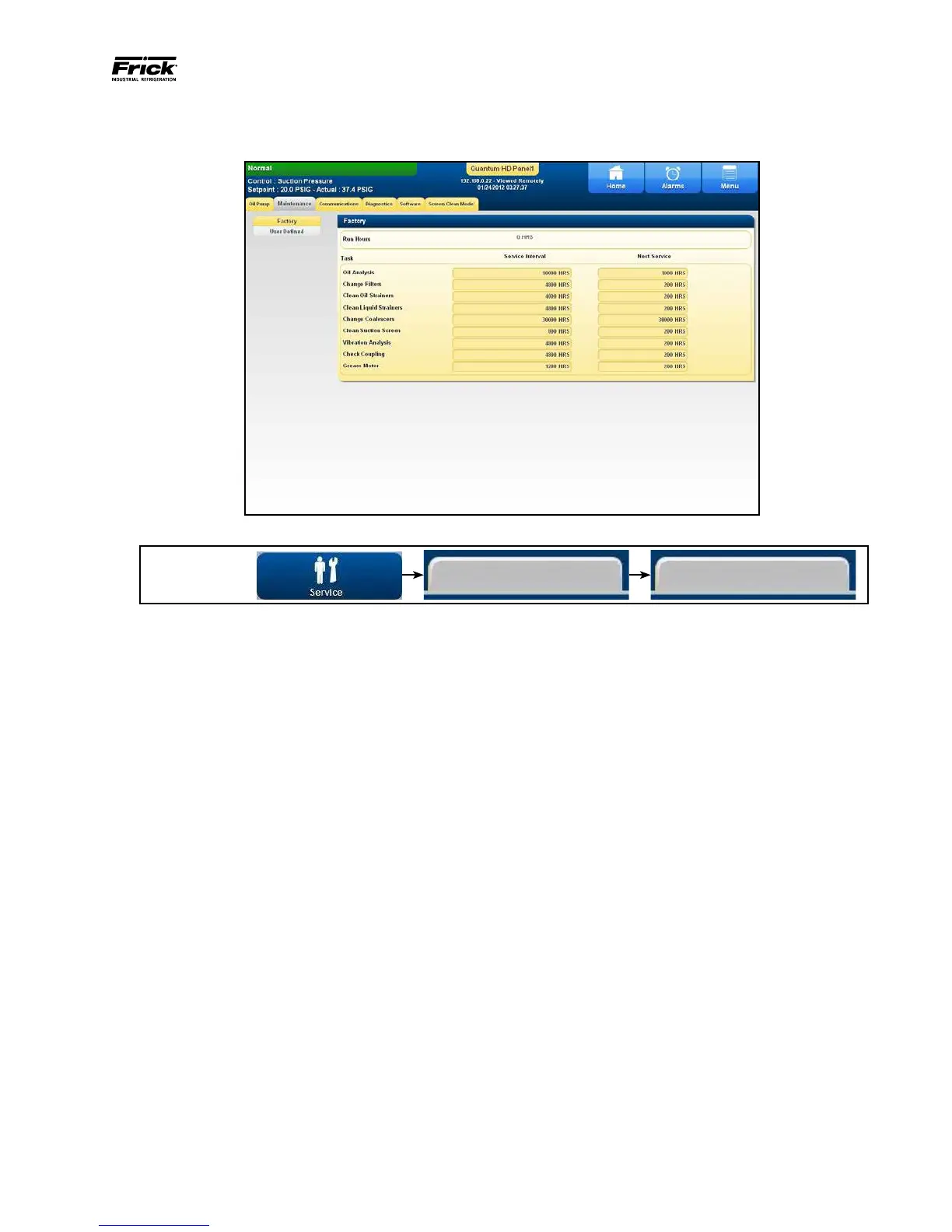
DESCRIPTION: This screen has been provided to aid the service
technician with keeping track of system maintenance, and can be
accessed from the main Menu. The Tasks will appear on
the Events screen after the Next Service values has been
reached.
The following additional information is provided on this
screen:
Run Hours - The value shown here is the total number of
hours that the compressor motor has actually been in the
running state. This value can be reset (or changed to any
value from 0 to 1,000,000 Hours) from the Conguration >
Package screen.
Task - This column shows a list of nine pre-dened main-
tenance items that may be tracked (an additional 7 custom
items may be tracked on the User Dened screen, see the
next page):
• Oil Analysis
• Change Filters
• Clean Oil Strainers
• Change Coalescers
• Clean Suction Screen
• Vibration Analysis
• Check Coupling
• Grease Motor
Service Interval - This column denes a period of time (in
hours) that will cause messages from the Task column to be
logged into the Event Log. Set this column to the number
of hours between the maintenance check that is dened as
the Task. Once this time has been achieved, a message will
be logged in the Event Log, and the value that is currently
shown in the Next Service column will have the value from
the Service Interval added to it.
Next Service - This column is initially is set to a default value,
which the user may change. Once changed, this value will
become the number of hours that the compressor must run
before the particular Task will be logged into the Event Log.
Once the event has occurred, this value will then be updated
by the value from the Service Interval column.
EXAMPLE: We will use Oil Analysis for instance. When the
compressor is running, the value in the Next Service column
is being clocked. After 1000 hours of compressor run time,
a message will be generated and placed on the Event Log
screen. This particular message will read Oil Analysis, with a
date/time stamp. This message will remain in the Event Log
until cleared. This message is to notify the operator that it
is time to have the Oil checked. At this point, the operator
should notify the proper maintenance personnel that the
appropriate maintenance be performed. The user should
access the Event Screen on a regular basis (perhaps once
per week) to review the information provided there.
Once the message has been entered in the Event Log, the
values for the row will be automatically updated, with new
values as predetermined by an internal programmed main-
tenance schedule. The values for the Next Service column
are based upon the Compressor Run Time hours.
From here, the service technician can view nine mainte-
nance schedules. This screen is based upon the Maintenance
Schedule that is provided in the IOM manual for the specic
compressor package.
ACCESSING:
FactoryMaintenance
090.040-PH0008.tif



 To Next Page