Technical Support is available from 8am to 5pm (PST) M - F at support@fslaser.com.
97
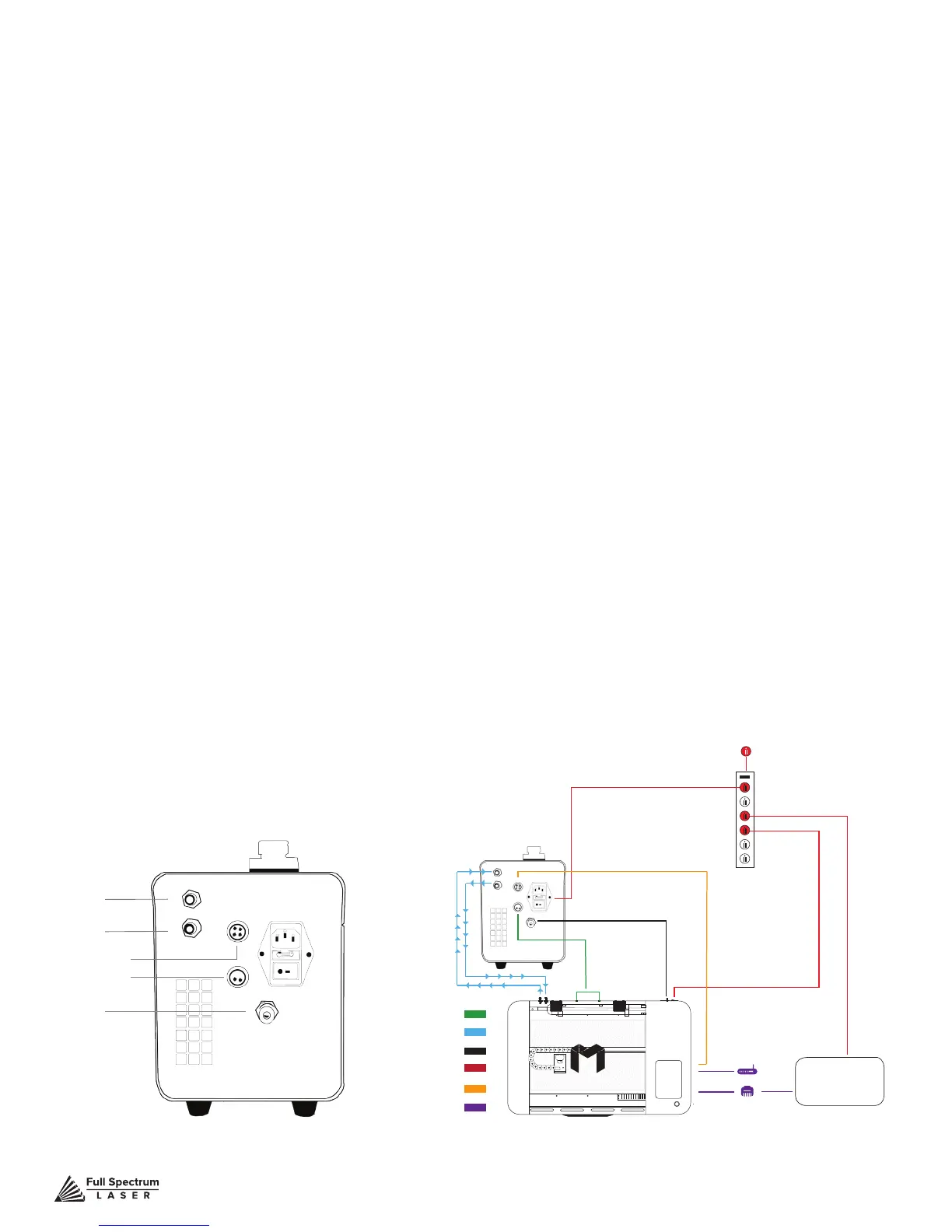
7. Connect Air Assist Hose to Coolbox: Disconnect the air assist hose from your existing air pump.
Do not disconnect the other end of the air assist hole from your Muse. Next, attach the air assist hose
to the “Air Out” port on your coolbox.
8. Connect Exhaust Fan to Coolbox: Using the provided 2-Pin Cable attach one end to the slot on
the fan cowling and the other to the back of the coolbox, in the slot labeled “Exhaust Control”. Once
each is snug in the slot, gently turn the metal rings on each end of the connector and tighten.
9. Connect Side Panel to Coolbox: Using the provided 4-Pin Cable attach one end to the slot on the
new side panel and the other to the back of the coolbox, in the slot labeled “Machine Control”. Once
each is snug in the slot, gently turn the metal rings on each end of the connector and tighten.
10. Connect Water Tubing to Coolbox. WARNING: The water tubes may contain water if you have
used the machine. Have a towel ready to catch any excess water that may pour out of your tubing
and avoid spilling on electronic components or sources of electricity. Detach the “Water In” water
tube from the existing water pump and securely attach it to the “Water Out” slot on the back of the
coolbox. Next, take the unconnected “Water Out” tube (the end that went to your water bucket) and
securely attach it to the “Water In” slot on the back of your Muse. This will create the proper circulation
of water through the laser tube and back to the coolbox.
11. Connect Ducting to Exhaust Port: Place your 4” ducting over the Exhaust Port located at the
back of the machine and hold. Secure with 4” ducting clamp or industrial ducting tape.
12. Connect Power Cord: Insert the Non-Outlet end of the power cord to the back of the coolbox, in
the AC power slot just above the power switch. Next, plug the other end into an appropriate outlet. DO
NOT plug the Coolbox into the slots in the back of your Muse.
Using Your Coolbox
1. Add Distilled Water: Unscrew water cap. Fill tank with distilled water (approx. 1250 ml). Put cap
back on and tighten.
2. Power On Coolbox: Flip the red power switch to the “On” position. Remember to always run your
coolbox when the laser is operating
Water InWater Out
Water In
Water Out
Air Tubing
Power Cords
Water Tubing
Exhaust Control
Machine Control
Software Connection
Computer
Options
Air Tubing
Exhaust Control
Machine Control
Water In
Water Out
Machine Control
Exhaust Control
Air Out



 To Next Page