Questions? Please Contact Your Local Manufacturer’s Representative
SECTION 3 VTG-IOM-2016-1214 OPERATION
3-15
Parameter Restore
1. Press and hold “F and A” until Code is displayed
a. Then enter unit national board number press enter
once complete.
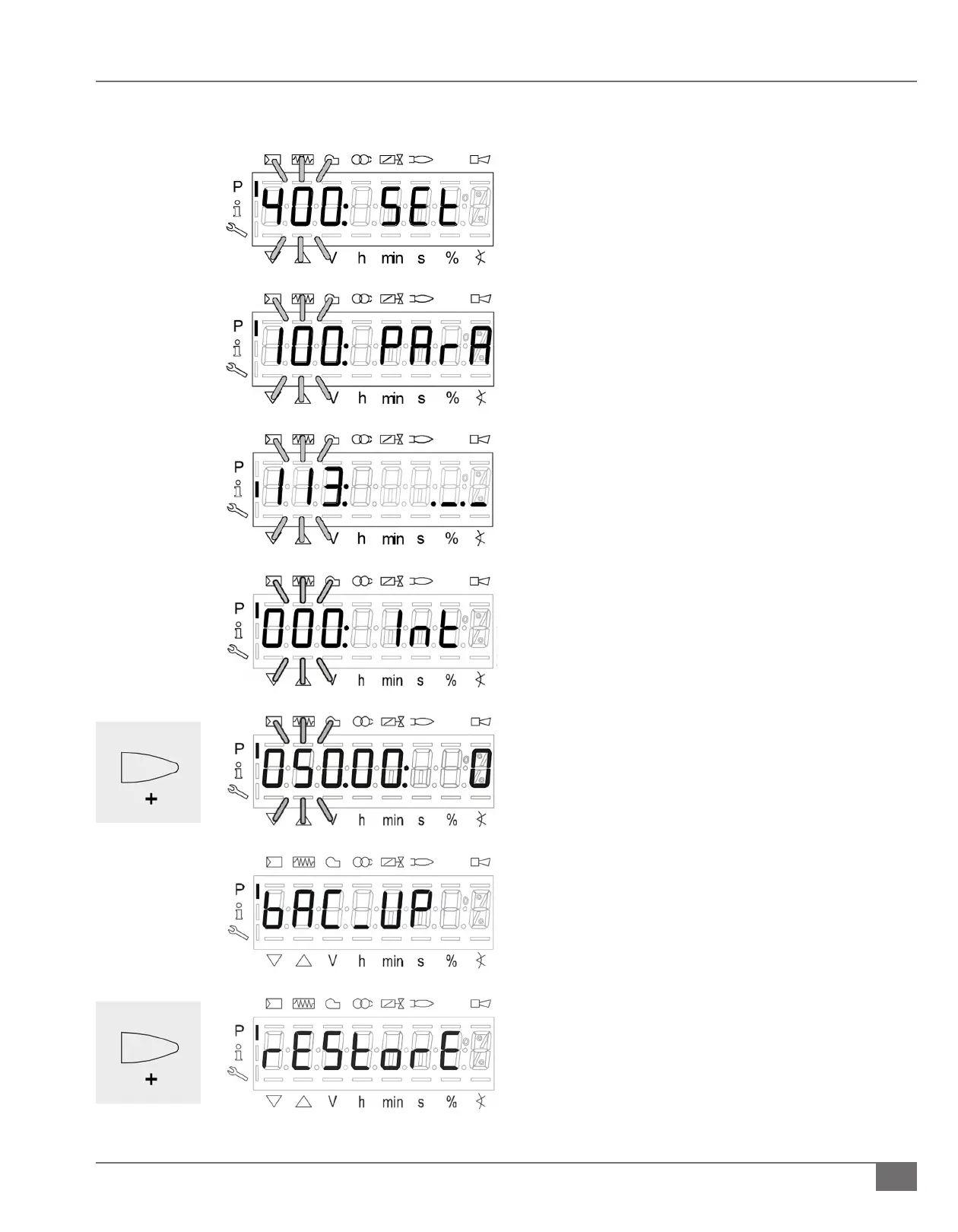
2. “400: Set” will be displayed
a. Press the “-“arrow two times until “100: PArA” is
displayed.
b. Press the Enter button to get into “100” parameters.
c. Press the “+” arrow until parameter 113 is reach enter
into the parameter and record the Burner ID#.
d. This is required for performing the Restore process.
3. Restore procedure:
a. Go to “000: Int” parameter enter in and go to P-050 (050
will be ashing).
b. Press enter > bAC_uP is displayed.
c. Press “+” button to select “rEStorE”.
d. Press enter > 0 is displayed.
e. Press “+” button and 1 is ashing
f. Press enter, after about 5 seconds a 0 appears on the
display indicating the end of the backup process.
g. Note: If an error occurs during the Restore process, a
negative value is displayed. For troubleshooting go
error code 137 to view diagnostic code.







 To Next Page