9. INSTALLATION
9-5
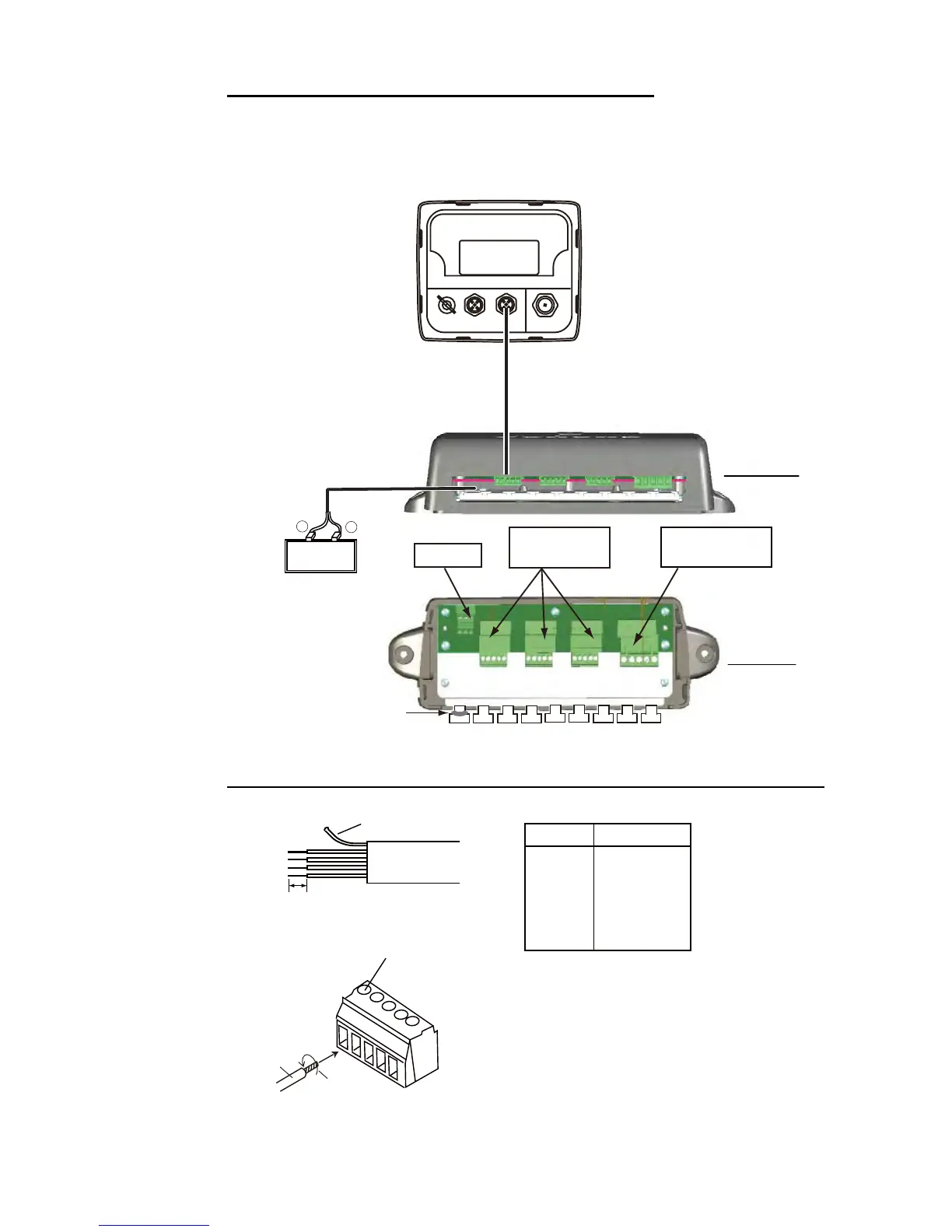
Connection between remote display and junction box
For serviceman: See “Furuno CAN bus Network Design Guide” (TIE-00170-X) for de-
tails about CAN bus network.
Fabrication of cable M12-05BM+05BF-060 and connection to MC connector
12 VDC
White
Black
+
–
Connect to
CN2 - CN5.
12 VDC
CN3 - CN5
DROP
JUNCTION BOX FI-5002 (option)
Fix cable with
supplied cable ties.
FI-5002
Power cable (2 m)
M12-05BM+05BF-0xx
(1 m, 2 m, 6 m)
Side view
Top view
CN2
BACKBONE
MC connector
RD-33 (rear)
Power switchboard
Screw
Core
Twist
MC connector
6 mm
Sheath
Cable Fabrication
Drain wire
Wire Conn. Pt.
Drain 1
Red 2
Black 3
White 4
Blue 5
How to insert cores:
1. Twist the cores.
2. Unfasten the screw with
Philips head screwdriver.
3. Set the core to hole.
4. Tighten the screw.
5. Pull the wire to confirm connection.



 To Next Page