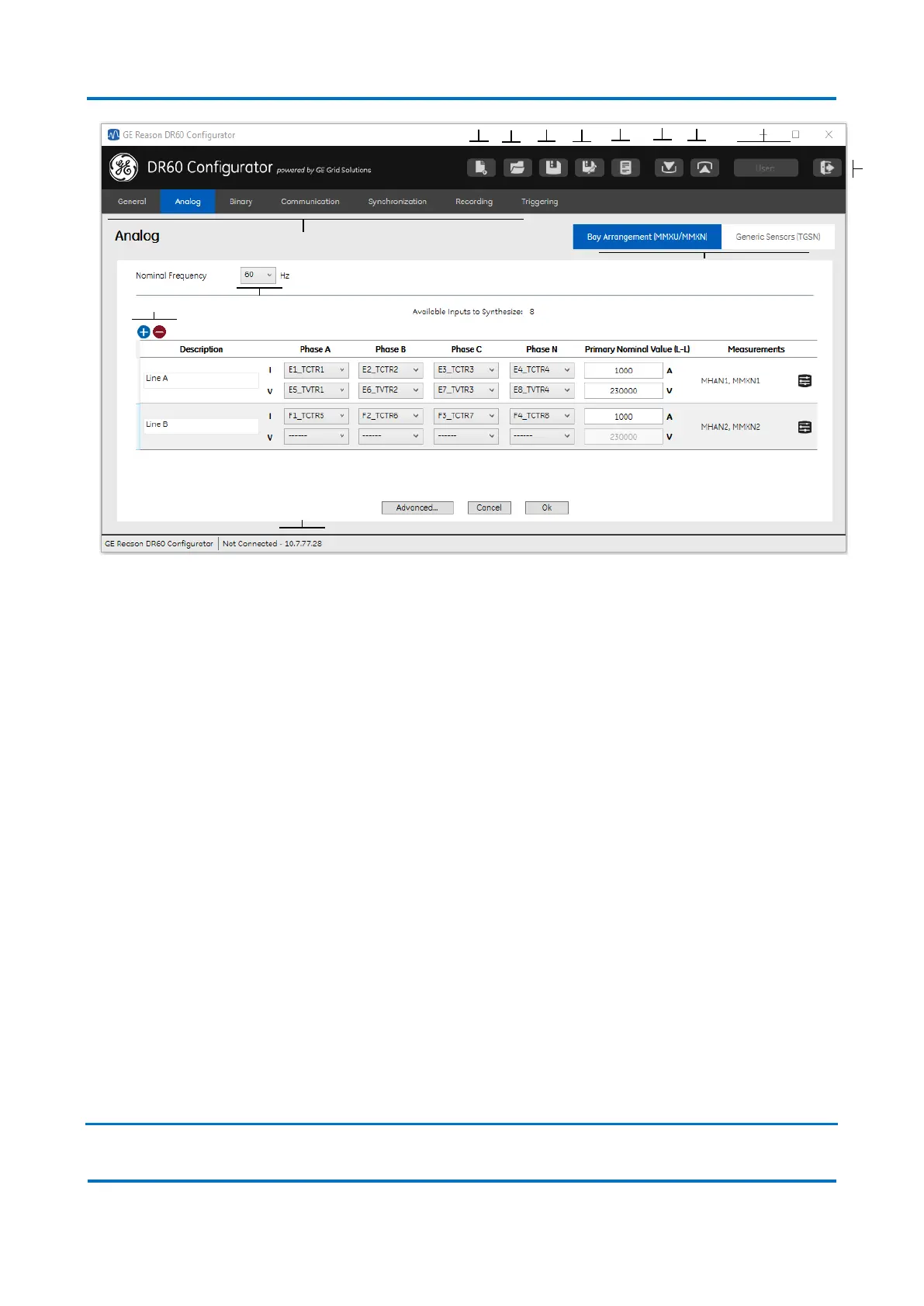
DR60 Configurator main screen
Below is described the main common menu options on the screen according to the
highlights on the figure above:
A Menu bar: New Configuration.
B Menu bar: Open Configuration.
C Menu bar: Save Configuration.
D Menu bar: Save Configuration As.
E Export Configuration Report: Exports PDF report with the configured parameters.
F Menu bar: Receive Configuration: download configuration from the DR60.
G Menu bar: Send Configuration: send configuration to the DR60.
H Menu bar: User: Shows which level of user is currently connected (Configuration, I
Administration).
I Menu bar: Exit
J Configuration tabs: contain all the device configuration divide by categories.
K Configuration sub-tabs: divide a tab the configuration into groups for ease of
configuration
L IP address of the DR60 currently connected to the DR Configurator.
M Add a new circuit or remove the selected circuit. Selecting a circuit and pressing
delete will also remove the circuit.
N Selects the nominal frequency of the system (50 Hz or 60 Hz)
1.2 Configuration Tabs


 To Next Page