The DR60 Configurator has three access levels, each one with a corresponding user
name.
The MON user is able access the DR60 Logs;
The CFG user is able to access the DR60 logs, to create, receive and send configurations
and to change its own password.
The ADM user is able to do all that CFG user is able to, plus firmware update, device key
change and alter all users’ passwords.
Password is not required to access the web monitoring page
The user names and default password are presented below:
3 Communication Setup and Configuration Files Use
This section describes how to configure the communications parameters and how to
manipulate configuration files (CID), using the DR60 Configurator.
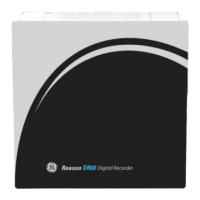
The initial screen of the DR60 Configurator application is shown in the figure below and
has the following options:
DR60 Configurator initial screen


 To Next Page