GE MEDICAL SYSTEMS
D
IRECTION 2300000, REVISION 2 LOGIQ™5 SERVICE MANUAL
Chapter 8 Replacement Procedures 8-35
8-4-11 OP Panel LCD Assy
Purpose: This is a description on how to remove and replace LCD Assy.
8-4-11-1 Tools
• Common pillips screwdrivers
8-4-11-2 Needed Manpower
• 1person, 10 minutes + travel
8-4-11-3 Preparations
• Shut Down the System and switch off the Main Breaker at the rear as described in section 4-3-2 on
page 3.
• Keyboard Assy should be removed before proceed. For more information, refer to KeyBoard Assy
on section 8-4-1 on page 15.
8-4-11-4 Removal Procedure
Refer to the OP PANEL LCD ASSY DISASSEMBLY on section 8-4-11 on page 35.
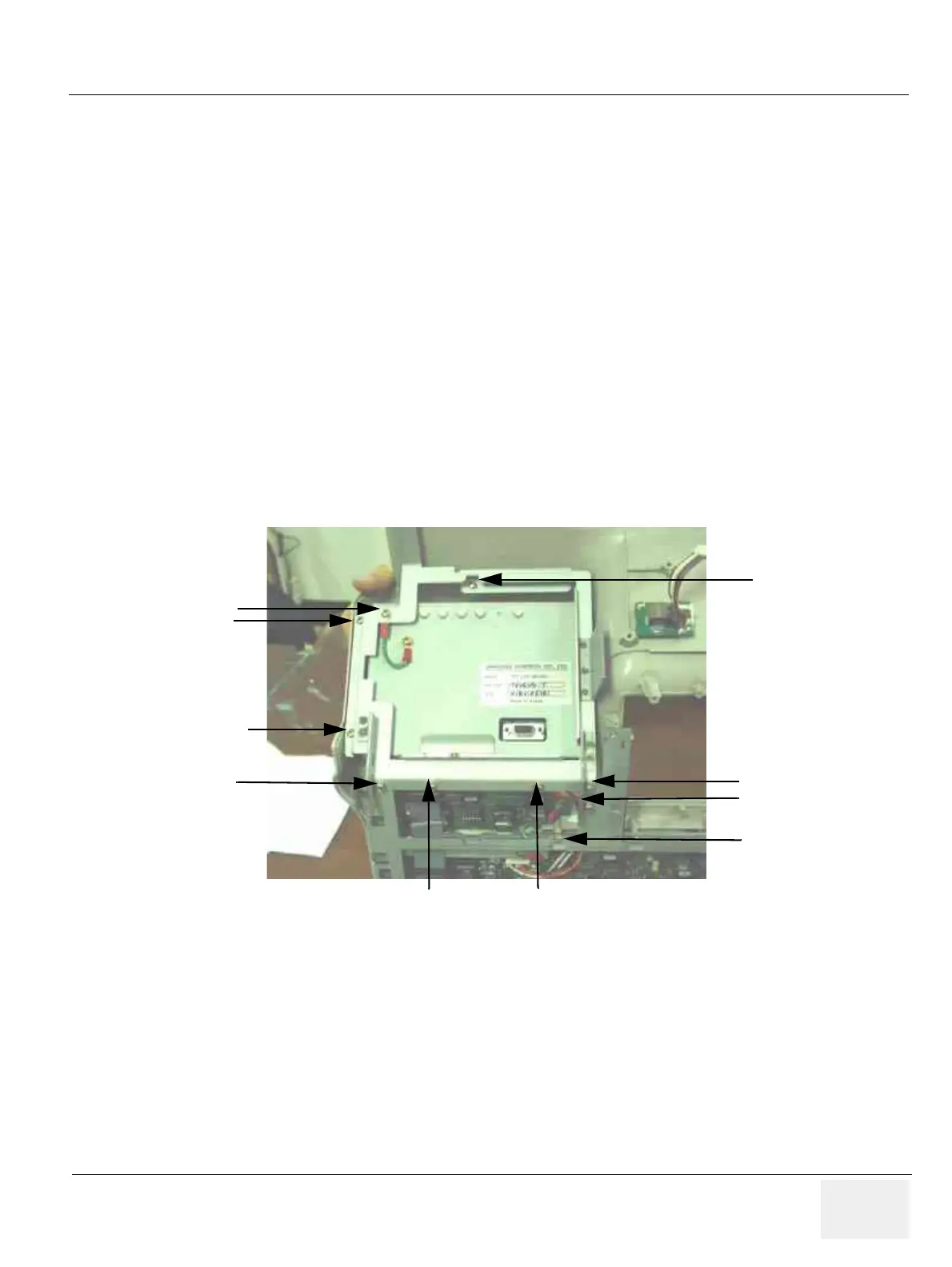
1.) Unscrew ten screws (1-10) from the LCD prefix bracket to remove it. Refer to Figure 8-42.
Figure 8-42 Unscrew 10 screws from the LCD brkt
(1)
(2)
(3)
(4)
(5)
(6)
(7)
(8)
(9)
(10)



 To Next Page