Section 3: Programming Operator Manual
G1900™
© Genmega 2011
3.7
CHANGE PASSWORD
This allows you to set each part of the “Secure Mode” Password. As with the other
passwords used in the G1900™, each must be a 6 digit number. If you change the
password and cannot remember it, you must clear RAM on the pin pad to reset.
NOTE:
In compliance with PCI specifications, you must change the Secure Mode
Passwords from default before any Master Keys can be entered. After changing the
Secure Mode Passwords, you must exit completely from the Operator Menu, and
reboot the machine. After this step, you can enter Master Keys
.
Entering Master Keys:
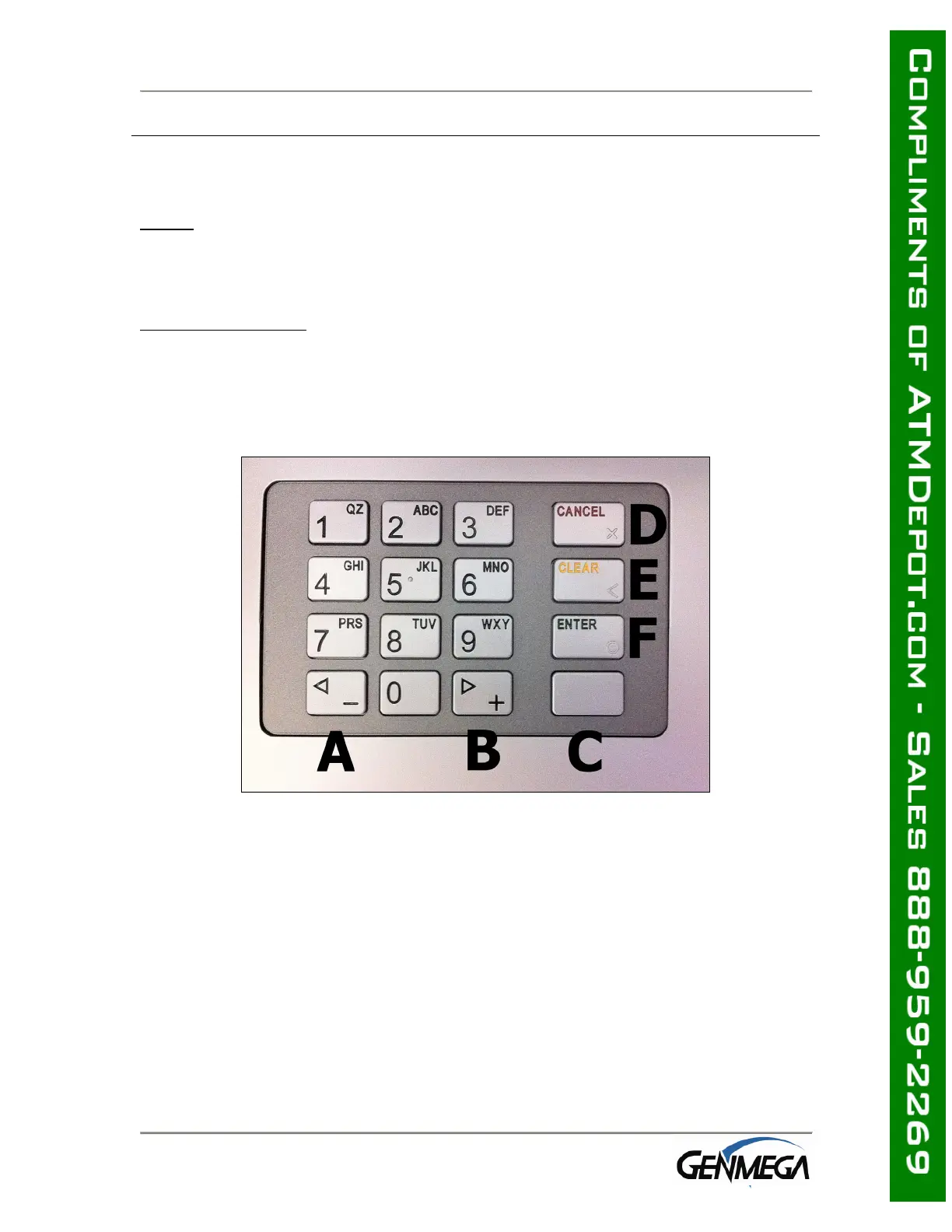
Use the chart below for entering Master Keys from the main pin pad.
Master Keys (or Key Management) cannot be entered from the optional Rear Service
Panel. Please see Appendix for specific Master Key instructions.
NOTE: The keypad above is EPP-B1 PCI / Interac certified EPP Device.
Previous models of EPP (PCI Only) had the Enter and Cancel keys reversed from
what is displayed above. If entering keys on the PCI only keypad, remember that
the Enter key is always F and the Cancel key is always D.



 To Next Page