| 86 | 5 Service Interfaces | CARDIOHELP System |
Service Manual | 3.3 | EN | 05
Copyright Maquet Cardiopulmonary GmbH
2 Activate the service interface (⇨ "Activate the Service Interface",
page 79).
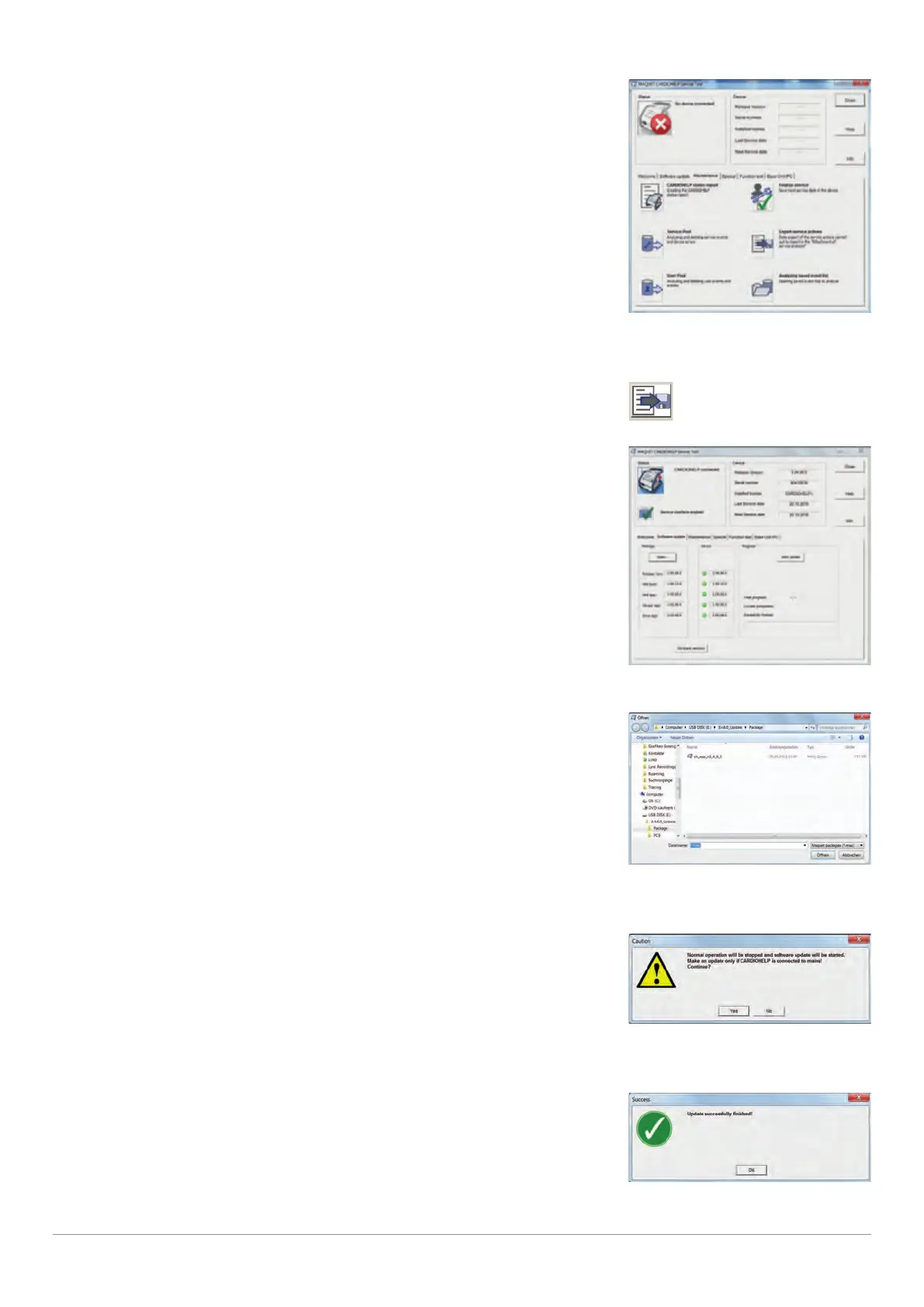
"Maintenance" tab
3 Start the service tool software (⇨ "Start Service Tool Software", page 85).
4 Switch to the “Maintenance” tab.
5 Export all relevant data and create service report (⇨ "Create
Attachment for Service Protocol", page 62).
[Export service data] symbol
6 Switch to the “Software update” tab.
"Software update" tab
7 Click on the [Open] button.
8 Select the desired software package and click on the [Open]
button.
Open software package
▶ The software packages for the CARDIOHELP have the file extension “maq”.
▶ If older software versions are to be loaded, an additional safety message is provided.
9 Ensure that the CARDIOHELP is connected to the external power
supply.
External power supply message
10 Confirm the message.
▶ The software update may, depending on the size of the update, take some time.
11 Click on the [OK] button.
Update completed
12 Make a note of the package version loaded in the service protocol.









 To Next Page