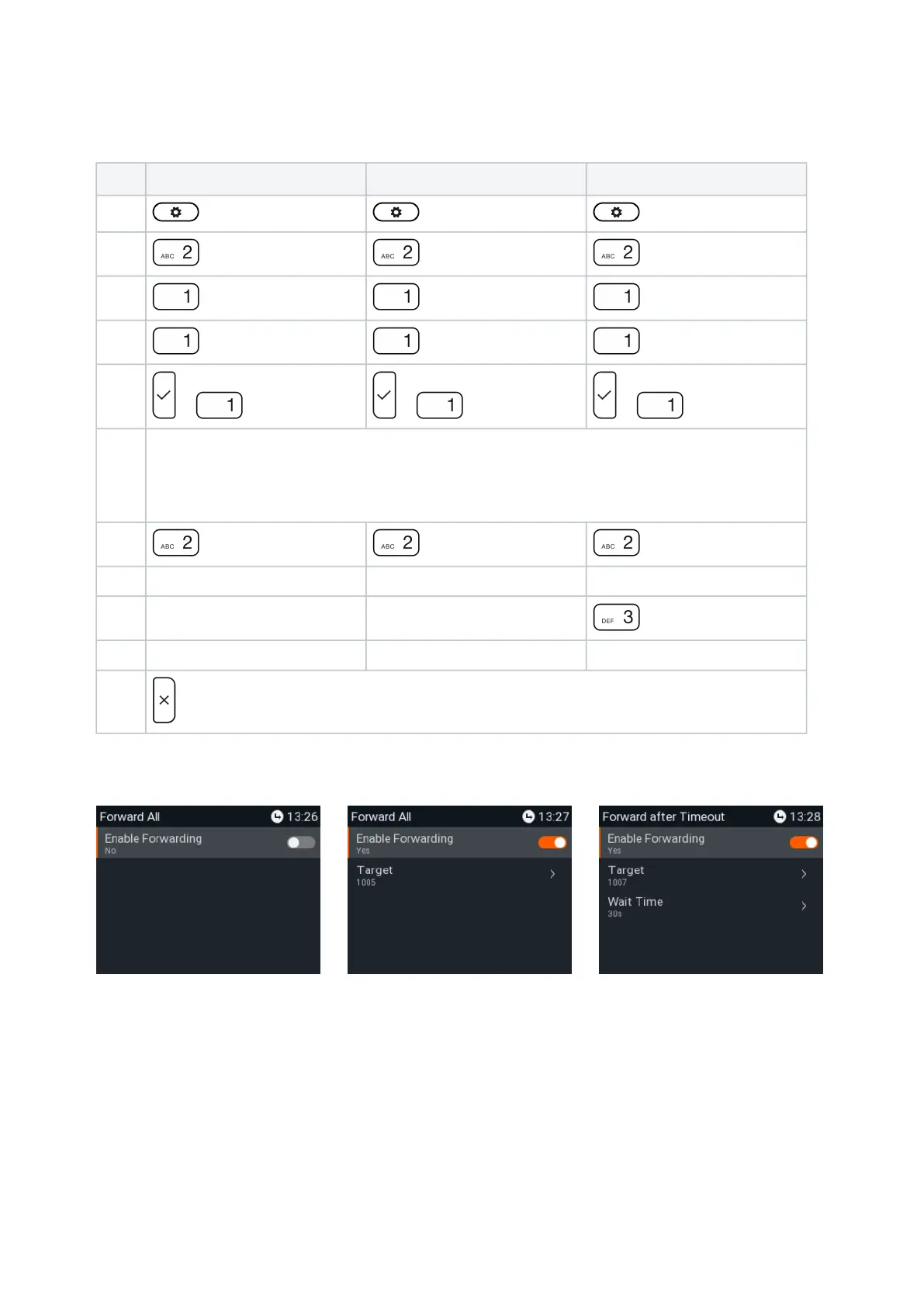
Settings on the phone and turning on call forwarding
(P710)
Forward all Forward when busy Forward after timeout
Press
Press
Call Features Call Features Call Features
Press
Call Forwarding Call Forwarding Call Forwarding
Press
Forward All Forward when Busy Forward after Timeout
Press
or Enable forwarding or Enable forwarding or Enable forwarding
The setting changes from off (no) (Fig. 6, below) to on (yes), and the setting for the forwarding
target appears (Fig. 7). In the case of forwarding after timeout, the setting for the time span
also appears(Fig. 8).
Press
Target Target Target
Type phone number phone number phone number
Press
Call Forwarding time
Type number of seconds
Press
for two seconds to return to the idle screen.
Fig. 6 Fig. 7 Fig. 8














 To Next Page