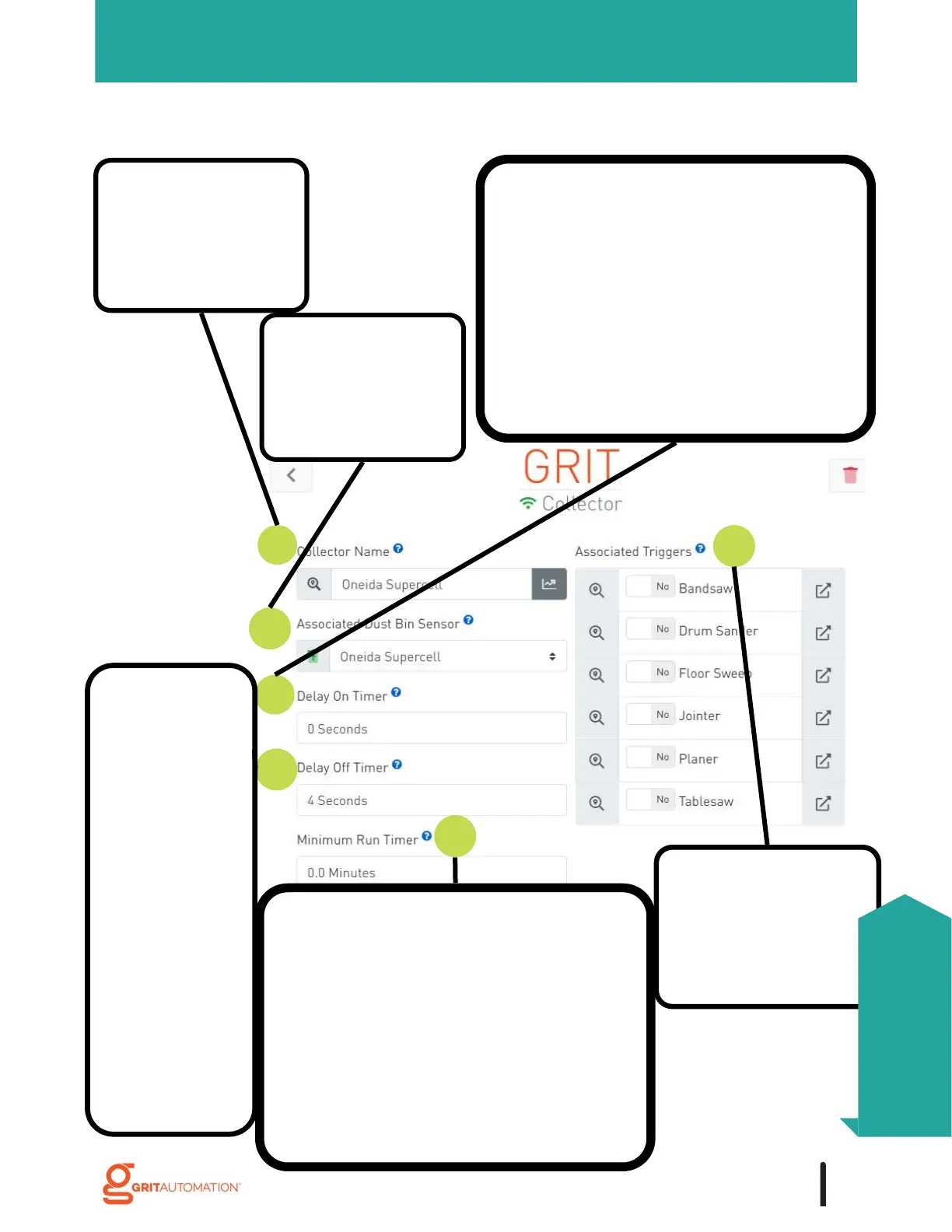
1. Rename the device
with the name of the
collector it is
associated with.
3. Set the number of seconds that the
collector should wait to turn on after a
trigger has been activated. If no gates
need to be changed, the collector will
immediately turn on. This setting gives
the system a chance to move the gates
first when a collector is too powerful.
The LED on the Collector will flash
green to indicate that it has received
the message to turn on.
6. Configure the
trigger or triggers
that will cause the
collector to be
turned on.
COLLECTORS
2. Select the
associated GRIT
Dust Bin Sensor, if
applicable.
5. Set the number of minutes that the
collector must run after it has been
turned on. The timer for this feature
starts when the collector first turns
on. If all triggers have been
deactivated and this minimum time has
not elapsed, the collector will remain
on until this minimum time has
passed. If the value is set to 0, the
feature is disabled.
Collector Device Configuration
4. Set the number
of seconds that
the collector
should wait to
turn off after all
associated
triggers have
been deactivated.
The LED on the
Collector will
flash red to
indicate that it
has received the
message to turn
off.
75
Collectors
Configuration



 To Next Page