EasyManua.ls Logo

GRIT Lock - Air Quality Device Configuration

GRIT Lock
101 pages
Print Icon
To Next Page IconTo Next Page
To Previous Page IconTo Previous Page
Loading...
1
2
3
4
5
6
7
AIR QUALITY
8
9
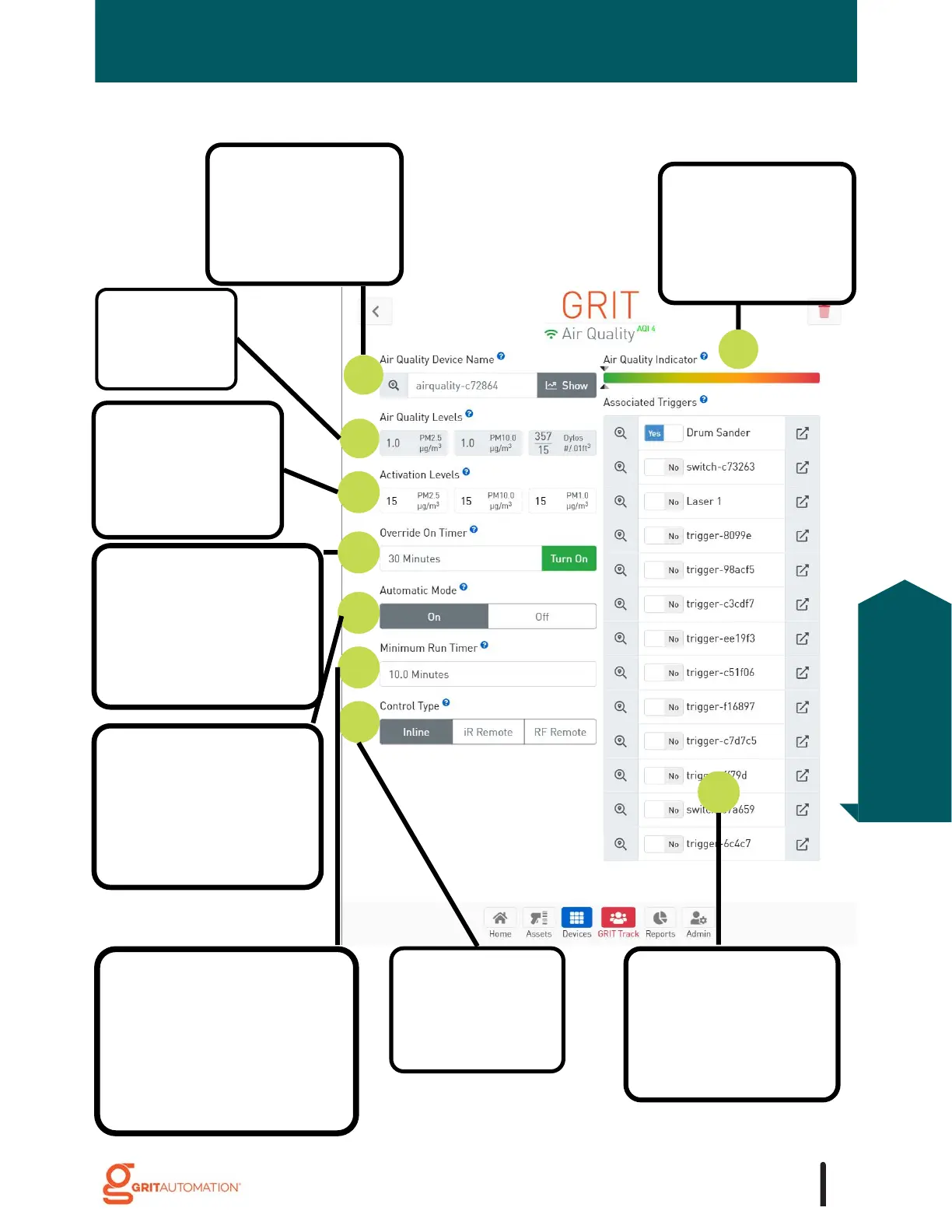
1. Rename the
device, usually, with
the name of the air
filtration unit it is
associated with.
4. Set the level of
dust in the air
that triggers the
air filter to turn
on.
5. Set the length of
time the air filter
should run
regardless of
automatic activation
levels.
6. Set whether the air
quality device should
automatically turn on
the air filter
according to
activation settings.
7. Set the number of
minutes the air filter
should run after it would
normally turn off (i.e.,
air levels are below set
activation levels.)
8. Select the type
of on/off control
for your air
filter.
9. Select that
tool/trigger that,
when running, will
cause the air filter
to turn on.
3. Current air
quality
readings from
the sensor.
Air Quality Device Configuration
2. A visual indicator
that represents the
current air quality
relative to the set
activation levels.
93
Air Quality
Configuration

Table of Contents