EasyManua.ls Logo

GRIT Lock - Trigger, Switch & Collector Configuration

GRIT Lock
101 pages
Print Icon
To Next Page IconTo Next Page
To Previous Page IconTo Previous Page
Loading...
Trigger Device Configuration
1
2
3
4
5
6
7
TRIGGERS
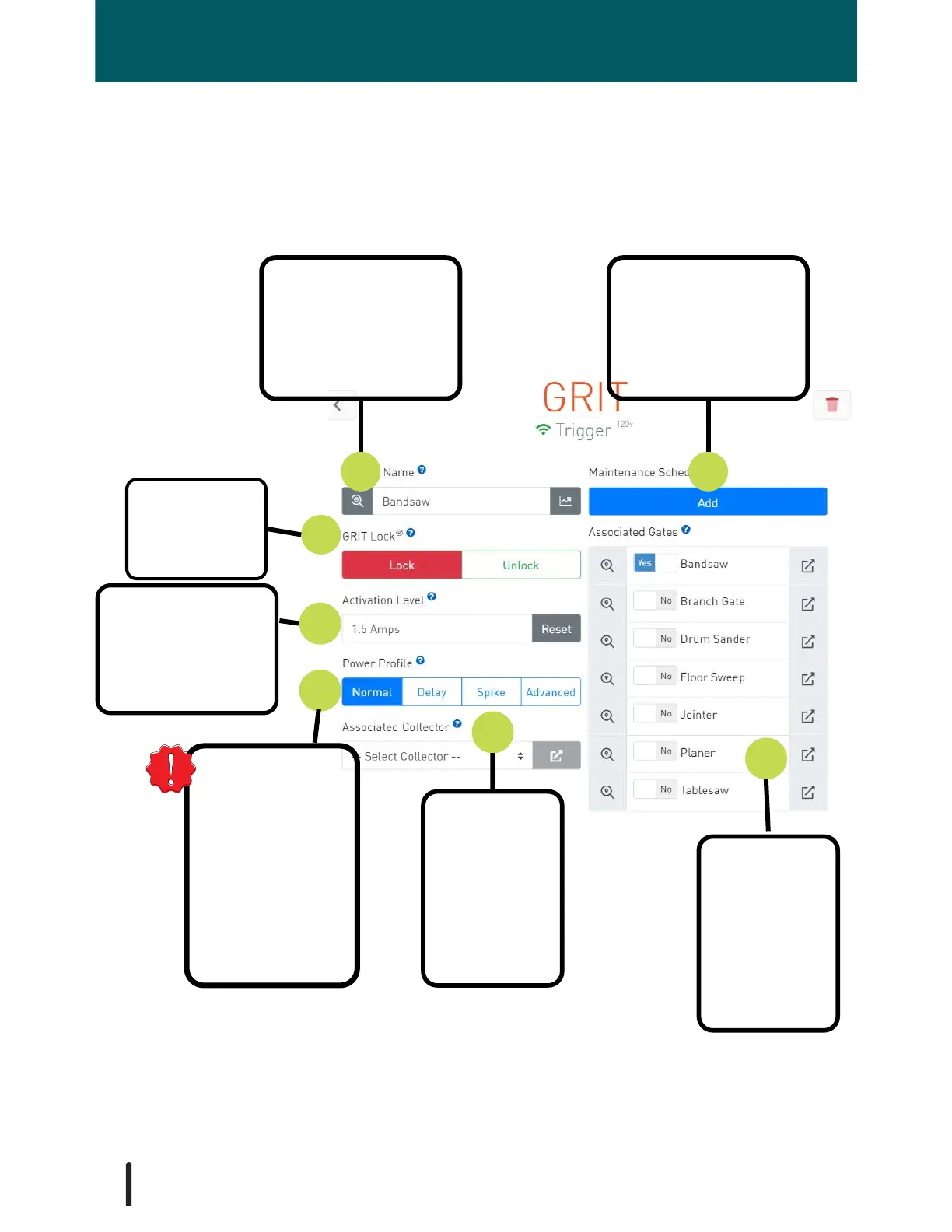
Each installed Trigger has its own detail configuration page in the GRIT App. As
mentioned in the GRIT Lock® section of the manual, it is essential that each Trigger be
carefully configured for its specified tool.
1. Rename the device,
usually, with the
name of the tool it is
associated with.
2. Manage
maintenance
schedule reminders
for this tool.
5. Specifies how
the tool acts when
it gets turned on to
ensure GRIT
Lock® functions
properly. See
Power Profile
section for detail.
3. Lock and
Unlock this
tool.
4. Set the power
required for this
tool to be
considered 'ON' by
the GRIT system.
7. Configure
the gate or
gates that will
be opened
when this tool
is running.
6. Configure
the collector
that will turn
on when this
trigger is
running.
52

Table of Contents