● Keep tools for processing short and narrow workpieces close at hand (e.g.
push grip, pushing stick, workpiece holder).
2.2 Switch on / switch off / shutdown due to an emergency stop
WARNING
Insufficient preparation
S
evere injuries and damage to property
− Do not start the machine until all prerequisites have been met
and all pr
eparatory work has been completed.
− Read the instructions for setup, adjustment and operation
be
fore turning on the machine.
NOTICE
Operating/room temperature
Damag
es due to storage, material damage
− The machine may only be operated in dry and frost-free rooms
a
t temperatures between +5 and +40 °C.
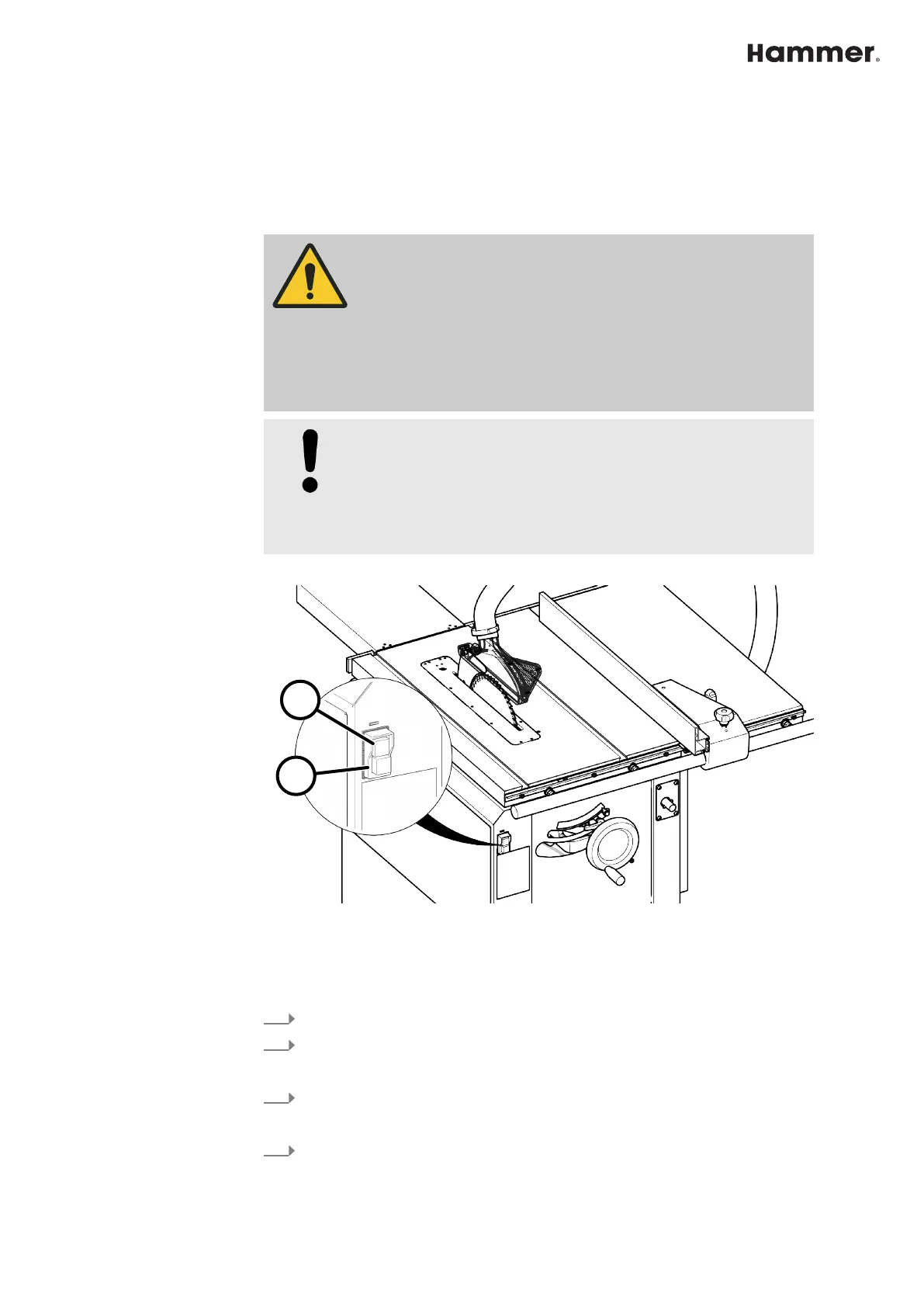
Fig. 22: Switch on / off
1 Green start button - Saw blade ON
2 Red stop button - Saw blade OFF
Switching on
1.
Connect the plug to the power supply.
2.
Press the green [S
tart]-button on the control panel and release.
Switch off / Emergency stop
1.
Press the red [S
top] button.
🡆
The machine stops immediately.
2.
Disconnect the machine from the main power supply.


 To Next Page