Adjustments and tool changes
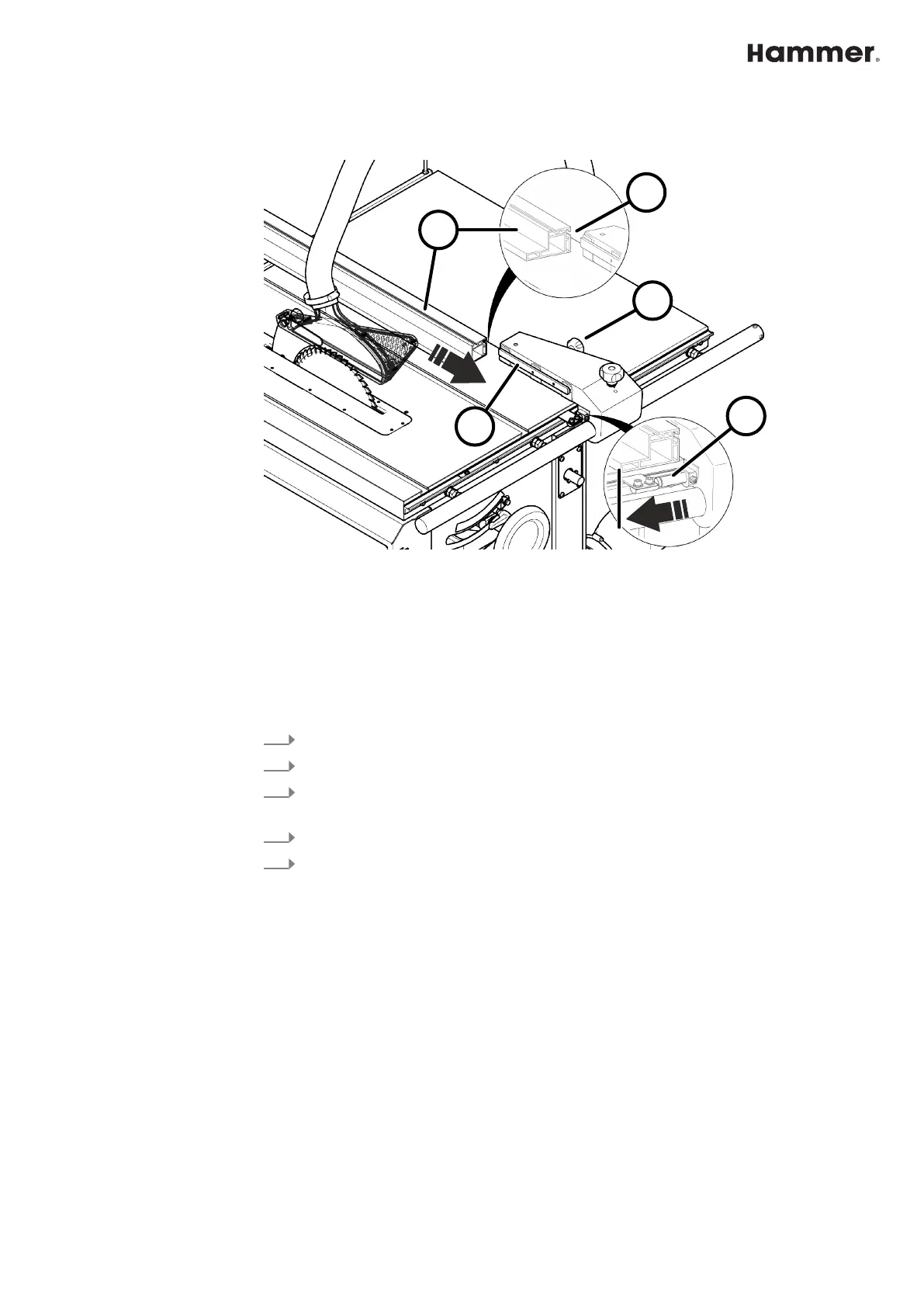
1.1.2 Change the fence plate (guide) over
Fig. 2: Mount the guide in a flat position
1 Thumb screw (clamping of the fence plate)
2 Guide (fence plate)
3 Groove
4 Clamping rail
5 Scale indicator
When the fence plate is mounted flat, the distance to the saw blade changes. By
mo
ving the scale indicator, the change in the cutting width can be corrected.
1.
Loosen the thumb screw.
2.
Pull the fence plate (guide) out backwards.
3.
Turn the fence plate (lay it flat on the table) and then slide it back on, using
the r
espective groove.
4.
Tighten the knurled thumb screw.
5.
Slide the scale indicator in the direction of the saw blade until it reaches the
loc
king point.
🡆
Read the corrected measurement from the front edge of the indicator.


 To Next Page