3.2 Preparations for maintenance work / Removing the cover plate
Ins
tructions to maintenance technicians
If the maintenance technician has to check whether they have carried out their
work correctly or troubleshoot whilst the machine is running, the following instruc-
tions must be followed:
● To ensure quick and unmistakable communication, visual contact between
the oper
ators must be kept at all times.
● Operators should repeat and confirm instructions before they are carried out.
● Wait for all the moving parts to come to a standstill.
● Only start the machine when there is no one within the safety zone.
● Maintenance technicians need to be fully aware of how the machine
oper
ates and moves, and they must be familiar with the exact operating
sequence.
● Keep a record of all maintenance work.
R
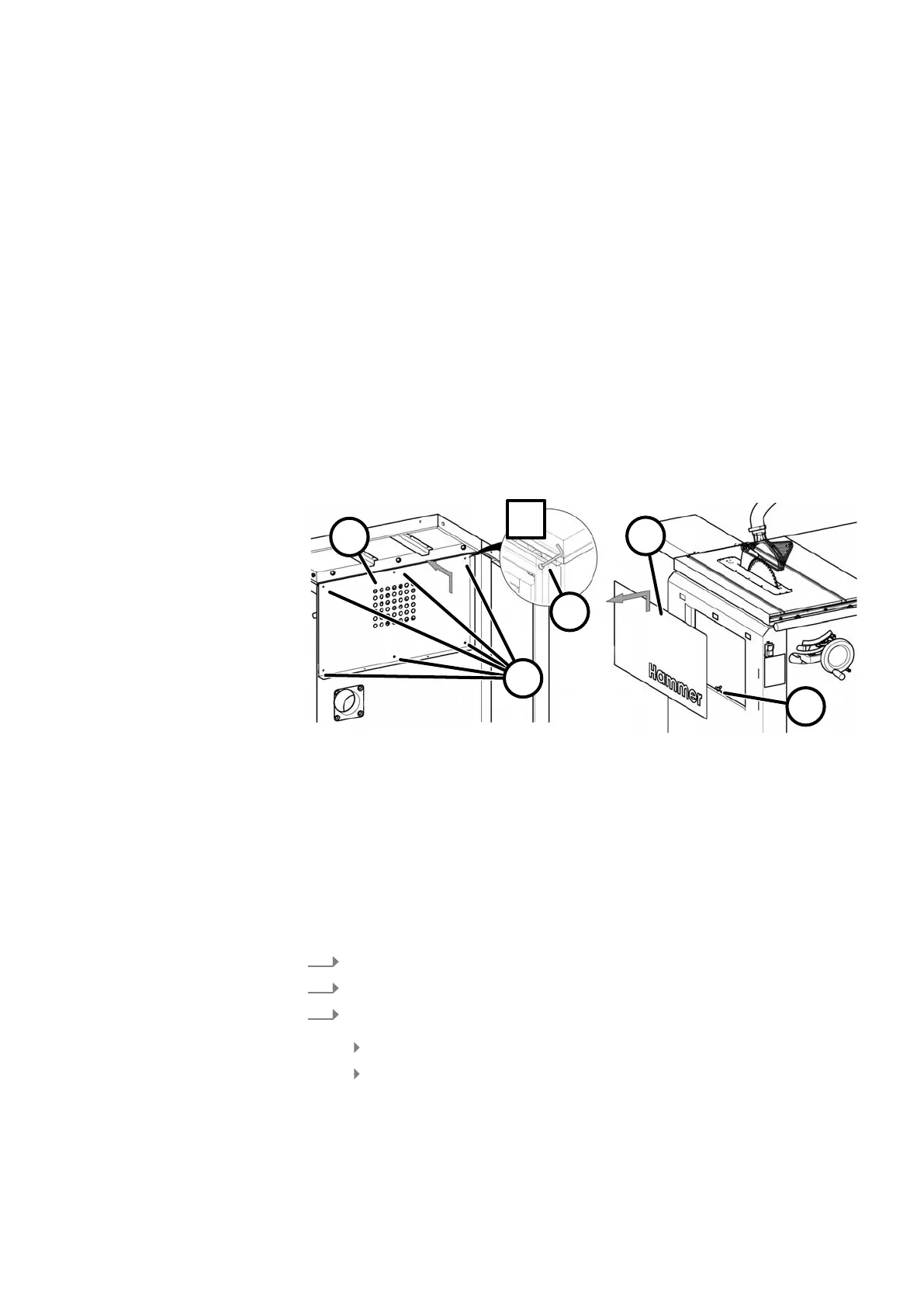
emove the cover plate from the rear and front side
Fig. 30: Remove the cover plate
1 Cover plate (rear side)
2 Hex screws M6 x 30
3 Allen key 4 mm
4 Wing nut
5 Cover plate (front side)
Remove both cover plates for the following maintenance tasks.
Tool:
● Allen key 4 mm
1.
Switch off the machine and secure it against being switched on again.
2.
Disconnect the machine from the mains power supply.
3.
Remove the cover plate from the rear side:
Release the hex screws (6x).
Push the cover plate upwards and remove it.


 To Next Page