3.
Switch machine off with the red [S
top] button.
The saw shaft with clamped saw blade must be brought to a complete stop
within 10 seconds.
Machine comes to a standstill within 10 seconds.
1.
Checking the time for the machine to come to a stop com-
ple
ted.
Machine takes longer than 10 seconds to come to a standstill.
1.
If present: Switch off [Main s
witch] (position "O" / "OFF").
2.
Disconnect the machine from the mains power supply.
3.
Contact Felder-Group service centre.
3.4.6 Check effectiveness of safety devices (end switch)
N
ote
The saw blade only operates if the limit switch inside the machine
frame has not been actuated (insert board must be inserted).
In the event of any problems or malfunctions, please contact a
member of the Felder Group service centre.
Ensure that the safety break switch is working properly
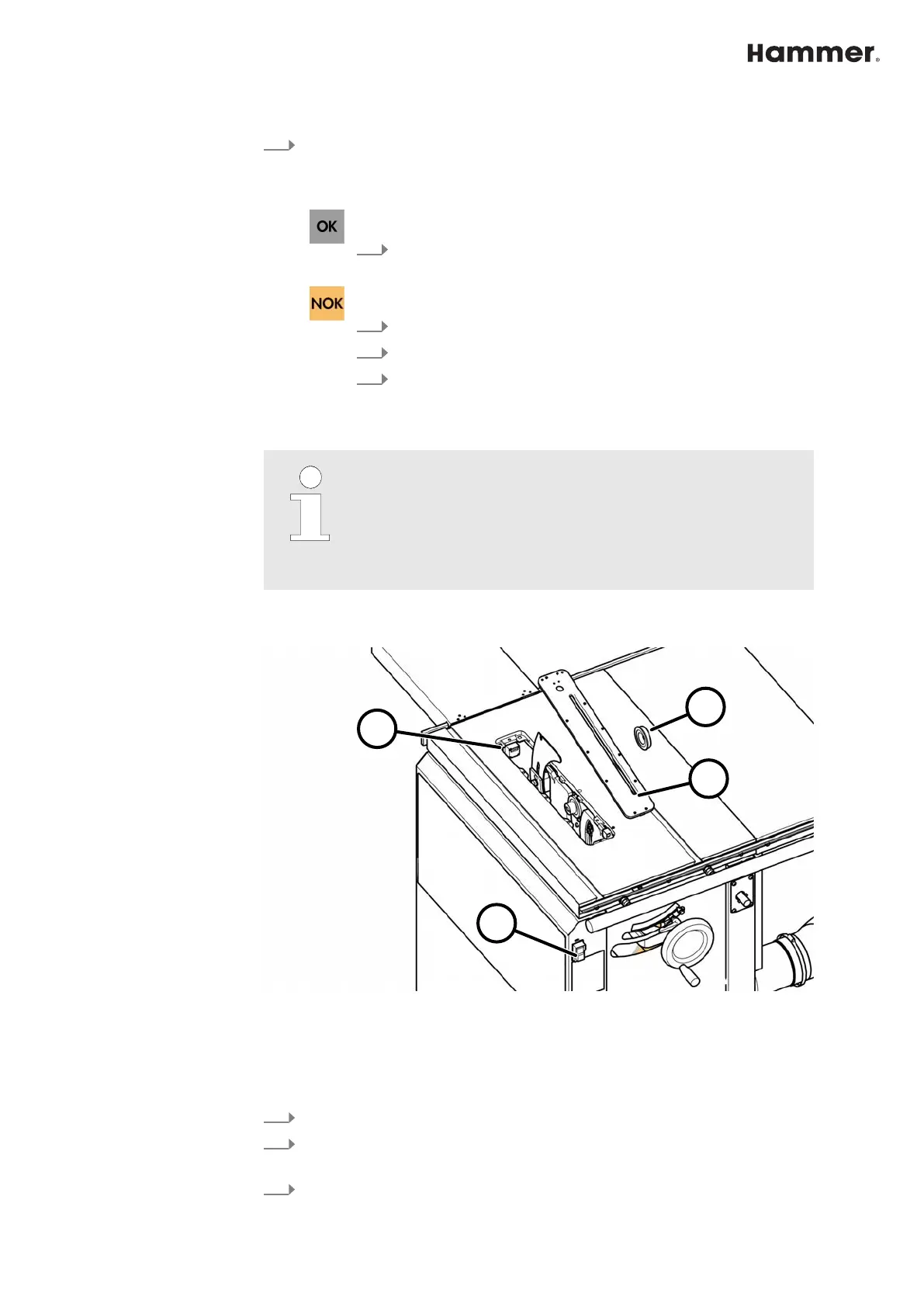
Fig. 32: Safety limit switches - Insert board
1 Insert board
2 Rear flange
3 Green start button - Saw blade ON
4 Limit switch
1.
Switch off the machine and secure it against being switched on again.
2.
Preparing the machine for a tool change. ⮫
Chapter 1.3.2 ‘Prepare to
change tooling’ on page 11
3.
Remove the insert board, saw blade and rear flange.


 To Next Page