Copyright © 2019, 2021, Hitachi, Ltd.
DKC910IHitachi Proprietary
[INST(IN)08-04-10]
Rev.0.5
INST(IN)08-04-10
8.4 Installing Power Supply (DKCPS)
The shapes and installation methods of the Power Supply differ depending on each type. Do not make a
mistake to mount the power supply in the specied position.
8.4.1 Installing Power Supply (DKCPS) for DKC
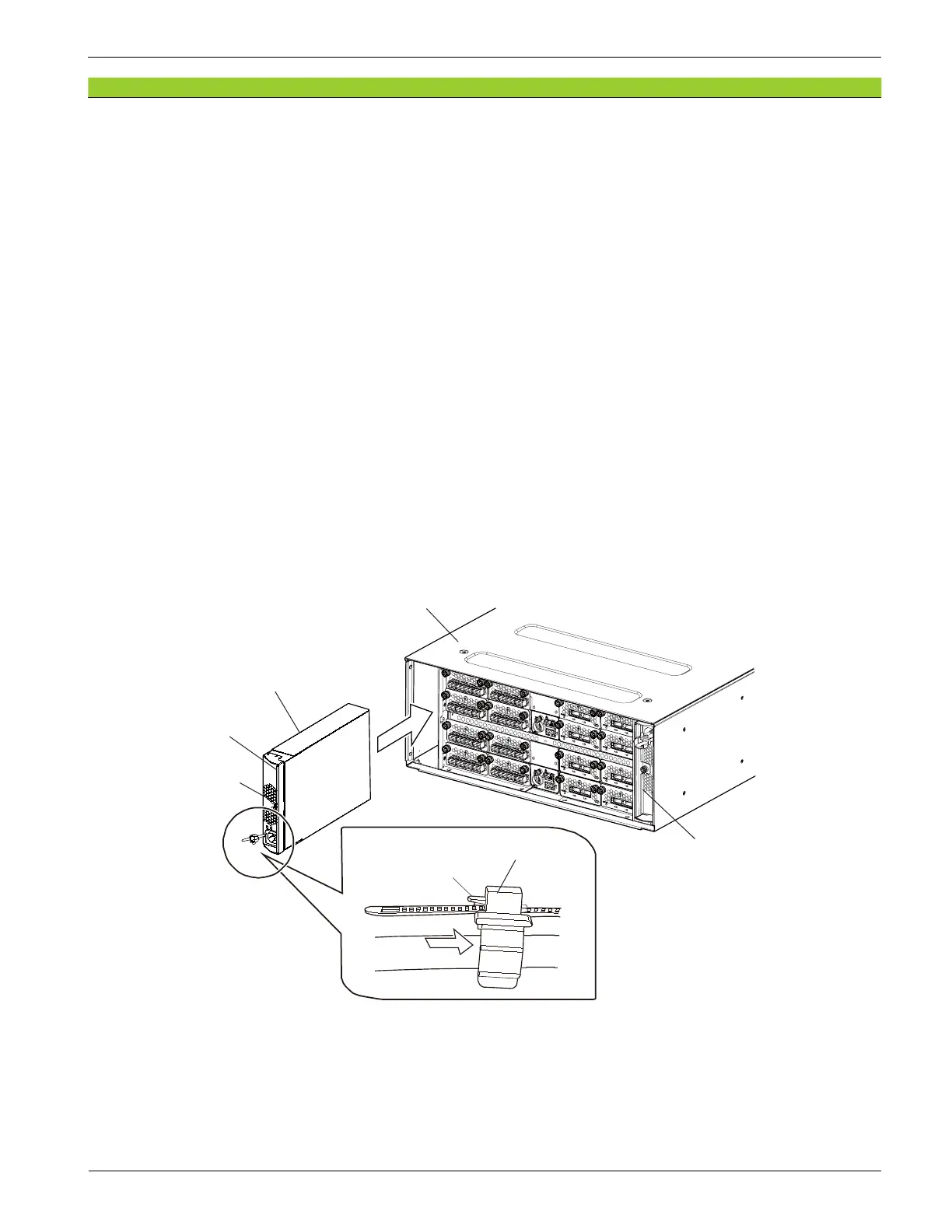
1. Hold up the latch on the cable holder of the Power Supply (DKCPS) to release the lock, and then slide
the cable holder forward.
2. With the lever completely opened, insert the Power Supply (DKCPS) into the slot.
If you cannot insert the Power Supply (DKCPS) into the slot easily, insert it after adjusting the position
by slightly returning the lever.
NOTE : Power Supply (DKCPS1) and Power Supply DKCPS2 have different insertion
directions.
3. Push the Power Supply (DKCPS) in all the way.
4. Close the lever completely to x the Power Supply (DKCPS).
5. Tighten the screw (blue) to x the Power Supply (DKCPS).
6. Push the cable holder in.
Figure 8-13 Installing Power Supply (DKCPS) (DKC)
DKC
DKCPS2
DKCPS1
Lever
Cable holder
Latch
Screw (blue)




 To Next Page