EasyManua.ls Logo

Hitachi VM-E530A - Charging the Battery; Charging Time; Operating Time; Notes on the Battery

Hitachi VM-E530A
56 pages
Print Icon
To Next Page IconTo Next Page
To Previous Page IconTo Previous Page
Loading...
Charging
the
Battery
The
first
step
is
to
set
the
battery
to
charge.
To
charge
the
battery
,
use
the
provided
AC
adapter/
charger.
Hole:
This
camcorder
operates
with
the
Lithium
ion
battery
such
as
VM-BPL13/VM-BPL27.
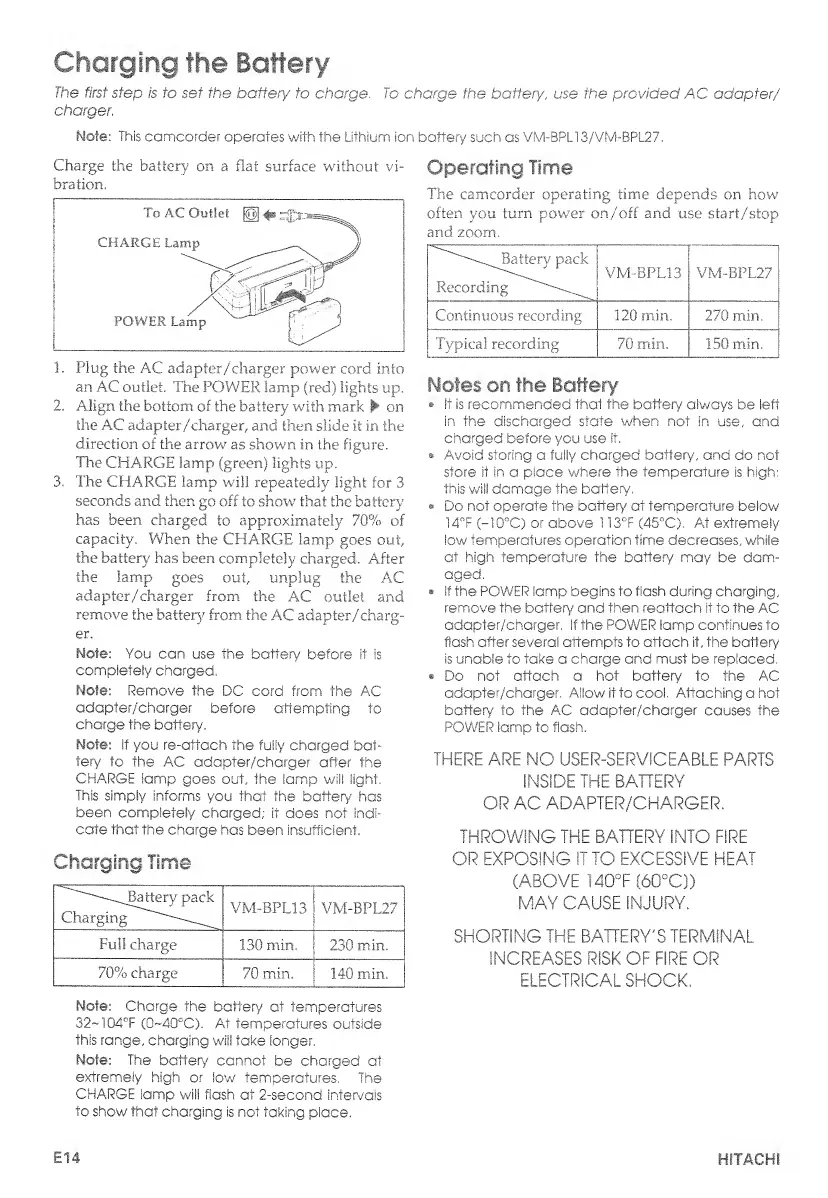
Charge
the
battery
on
a.
flat
surface
without
vi¬
bration.
1.
Plug
the
AC
adapter/charger
power
cord
into
an
AC
outlet.
The
POWER
lamp
(red)
lights
up.
2.
Align
the
bottom
of
the
battery
with
mark
on
the
AC
adapter/charger,
and
then
slide
it
in
the
direction
of
the
arrow
as
shown
in
the
figure.
The
CHARGE
lamp
(green)
lights
up.
3.
The
CHARGE
lamp
will
repeatedly
light
for
3
seconds
and
then
go
off
to
show
that
the
battery
has
been,
charged
to
approximately
70%
of
capacity.
When
the
CHARGE
lamp
goes
out,
the
battery
has
been
completely
charged.
After
the
lamp
goes
out,
unplug
the
AC
adapter/charger
from
the
AC
outlet
and
remove
the
battery
from
the
AC
adapter/charg-
Note:
You
can
use
the
battery
before
it
is
completely
charged.
Mote:
Remove
the
DC
cord
from
the
AC
adapter/charger
before
attempting
to
charge
the
battery.
Mote:
Sf
you
re-attach
the
fully
charged
bat¬
tery
to
the
AC
adapter/charger
after
the
CHARGE
lamp
goes
out,
the
lamp
will
light.
This
simply
Informs
you
that
the
battery
has
been
completely
charged;
it
does
not
indi¬
cate
that
the
charge
has
been
insufficient,
Charging
Time
'^^^JBattery
pack
Charging
__
VM-BPL13
VM-BPL27
Full
charge
130
min.
;
230
min.
70%
charge
70
min.
1
140
min.
Note:
Charge
the
battery
at
temperatures
32~104°F
(0~40°C).
At
temperatures
outside
this
range,
charging
will
take
Sanger.
Note;
The
battery
cannot
be
charged
at
extremely
high
or
low
temperatures.
The
CHARGE
lamp
will
flash
at
2-second
intervals
to
show
that
charging
is
not
taking
place.
Operating
Time
The
camcorder
operating
time
depends
on
how
often
you
turn
power
on/off
and
use
start/stop
and
zoom.
Batterv
pack
"
VM-BPL13
Recording
VM-BPL27
Continuous
recording
120
min.
270
min.
Typical
recording
70
min.
150
min.
Motes
on
the
Battery
it
is
recommended
that
the
battery
always
be
left
in
the
discharged
state
when
not
in
use,
and
charged
before
you
use
it.
Avoid
storing
a
fully
charged
battery,
and
do
not
store
it
in
a
place
where
the
temperature
is
high:
this
will
damage
the
battery,
Do
not
operate
the
battery
at
temperature
below
14°F
(-10°C)
or
above
113°F
(45°C),
At
extremely
low
temperatures
operation
time
decreases,
while
at
high
temperature
the
battery
may
be
dam¬
aged.
If
the
POWER
Samp
begins
to
flash
during
charging,
remove
the
battery
and
then
reattach
it
to
the
AC
adapter/charger,
if
the
POWER
lamp
continues
to
flash
after
several
attempts
to
attach
it,
the
battery
is
unable
to
take
a
charge
and
must
be
replaced.
Do
not
attach
a
hot
battery
to
the
AC
adapter/charger.
Allow
it
to
cool.
Attaching
a
hot
battery
to
the
AC
adapter/charger
causes
the
POWER
lamp
to-
flash.
THERE
ARE
NO
USER-SERVICEABLE
PARTS
INSIDE
THE
BATTERY
OR
AC
ADAPTER/CHARGER.
THROWING
THE
BATTERY
INTO
FIRE
OR
EXPOSING
IT
TO
EXCESSIVE
HEAT
(ABOVE
140°F
(60°Q)
MAY
CAUSE
INJURY.
SHORTING
THE
BATTERY'S
TERMINAL
INCREASES
RISK
OF
FIRE
OR
ELECTRICAL
SHOCK.
E14
HITACHI

Table of Contents

Related product manuals