EasyManua.ls Logo

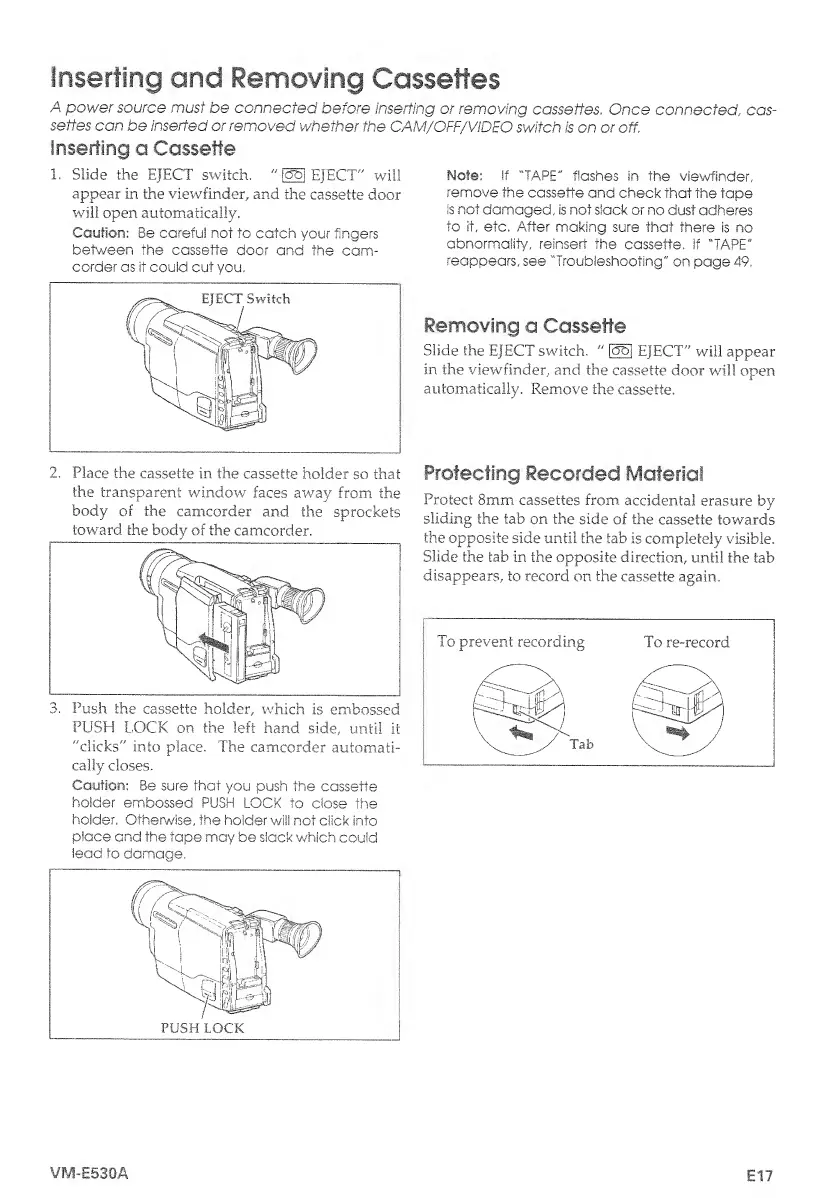
Hitachi VM-E530A - Inserting and Removing Cassettes; Inserting a Cassette; Removing a Cassette; Protecting Recorded Material

Hitachi VM-E530A
56 pages
Print Icon
To Next Page IconTo Next Page
To Previous Page IconTo Previous Page
Loading...
Inserting
and
Removing
Cassettes
A
power
source
must
be
connected
before
inserting
or
removing
cassettes.
Once
connected
,
cas¬
settes
can
be
inserted
or
removed
whether
the
CAM/OFF/ViDEO
switch
is
on
or
off.
Inserting
a
Cassette
1.
Slide
the
EJECT
switch.
"
[55]
EJECT"
will
appear
in
the
viewfinder,
and
the
cassette
door
will
open
automatically.
Caution-:
Be
careful
not
to
catch
your
fingers
between
the
cassette
door
and
the
cam¬
corder
as
it
could
cut
you.
2.
Place
the
cassette
in
the
cassette
holder
so
that
the
transparent
window
faces
away
from
the
body
of
the
camcorder
and
the
sprockets
toward
the
body
of
the
camcorder.
3.
Push
the
cassette
holder,
which
is
embossed
PUSH
LOCK
on
the
left
hand
side,
until
it
"clicks'''
into
place.
The
camcorder
automati¬
cally
doses.
Note:
If
"TAPE"
flashes
in
the
viewfinder,
remove
the
cassette
and
check
that
the
tape
is
not
damaged,
is
not
slack
or
no
dust
adheres
to
it,
etc,
After
making
sure
that
there
is
no
abnormality,
reinsert
the
cassette,
If
"TAPE"
reappears,
see
"Troubleshooting"
on
page
49.
Removing
a
Cassette
Slide
the
EJECT
switch.
"
[35]
EJECT"
will
appear
in
the
viewfinder,
and
the
cassette
door
will
open
automatically.
Remove
the
cassette.
Protecting
Recorded
Material
Protect
8mm
cassettes
from
accidental
erasure
by
sliding
the
tab
on
the
side
of
the
cassette
towards
the
opposite
side
until
the
tab
is
completely
visible.
Slide
the
tab
in
the
opposite
direction,
until
the
tab
disappears,
to
record
on
the
cassette
again.
To
prevent
recording
To
re-record
RbttUi
Tab
\
**
/
_
Caution:
Be
sure
that
you
push
the
cassette
holder
embossed
PUSH
LOCK
to
close
the
holder,
Otherwise,
the
holder
will
not
click
into
place
and
the
tape
may
be
slack
which
could
lead
to
damage.
VM-E530A
E17

Table of Contents

Related product manuals