EasyManua.ls Logo

Hitachi VM-E530A - Setting the Date and Time; Correcting the Date and Time

Hitachi VM-E530A
56 pages
Print Icon
To Next Page IconTo Next Page
To Previous Page IconTo Previous Page
Loading...
Setting
the
Date
and
Time
Take
the
time
to
set
the
date
and
time
now.
The
date
and
time
can
be
recorded
on
your
tapes
to
act
as
a
handy
reference
when
viewing
them
later
,
Use
the
following
procedure
to
set
up
the
display
for
the
current
date
and
time.
Note:
Be
sure
to
insert
the
dock
battery
before
setting
the
date
and
time.
Although
the
date
and
time
can
be
set
without
the
dock
battery
inserted,
they
will
disappear
when
the
battery
providing
power
to
the
camcorder
is
removed,
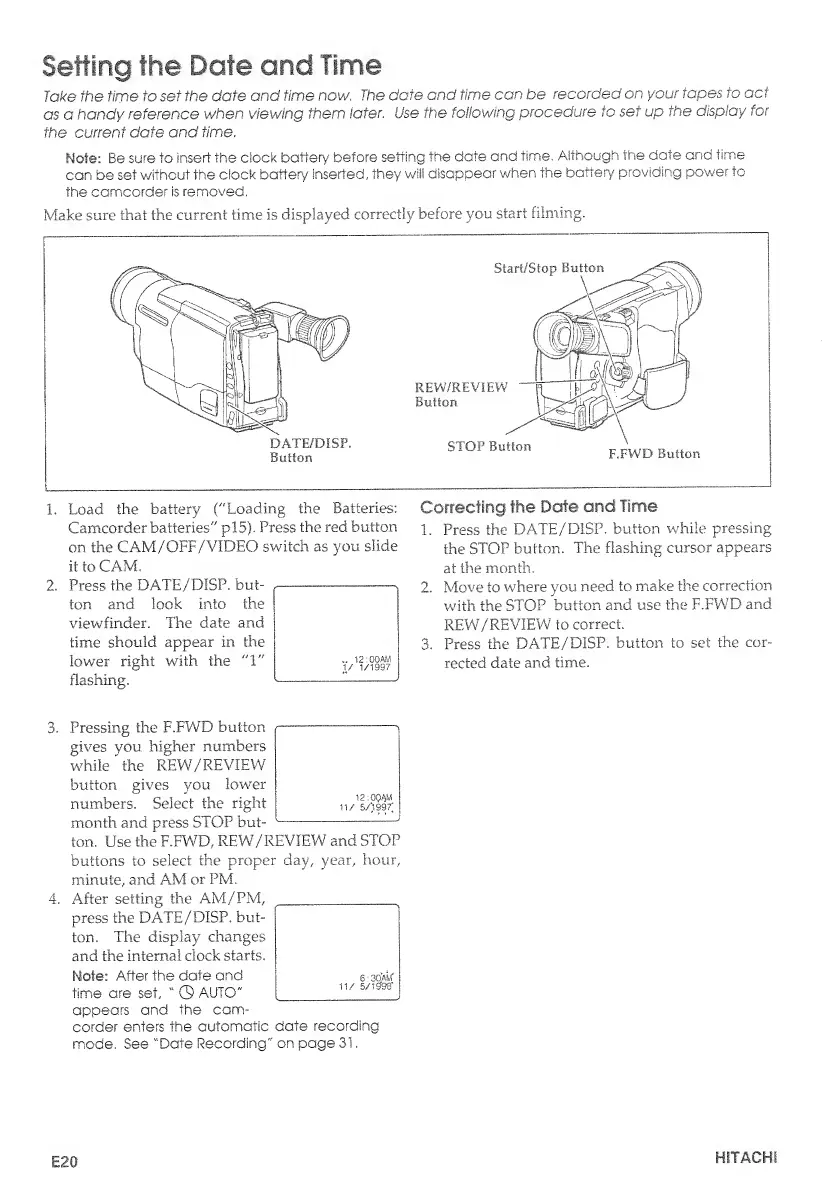
Make
sure
that
the
current
time
is
displayed
correctly
before
you.
start
filming.
1.
Load
the
battery
("Loading
the
Batteries:
Camcorder
batteries"
pi
5).
Press
the
red
button
on
the
CAM/OFF/VIDEO
switch
as
you
slicie
it
to
CAM.
2.
Press
the
DATE/DISP.
but¬
ton
and
look
into
the
viewfinder.
The
date
and
time
should
appear
in
the
lower
right
with
the
flashing.
Correcting
the
Date
and
Time
1.
Press
the
DATE/DISP.
button
while
pressing
the
STOP
button.
The
flashing
cursor
appears
at
the
month.
2.
Move
to
where
you
need,
to
make
the
correction
with
the
STOP
button
and
use
the
F.FWD
and
REW/REVIEW
to
correct.
3.
Press
the
DATE/DISP.
button
to
set
the
cor¬
rected
date
and
time.
..
12:00
AM
1/
1/1997
3.
Pressing
the
F.FWD
button
gives
you
higher
numbers
while'the
REW/REVIEW
button
gives
you
lower
numbers.
Select
the
right
month
and
press
STOP
but¬
ton.
Use
the
F.FWD,
REW/REVIEW
and
STOP
buttons
to
select
the
proper
day,
year,
hour,
minute,
and
AM
or
PM.
4.
After
setting
the
AM/PM,
press
the
DATE/DISP.
but¬
ton.
Tire
display
changes
and
the
internal
clock
starts.
Note:
After
the
date
and
time
are
set,
"
0
AUTO"
appears
and
the
cam¬
corder
enters
the
automatic
date
recording
mode.
See
"Date
Recording"
on
page
31.
12:00AM
11/
5/199?;
£20
HITACHI

Table of Contents

Related product manuals