EasyManua.ls Logo

Hitachi VM-E530A - Camcorder Batteries; Removing the Battery Pack; Checking the Batterys Charge

Hitachi VM-E530A
56 pages
Print Icon
To Next Page IconTo Next Page
To Previous Page IconTo Previous Page
Loading...
Camcorder
Batteries
Using
Battery
Pack
Before
you
install
the
battery
for
the
first
time
it
must
be
fully
charged.
See
'"Charging
the
Battery"
on
page
14
for
details.
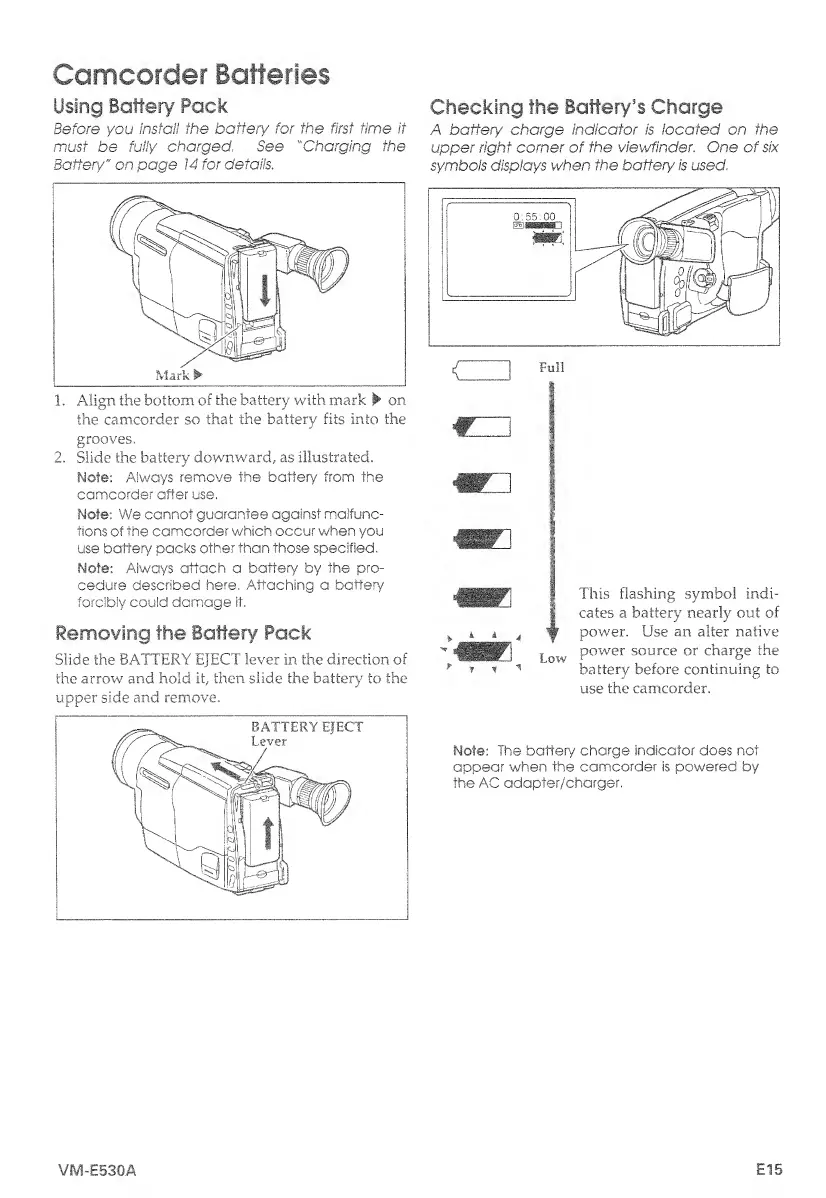
1.
Align
the
bottom
of
the
battery
with
mark
on
the
camcorder
so
that
the
battery
fits
into
the
grooves.
2.
Slide
the
battery
downward,
as
illustrated.
Mote:
Always
remove
the
battery
from
the
camcorder
after
use.
Note;
We
cannot
guarantee
against
malfunc¬
tions
of
the
camcorder
which
occur
when
you
use
battery
packs
other
than
those
specified,
Mote:
Always
attach
a
battery
by
the
pro¬
cedure
described
here,
Attaching
a
battery
forcibly
could
damage
it.
Removing
the
Battery
Pack
Slide
the
BATTERY
EJECT
lever
in
the
direction
of
the
arrow
and
hold
it,
then
slide
the
battery
to
the
upper
side
and
remove.
Checking
the
Battery’s
Charge
A
battery
charge
indicator
is
located
on
the
upper
right
corner
of
the
viewfinder.
One
of
six
symbols
displays
when
the
battery
is
used.
use
the
camcorder.
Note:
The
battery
charge
indicator
does
not
appear
when
the
camcorder
is
powered
by
the
AC
adapter/charger.
VM-E530A
E15

Table of Contents

Related product manuals