EasyManua.ls Logo

Hitachi VM-E530A - Components and Accessories

Hitachi VM-E530A
56 pages
Print Icon
To Next Page IconTo Next Page
To Previous Page IconTo Previous Page
Loading...
Getting
Started
This
section
guides
you
through
the
initial
preparation
of
the
cam¬
corder
.
None
of
these
processes
are
complex,
Set
aside
some
time
,
relax
,
and
familiarize
yourself
with
this
quality
instrument.
Enjoy
getting
to
know
ail
about
your
Hitachi
3mm
camcorder.
The
more
comfortable
and
familiar
you
are
with
the
machine
and
its
features
,
the
more
you
can
make
it
do
for
you.
Let's
get
started!
it
is
crucial
that
you
read
and
understand
all
the
safety
instructions
before
you
begin,
if
you
haven't
read
the
safety
instructions
yet
,
please
take
the
time
to
do
so
now,
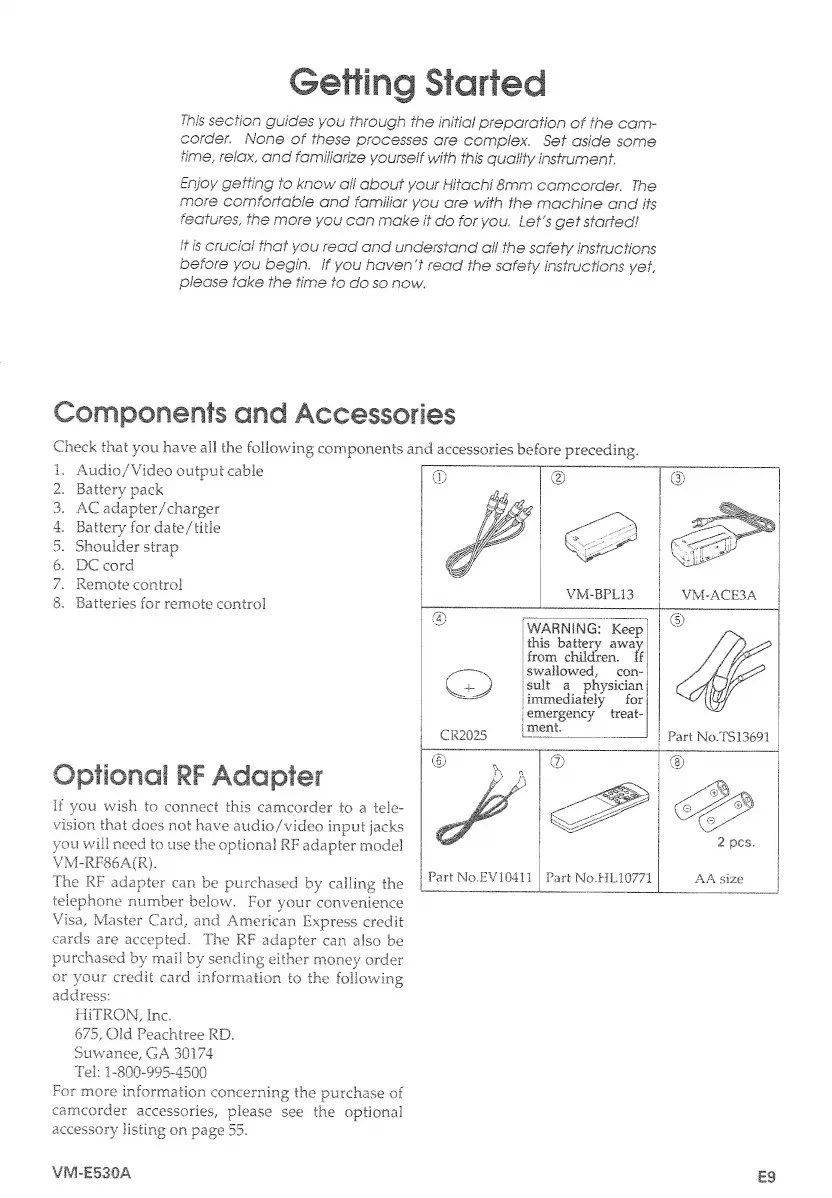
Components
and
Accessories
Check
that
you
have
all
the
following
components
and
accessories
before
preceding.
1.
Audio/'Video
output
cable
2.
Battery
pack
3.
AC
adapter/charger
4.
Battery
for
date
/
title
5.
Shoulder
strap
6.
DC
cord
7.
Remote
control
8.
Batteries
for
remote
control
Optional
RF
Adapter
If
you
wish
to
connect
this
camcorder
to
a
tele¬
vision
that
does
not
have
audio/video
input
jacks
you
will
need
to
use
the
optional
RF
adapter
model
VM-RF86A(R).
The
RF
adapter
can
be
purchased
by
calling
the
telephone
number
below.
For
your
convenience
Visa,
Master
Card,
and
American
Express
credit
cards
are
accepted.
The
RF
adapter
can
also
be
purchased
by
mail
by
sending
either
money
order
or
your
credit
card
information
to
the
following
address:
HiTRON,
Inc.
675,
Old
Peachtree
RD.
Suwanee,
GA
30174
Tel:
1-800-995-4500
For
more
information
concerning
the
purchase
of
camcorder
accessories,
please
see
the
optional
accessory
listing
on
page
55.
VM-E530A
E9

Table of Contents

Related product manuals