EasyManua.ls Logo

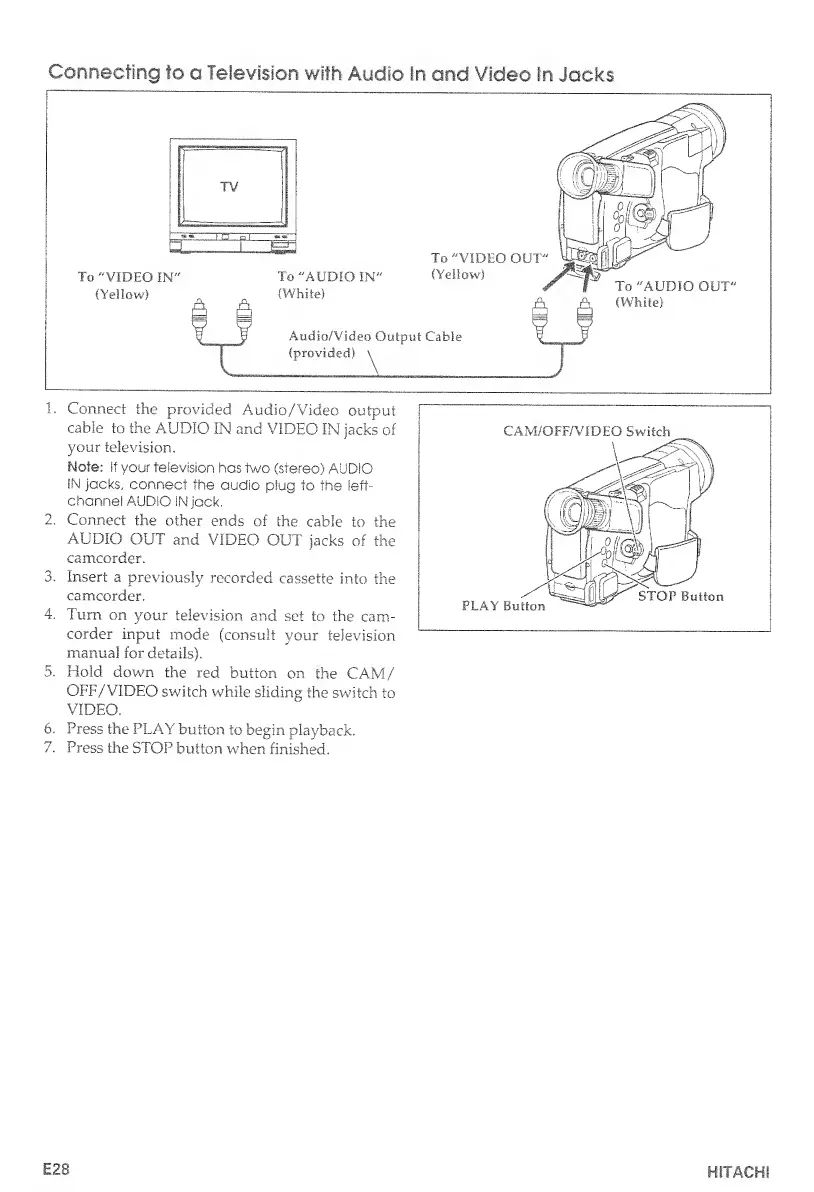
Hitachi VM-E530A - Connecting to a Television with Audio in and Video in Jacks

Hitachi VM-E530A
56 pages
Print Icon
To Next Page IconTo Next Page
To Previous Page IconTo Previous Page
Loading...
Connecting
to
a
Television
with
Audio
In
and
Video
In
Jacks
1.
Connect
the
provided
Audio/Video
output
cable
to
the
AUDIO
IN
and
VIDEO
IN
jacks
of
your
television.
Note:
if
your
television
has
two
(stereo)
AUDIO
IN
jacks,
connect
the
audio
plug
to
the
left-
channel
AUDIO
IN
jack.
2.
Connect
the
other
ends
of
the
cable
to
the
AUDIO
OUT
and
VIDEO
OUT
jacks
of
the
camcorder.
3.
Insert
a
previously
recorded
cassette
into
the
camcorder.
4.
Turn
on
your
television
and
set
to
the
cam¬
corder
input
mode
(consult
your
television
manual
for
details).
5.
Hold
down
the
red
button
on
the
CAM/
OFF/VIDEO
switch
while
sliding
the
switch
to
VIDEO.
6
.
Press
the
PLAY
button
to
begin
playback.
7.
Press
the
STOP
button
when
finished.
E28
HITACHI

Table of Contents

Related product manuals