EasyManua.ls Logo

Hitachi VM-E530A - Connecting to a Television Without Audio in and Video in Jacks

Hitachi VM-E530A
56 pages
Print Icon
To Next Page IconTo Next Page
To Previous Page IconTo Previous Page
Loading...
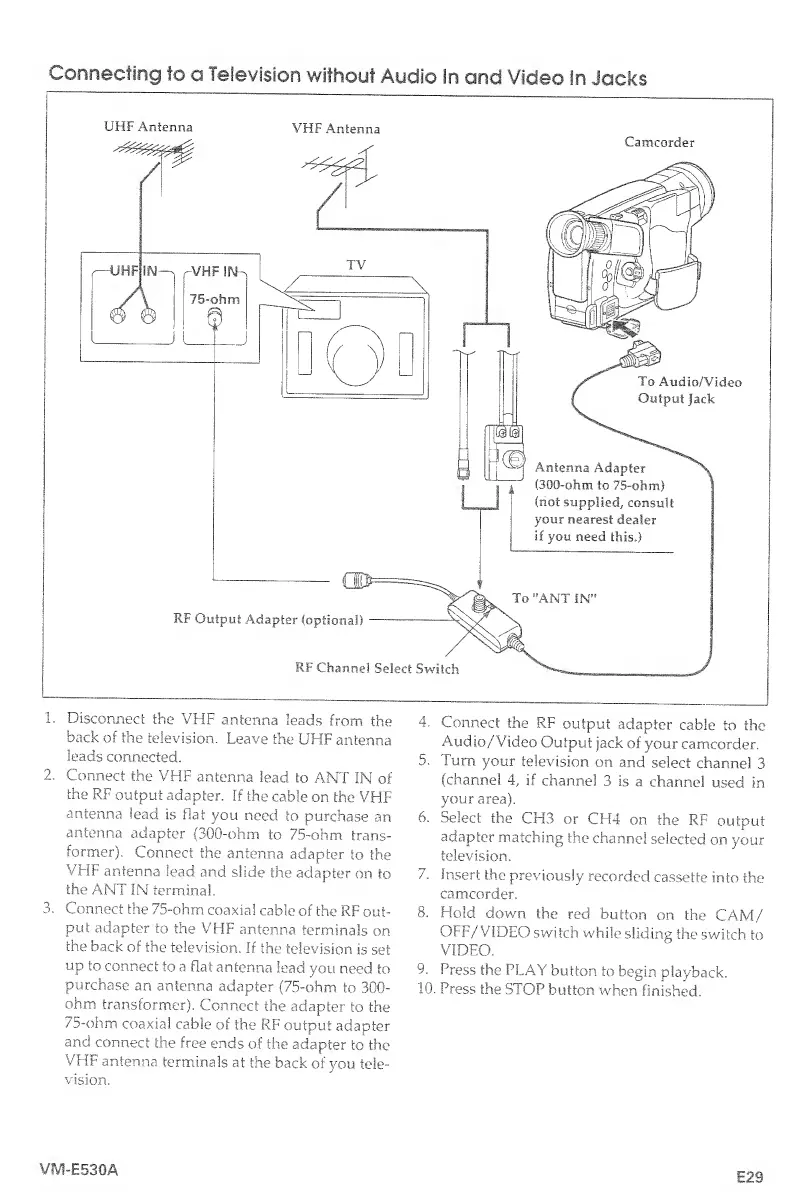
Connecting
to
a
Television
without
Audio
In
and
Video
In
Jacks
UHF
Antenna
VHF
Antenna
1.
Disconnect
the
VHF
antenna
leads
from
the
back
of
the
television.
Leave
the
UHF
antenna
leads
connected.
2.
Connect
the
VHF
antenna
lead
to
ANT
IN
of
the
RF
output
adapter.
If
the
cable
on
the
VHF
antenna
lead
is
flat
you
need
to
purchase
an
antenna
adapter
(300-ohm
to
75-ohm
trans¬
former).
Connect
the
antenna
adapter
to
the
VHF
antenna
lead
and
slide
the
adapter
on
to
the
ANT
IN
terminal.
3.
Connect
the
75-ohm
coaxial
cable
of
the
RF
out¬
put
adapter
to
the
VHF
antenna
terminals
on
the
back
of
the
television.
If
the
television
is
set
up
to
connect
to
a
flat
antenna
lead
you
need
to
purchase
an
antenna
adapter
(75-ohm
to
300-
ohm
transformer).
Connect
the
adapter
to
the
75-ohm
coaxial
cable
of
the
RF
output
adapter
and
connect
the
free
ends
of
the
adapter
to
the
VHF
antenna
terminals
at
the
back
of
you
tele¬
vision.
4.
Connect
the
RF
output
adapter
cable
to
the
Audio/'Video
Output
jack
of
your
camcorder.
5.
Turn
your
television
on
and
select
channel
3
(channel
4,
if
channel
3
is
a
channel
used
in
your
area).
6
.
Select
the
CH3
or
CH4
on
the
RF
output
adapter
matching
the
channel
selected
on
your
television.
7.
Insert
the
previously
recorded
cassette
into
the
camcorder.
8
.
Hold
down
the
red
button
on
the
CAM/
OFF/VIDEO
switch
while
sliding
the
switch
to
VIDEO.
9.
Press
the
PLAY
button
to
begin
playback.
10.
Press
the
STOP
button
when
finished.
VIV1-E530A
E29

Table of Contents

Related product manuals