EasyManua.ls Logo

Hitachi VM-E530A - Identifying Controls

Hitachi VM-E530A
56 pages
Print Icon
To Next Page IconTo Next Page
To Previous Page IconTo Previous Page
Loading...
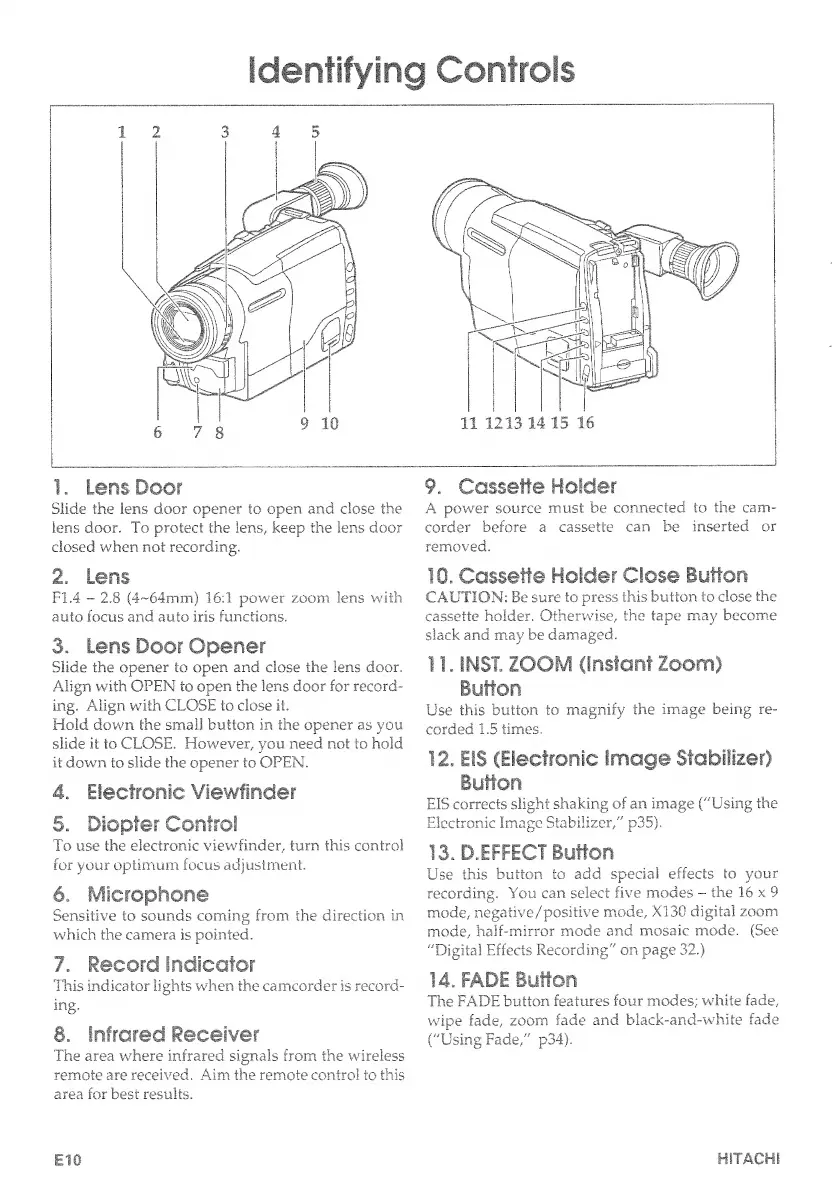
Identifying
Controls
1.
L
ens
Door
9
.
Cassette
Holder
Slide
the
lens
door
opener
to
open
and
close
the
A
power
source
must
be
connected
to
the
cam-
lens
door.
To
protect
the
lens,
keep
the
lens
door
corder
before
a.
cassette
can
be
inserted
or
closed
when
not
recording.
removed.
2.
Lens
FI.4
-
2.8
(4~64mm)
16:1
power
zoom
lens
with
auto
focus
and
auto
iris
functions.
3.
Lens
Door
Opener
Slide
the
opener
to
open
and
close
the
lens
door.
Align
with
OPEN
to
open
the
lens
door
for
record¬
ing.
Align
with
CLOSE
to
close
it.
Hold
down
the
small
button
in
the
opener
as
you
slide
it
to
CLOSE.
However,
you
need
not
to
hold
it
down
to
slide
the
opener
to
OPEN.
4.
Electronic
Viewfinder
5.
Diopter
Control
To
use
the
electronic
viewfinder,
turn
this
control
for
your
optimum
focus
adjustment.
6.
IMfiwfopnoo©
Sensitive
to
sounds
coming
from
the
direction
in
which
the
camera
is
pointed.
7.
Record
indicator
This
indicator
lights
when
the
camcorder
is
record-
ing.
8.
Infrared
Receiver
The
area
where
infrared
signals
from
the
wireless
remote
are
received.
Aim
the
remote
control
to
this
area
for
best
results.
10.
Cassette
Holder
Close
Button
CAUTION:
Be
sure
to
press
this
button
to
dose
the
cassette
holder.
Otherwise,
the
tape
may
become
slack
and
may
be
damaged.
11.
INST.
ZOOM
(instant
Zoom)
Button
Use
this
button
to
magnify
the
image
being
re¬
corded
1.5
times.
12.
EIS
(Electronic
image
Stabilizer)
Button
EIS
corrects
slight
shaking
of
an
image
("Using
the
Electronic
Image
Stabilizer,"
p35).
13.
D.EFFECT
Button
Use
this
button
to
add
special
effects
to
your
recording.
You
can
select
five
modes
-
the
16
x
9
mode,
negative/positive
mode,
XI30
digital
zoom
mode,
half-mirror
mode
and
mosaic
mode.
(See
"Digital
Effects
Recording"
on
page
32.)
14.
FADE
Button
The
FADE
button
features
four
modes;
white
fade,
wipe
fade,
zoom
fade
and
black-and-white
fade
("Using
Fade,"
p34).
Ell)
HITACHI

Table of Contents

Related product manuals