EasyManua.ls Logo

Hitachi VM-E530A - Page 11

Hitachi VM-E530A
56 pages
Print Icon
To Next Page IconTo Next Page
To Previous Page IconTo Previous Page
Loading...
15.
DATE/DISR
Button
When
the
CAM/OFF/VIDEO
switch
is
set
to
CAM,
this
button
can
be
used
as
the
DATE
button:
set
the
date
and
time,
and
select
the
date
display
you
want
to
record
("Setting
the
Date
and
Time",
p2Q
and
"Date
Recording",
p31).
In
the
VIDEO
mode,
the
DATE/DISP.
button
is
used
as
the
DISPLAY
button
("Using
the
Display
Button",
p36).
Mote:
Be
sure
to
insert
the
clock
battery
before
setting
the
date
and
time
or
creating
a
title.
16.
FOCUS
Control
Buttons
Press
these
buttons
simultaneously
to
select
manu¬
al
or
automatic
focus.
For
manual
focusing
("Using
Manual
Focus",
p24),
press
the
A
or
T
buttons
to
bring
the
subject
into
focus.
When
using
manual
focus,
"FOCUS"
appears
in
the
viewfinder.
17.
DC
IN
Jack
When
using
the
AC
adapter/charger,
connect
one
end
of
the
DC
cord
(provided)
to
this
jack
and
the
other
end
to
the
DC
OUT
jack
of
the
AC
adapter/charger.
When
using
the
car
battery
cord
(optional),
connect
this
jack
and
the
DC
OUTPUT
jack
of
the
car
battery
cord.
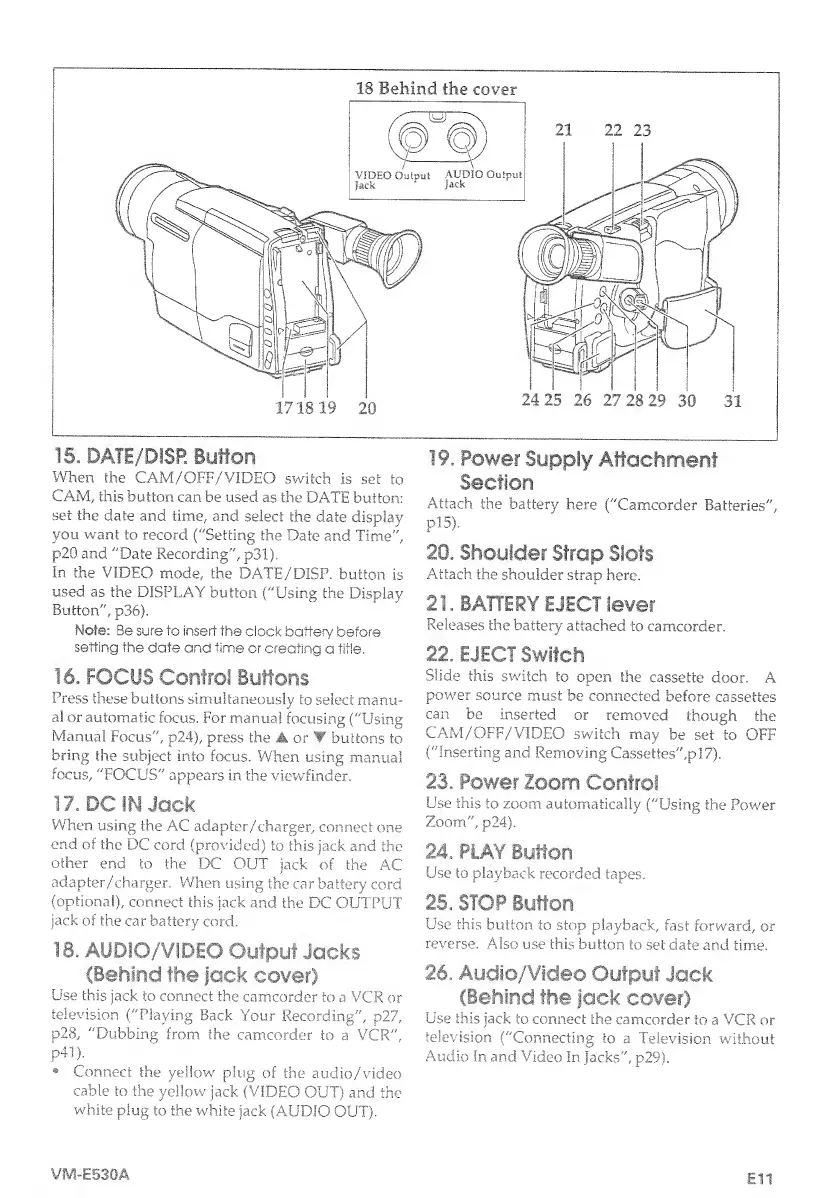
18.
AUDIO/VIDEO
Output
Jacks
(Behind
the
jack
cover)
Use
this
jack
to
connect
the
camcorder
to
a
VCR
or
television
("Playing
Back
Your
Recording",
p27,
p28,
"Dubbing
from
the
camcorder
to
a
VCR",
p41),
Connect
the
yellow
plug
of
the
audio/video
cable
to
the
yellow
jack
(VIDEO
OUT)
and
the
white
plug
to
the
white
jack
(AUDIO
OUT),
19.
Power
Supply
Attachment
Section
Attach
the
battery
here
("Camcorder
Batteries",
pl5).
20.
Shoulder
Strap
Slots
Attach
the
shoulder
strap
here.
21.
BATTERY
EJECT
lever
Releases
the
battery
attached
to
camcorder.
22.
EJECT
Switch
Slide
this
swatch
to
open
the
cassette
door.
A
power
source
must
be
connected
before
cassettes
can
be
inserted
or
removed
though
the
CAM/OFF/VIDEO
switch
may
be
set
to
OFF
("Inserting
and
Removing
Cassettes",pl7).
23.
Power
Zoom
Control
Use
this
to
zoom
automatically
("Using
the
Power
Zoom",
p24).
24.
PLAY
Button
Use
to
playback
recorded
tapes.
25.
STOP
Button
Use
this
button
to
stop
playback,
fast
forward,
or
reverse.
Also
use
this
button
to
set
date
and
time.
26.
Audio/Video
Output
Jack
(Behind
the
jack
cover)
Use
this
jack
to
connect
the
camcorder
to
a
VCR
or
television
("Connecting
to
a
Television
without
Audio
In
and
Video
In
jacks",
p29).
VM-E530A
Ell

Table of Contents

Related product manuals