EasyManua.ls Logo

Hitachi VM-E530A - Using the Wireless Remote Control; Attaching the Optional Wide or Tele Converter Lens

Hitachi VM-E530A
56 pages
Print Icon
To Next Page IconTo Next Page
To Previous Page IconTo Previous Page
Loading...
Using
the
Wireless
Remote
Control
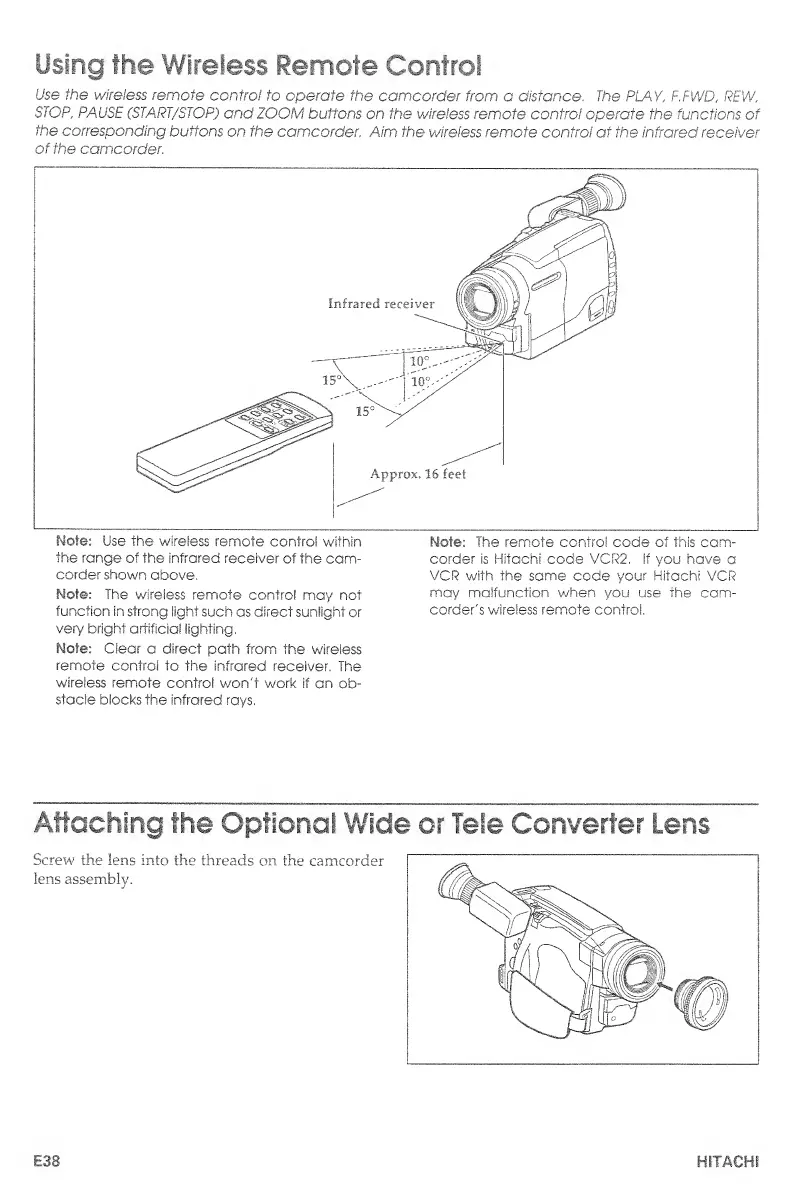
Use
the
wireless
remote
control
to
operate
the
camcorder
from
a
distance.
The
PLAY,
F.FWD,
REW,
STOP
,
PAUSE
(START/STOP)
and
ZOOM
buttons
on
the
wireless
remote
control
operate
the
functions
of
the
corresponding
buttons
on
the
camcorder.
Aim
the
wireless
remote
control
at
the
infrared
receiver
of
the
camcorder.
Mote:
Use
the
wireless
remote
control
within
the
range
of
the
infrared
receiver
of
the
cam¬
corder
shown
above,
Mote:
The
wireless
remote
control
may
not
function
in
strong
light
such
as
direct
sunlight
or
very
bright
artificial
lighting,
Mole:
Clear
a
direct
path
from
the
wireless
remote
control
to
the
infrared
receiver.
The
wireless
remote
control
won't
work
if
an
ob¬
stacle
blocks
the
infrared
rays,
Mote:
The
remote
control
code
of
this
cam¬
corder
is
Hitachi
code
VCR2.
If
you
have
a
VCR
with
the
same
code
your
Hitachi
VCR
may
malfunction
when
you
use
the
cam¬
corder's
wireless
remote
control.
Attaching
the
Optional
Wide
or
Tele
Converter
Lens
Screw
the
lens
into
the
threads
on
the
camcorder
lens
assembly.
E38
HITACHI

Table of Contents

Related product manuals