EasyManua.ls Logo

Hitachi VM-E530A - Loading Clock and Remote Control Batteries

Hitachi VM-E530A
56 pages
Print Icon
To Next Page IconTo Next Page
To Previous Page IconTo Previous Page
Loading...
Loading
Clock
and
Remote
Control
Batteries
Clock
Battery
install
the
battery
to
prevent
misplacing
it,
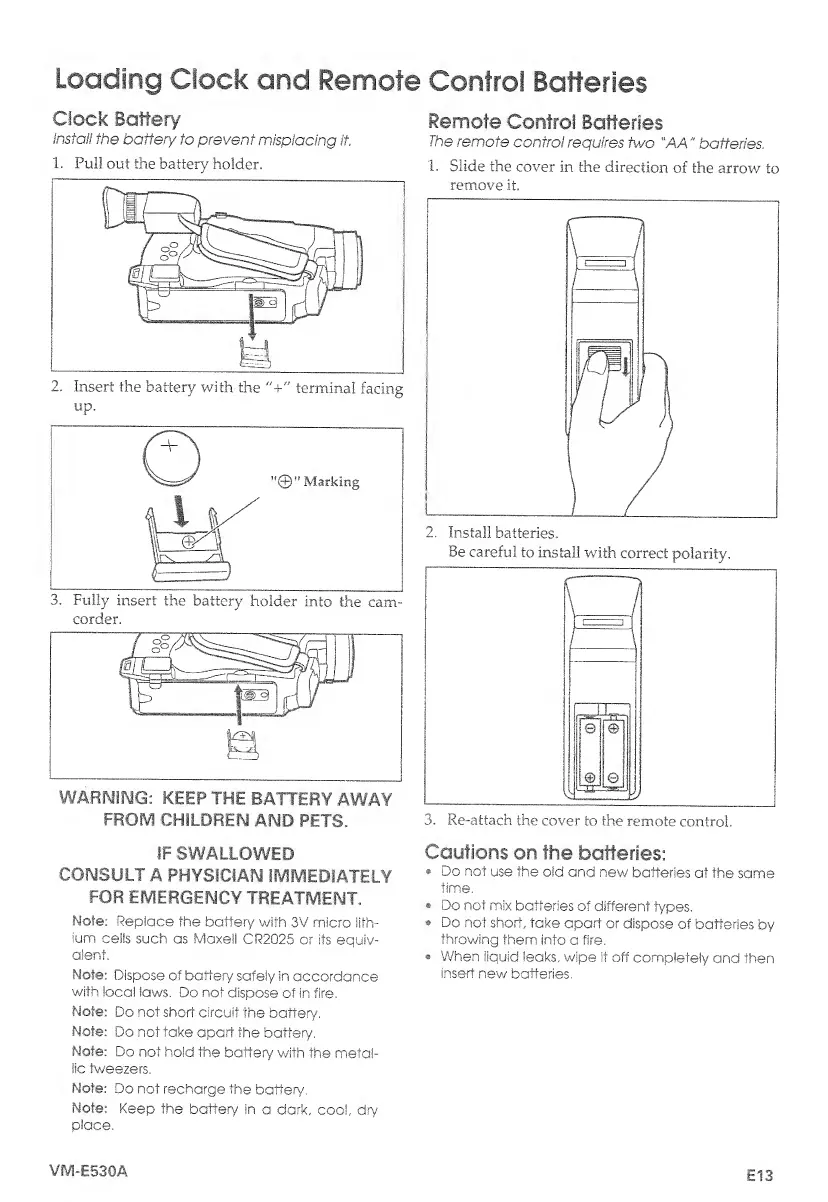
1.
Pull
out
the
battery
holder.
2.
Insert
the
battery
with
the
"+"
terminal
facing
up.
corder.
WARNING:
KEEP
THE
BATTERY
AWAY
FROIV!
CHILDREN
AND
PETS.
IF
SWALLOWED
CONSULT
A
PHYSICIAN
IMMEDIATELY
FOR
EMERGENCY
TREATMENT.
Mote:
Replace
the
battery
with
3V
micro
lith¬
ium
cells
such
as
Maxell
CR2Q25
or
its
equiv¬
alent.
Note:
Dispose
of
battery
safely
in
accordance
with
local
laws.
Do
not
dispose
of
in
fire.
Mote:
Do
not
short
circuit
the
battery,
Mote:
Do
not
take
apart
the
battery,
Note:
Do
not
hold
the
batter/
with
the
metal¬
lic
tweezers.
Mote:
Do
not
recharge
the
batten/,
Note:
Keep
the
battery
In
a
dark,
cool,,
dry
place,
Remote
Control
Batteries
The
remote
control
requires
two
"AA"
batteries,
1.
Slide
the
cover
in
the
direction
of
the
arrow
to
remove
it.
2.
Install
batteries.
Be
careful
to
install
with
correct
polarity.
3.
Re-attach
the
cover
to
the
remote
control.
Cautions
on
the
batteries:
Do
not
use
the
old
and
new
batteries
at
the
same
time,
Do
not
mix
batteries
of
different
types.
Do
not
short,
take
apart
or
dispose
of
batteries
by
throwing
them
into
a
fire.
When
liquid
leaks,
wipe
it
off
completely
and
then
insert
new
batteries.
VIV1-E530A
E13

Table of Contents

Related product manuals